
Breaking News

Samsung Brings Satellite Communication Support to Galaxy Smartphones Across the Globe vivo Announces MWC 2026 Attendance and sets to Showcase New Flagship X300 Ultra Razer Elevates Everyday Carry with the Laptop Sleeve 16” with Wireless Charging Samsung Unveils Galaxy S26 Series and Galaxy Buds4 Razer announces Kiyo V2 4K AI Webcamera

logo

  • Share Us
    • Facebook
    • Twitter
  • Home
  • Home
  • News
  • Reviews
  • Essays
  • Forum
  • Legacy
  • About
    • Submit News

    • Contact Us
    • Privacy

    • Promotion
    • Advertise

    • RSS Feed
    • Site Map

Search form

Asus P5E3 Deluxe WiFi

Nov 22,2007 0

13. Overclocking


Review Pages

1. Introduction, features
2. A closer look
3. BIOS settings
4. Test configuration
5. Everest Ultimate Edition 2007
6. SiSoftware Sandra
7. PCMark05, 3DMark06
8. Science Mark 2.0, Pov-Ray, x264 Benchmark
9. Maxon CineBench
10. SuperPI
11. SYSmark 2007, WorldBench 6
12. Lost Planet: Extreme Condition
13. Overclocking
14. Asus ExpressGate 1
15. Asus ExpressGate 2
16. Final words


1st Test

In our first test, all tested motherboards must achieve the highest overclocking speed with all the BIOS settings left to Auto. This means that each motherboard must calculate how much voltage the CPU needs in order to be absolutely stable while operating in higher clock speed. The memory dividers and the memory/FSB/MCH voltages are also left to Auto. In other words this is the easiest overclocking you can do. For this test we use a retail Intel E6600 with it's CPU multiplier locked at x9 and we raise the FSB until we get a perfectly stable system (Orthos2004+PovRay running). An additional 8cm fan was used for further cool the whole system.
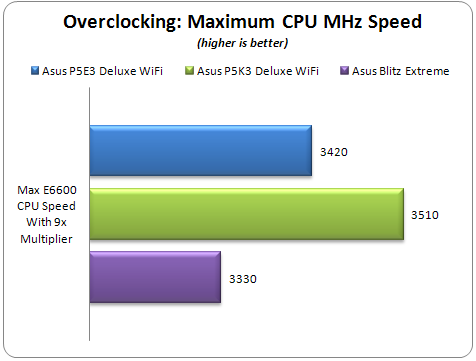
Keeping the CPU multiplier at 9x, the P5K3 Deluxe WiFi achieved the highest CPU speed with all the BIOS settings left to Auto. The Asus P5E3 Deluxe WiFi was somewhat lower with 3420MHz.

2nd Test

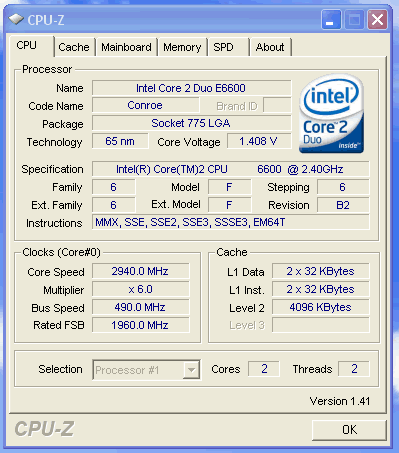
Apart from the maximum overclocking speed, we have to find the maximum possible FSB frequency with our used CPU. Again all BIOS settings are left to Auto and the CPU multiplier is dropped to 6x. The memory timings and the dividers are also left to auto. An additional 8cm fan was used for further cool the whole system.
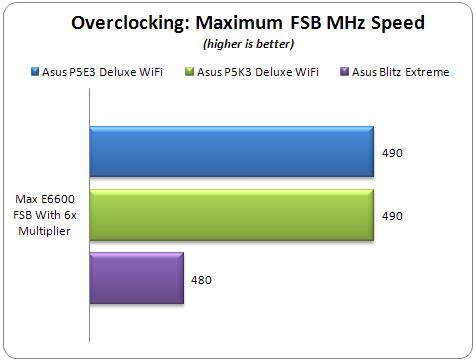
The performance of all the tested motherboards was similar with 490MHz FSB for the P5E3/P5K3 Deluxe WiFi and 480MHz for the Blitz Extreme.
3rd Test

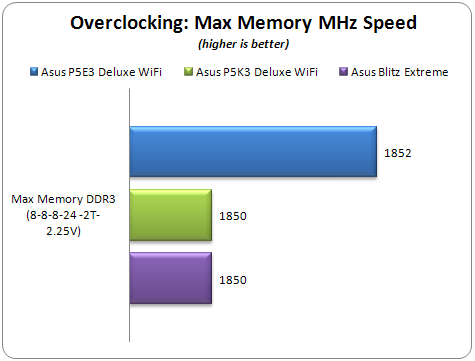
Our final overclocking test is intended to find how good a motherboard is in overclocking the memory. In this test we used one pair of SuperTalent's DDR3-1600CL7 with the following settings:

  • Timings: 8-8-8-24-2T
  • Voltage: 2.25V
  • FSB:DRAM divider: 1:2
  • Additional 8cm rotating fan
  • All other BIOS settings left to Auto

By raising the FSB we tested the stability until we "hit the roof". All the tested motherboards had a similar performance, while the Asus P5E3 Deluxe WiFi edition went somewhat higher...
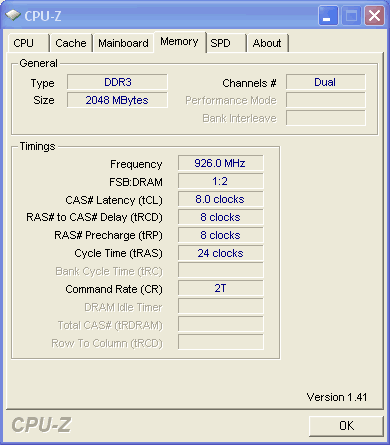
- Overclocking stability

During our overclocking attempts, we didn't noticed any serious problems. The motherboard would post after any failure with the corresponding message prompting us to change the BIOS settings and simply try again.


Review Pages

1. Introduction, features
2. A closer look
3. BIOS settings
4. Test configuration
5. Everest Ultimate Edition 2007
6. SiSoftware Sandra
7. PCMark05, 3DMark06
8. Science Mark 2.0, Pov-Ray, x264 Benchmark
9. Maxon CineBench
10. SuperPI
11. SYSmark 2007, WorldBench 6
12. Lost Planet: Extreme Condition
13. Overclocking
14. Asus ExpressGate 1
15. Asus ExpressGate 2
16. Final words


Pages

  • « first
  • ‹ previous
  • …
  • 8
  • 9
  • 10
  • 11
  • 12
  • 13
  • 14
  • 15
  • 16
  • next ›
  • last »

ASUS

Tags: ASUS
Previous Post
ASUS BC1205PT
Next Post
Corsair Dominator TWIN3X2048-1800C7DFG

Related Posts

  • ASUS Unveils ExpertBook B3 G2

  • Announcing ASUS ExpertBook B5 G2

  • ASUS Unveils Mac-Friendly Features on ProArt Displays to Enhance Workflows

  • Asus at CES 2026

  • ASUS Announces ProArt PF120 Case Fan

  • ASUS Announces Prime AP303 Compact Mid-Tower ATX Case

  • ASUS TUF Gaming Unveils Call of Duty Black Ops 7 Edition AMD Radeon RX 9070 XT

  • ASUS Announces October Availability of ProArt Display 8K PA32KCX

Latest Reviews

Kioxia Exceria Plus G3 512GB microSD
Cameras

Kioxia Exceria Plus G3 512GB microSD

SoundPeats Cove Pro
Consumer Electronics

SoundPeats Cove Pro

Asustor AS5404T 4-Bay NAS System
Enterprise & IT

Asustor AS5404T 4-Bay NAS System

be quiet! Pure Power 13M 1200W
PC components

be quiet! Pure Power 13M 1200W

Server-Side Gaming Why Canadian Online Casinos Are Abandoning Local Clients for HTML5 Clouds
Enterprise & IT

Server-Side Gaming Why Canadian Online Casinos Are Abandoning Local Clients for HTML5 Clouds

Popular News

COLORFUL Introduces CVN B850I GAMING FROZEN Motherboard

COLORFUL Introduces CVN B850I GAMING FROZEN Motherboard

COLORFUL Presents CVN X870 ARK FROZEN Motherboard for AMD Ryzen 9000 CPUs

COLORFUL Presents CVN X870 ARK FROZEN Motherboard for AMD Ryzen 9000 CPUs

TEAMGROUP Launches EXPERT P34F Find My External SSD

TEAMGROUP Launches EXPERT P34F Find My External SSD

Samsung announces Galaxy Tab S11 and Galaxy S25 FE series

Samsung announces Galaxy Tab S11 and Galaxy S25 FE series

Viltrox Showcases Upcoming Lens Lineup and New TTL Flash at IBC 2025

Viltrox Showcases Upcoming Lens Lineup and New TTL Flash at IBC 2025

CORSAIR announces Vanguard Pro 96 and Vanguard 96 Gaming Keyboards

CORSAIR announces Vanguard Pro 96 and Vanguard 96 Gaming Keyboards

Panasonic Introduces the First Ultra-Telephoto Zoom Lens in the LUMIX S Series

Panasonic Introduces the First Ultra-Telephoto Zoom Lens in the LUMIX S Series

MSI Launches DATAMAG 40Gbps Magnetic Portable SSD

MSI Launches DATAMAG 40Gbps Magnetic Portable SSD

Main menu

  • Home
  • News
  • Reviews
  • Essays
  • Forum
  • Legacy
  • About
    • Submit News

    • Contact Us
    • Privacy

    • Promotion
    • Advertise

    • RSS Feed
    • Site Map
  • About
  • Privacy
  • Contact Us
  • Promotional Opportunities @ CdrInfo.com
  • Advertise on out site
  • Submit your News to our site
  • RSS Feed