Breaking News

Razer Unveils All-New Wolverine V4 Line ASUS Republic of Gamers Ships ROG Rapture GT-BN98 Router GMK Unveils TriggerKey, a New Mechanical Key System for Greater Precision and Comfort Akasa Unveils Euler MX2, Fanless Mini-ITX Case for Unattended Commercial and Industrial Computing Air Power G10 PC Case Now Available at Newegg with Three Tilting Front Fans

logo

  • Share Us
    • Facebook
    • Twitter
  • Home
  • Home
  • News
  • Reviews
  • Essays
  • About
    • Submit News

    • Contact Us
    • Privacy

    • Promotion
    • Advertise

    • RSS Feed

Search form

Arctic Cooling - Freezer 64

Jun 14,2005 0

2. Installation


Review Pages

1. Introduction
2. Installation
3. Performance
4. Conclusion


As noted previously, the Freezer 64 is extremely easy to install. In fact, it took more time to detach the stock cooler, than it did to install the new one. We installed the cooler on an Asus A8V Deluxe and we used the stock Retention Module as it fitted right on and no replacement was needed.

The overall procedure is straightforward. First, we uninstalled the AMD 3500 Stock Cooler and removed any residue thermal paste from the CPU. We then applied the Arctic MX-1 thermal compound which is included in the retail cooler box. Note here that in order to achieve maximum performance with the CPU cooler, it has to "work" for approximately 200h as the compound hardens and performance improves steadily.

Not much left to do now but to install the Freezer on to the Asus motherboard...

We put the cooler on the CPU and connected the clips onto the hooks of the Retention Module

The Freezer 64 is installed with the fan facing the bottom of the standard ATX case. It can also be installed with the fan facing towards the back of the case, depending on the motherboard.

We then fastened the lever, so as to lock the Freezer 64 in place

To successfully complete the installation, we attached the fan power cable to the respective power socket on the motherboard.
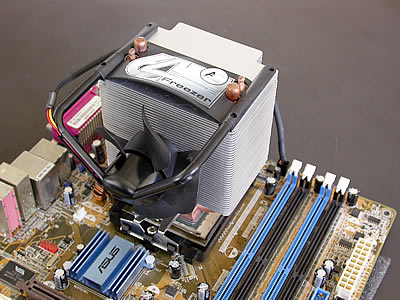
The power cable should "pass" round the rear of the cooler, leaving the fan free...

And we are ready to go. Installation completed successfully.
 

Review Pages

1. Introduction
2. Installation
3. Performance
4. Conclusion


Pages

  • « first
  • ‹ previous
  • 1
  • 2
  • 3
  • 4
  • next ›
  • last »

Arctic Cooling

Tags: Arctic Cooling
Previous Post
ABIT AN-8 Fatal1ty
Next Post
Teac DV-W516GB

Related Posts

  • Arctic Liquid Freezer II 360 Α-RGB

  • Arctic Liquid Freezer II 280 RGB

  • Arctic Unveils the Freezer 7 X CPU Cooler

  • Keep Your AMD 3rd Gen Ryzen Threadripper Processor Cool with ARCTIC Freezer 50 TR

  • ARCTIC Unveils the Liquid Freezer II series

  • Arctic Introduces New Freezer 34 CPU Coolers

  • ARCTIC Releases New VGA Cooler Series

  • Arctic Freezer i11/A11 CPU Coolers Released

Latest Reviews

Fanxiang MP83 M.2 NVMe SSD Enclosure
Enterprise & IT

Fanxiang MP83 M.2 NVMe SSD Enclosure

Ugreen CM642 USB4.0 Enclosure
PC components

Ugreen CM642 USB4.0 Enclosure

be quiet! Dark Power 14 IO
PC components

be quiet! Dark Power 14 IO

SanDisk High Endurance 512GB microSDXC
Cameras

SanDisk High Endurance 512GB microSDXC

Samsung PRO Ultimate 512GB microSDXC
Cameras

Samsung PRO Ultimate 512GB microSDXC

Popular News

MSI’s Latest AMD X870E MAX & EVO Series Motherboards

MSI’s Latest AMD X870E MAX & EVO Series Motherboards

COLORFUL Launches iGame B850M ULTRA Series Micro-ATX Motherboards

COLORFUL Launches iGame B850M ULTRA Series Micro-ATX Motherboards

COLORFUL Presents Limited Edition Chitu MAG-60 Magnetic Keyboard Inspired by the Year of the Horse

COLORFUL Presents Limited Edition Chitu MAG-60 Magnetic Keyboard Inspired by the Year of the Horse

COLORFUL Launches iGame B850I MINI OC V14 Motherboard

COLORFUL Launches iGame B850I MINI OC V14 Motherboard

COLORFUL Presents iGame Z890 ULTRA-S W and iGame Z890M ULTRA Z Motherboards

COLORFUL Presents iGame Z890 ULTRA-S W and iGame Z890M ULTRA Z Motherboards

COLORFUL Launches the iGame X870E VULCAN W OC Motherboard

COLORFUL Launches the iGame X870E VULCAN W OC Motherboard

COLORFUL Expands B850 Motherboard Lineup with New CVN, Battle-Ax, and MEOW Models

COLORFUL Expands B850 Motherboard Lineup with New CVN, Battle-Ax, and MEOW Models

ASRock Adds Support for One Sub-Channel DRAM Module on Intel DDR5 Motherboards

ASRock Adds Support for One Sub-Channel DRAM Module on Intel DDR5 Motherboards

Main menu

  • Home
  • News
  • Reviews
  • Essays
  • About
    • Submit News

    • Contact Us
    • Privacy

    • Promotion
    • Advertise

    • RSS Feed
  • About
  • Privacy
  • Contact Us
  • Promotional Opportunities @ CdrInfo.com
  • Advertise on out site
  • Submit your News to our site
  • RSS Feed