Breaking News

SAMA Introduces the S32 WOOD, a Compact M-ATX Case Bundled with an 80 PLUS Gold PSU Thypoch Completes Simera-C Cine Prime Lineup with New 100mm T1.9 Lens CORSAIR Launches the RM1200e Power Supply with Built-in PinProtect GPU Overcurrent Protection and Platinum-certified Efficiency CORSAIR Changes the Game with PureVector, a Science-Based Personalized Aiming Technology, Launching Exclusively in the SABRE v3 PRO PureVector Mouse Series AMD FSR Upscaling 4.1 Boosts Frames and Image Quality on More Devices

logo

  • Share Us
    • Facebook
    • Twitter
  • Home
  • Home
  • News
  • Reviews
  • Essays
  • About
    • Submit News

    • Contact Us
    • Privacy

    • Promotion
    • Advertise

    • RSS Feed

Search form

Pioneer DV-370

Jul 2,2004 0

2. Unpacking - Control Menu


Review Pages

1. Introduction
2. Unpacking - Control Menu
3. Reading Tests
4. Error Correction Tests
5. Conclusion


Pioneer DV-370 DVD Player - page 2

Unpacking - Control Menu

The European retail package includes the unit, the remote control, two AA/R6P dry cell batteries, the power and the Audio/video cable (red/white/yellow plugs). We would like to see a coaxial cable included as well. Full multilanguage manual and warranty are also included.

Below we can see the inside of the DV-370, after opening the cover, an action which is not recommended since you void the manufacturer's warranty.

Click to enlarge

Below are the main chips used in the unit.


On the rear panel are the audio/video outputs. Analytically there are: a coaxial (digital) audio output, the S-Video, component video, a stereo audio output (L & R) with video and last the universal (Scart) line out. There is no 5.1CH decoder, but this is something we wouldn't necessarily expect to find on a low-priced DVD player.
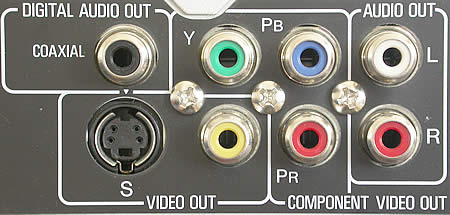
For excellent sound, we recommend you use the coaxial output for digital sound, with the use of an A/V 5.1CH (or more) amplifier. Pioneer offers a wide variety of home theater solutions.

If you are about to connect the DVD player straight to your TV you can use one of the above provided connections, composite video output and audio (RCA), or the scart, which also includes stereo sound.

Click to Enlarge

The retail package also includes the excellent remote control. Click on the image for an enlarged view.

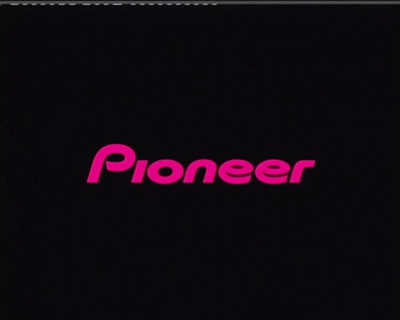
Below is a screenshot of the main screen from the player, the one you see every time you turn the player on.
  • Settings adjustment

  • DVD movie playback

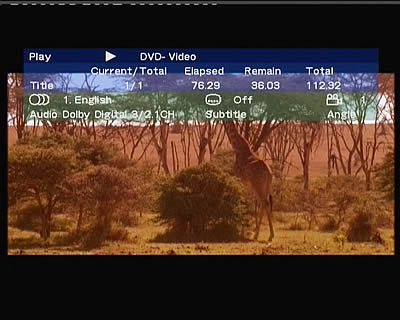
Below can been seen the provided information while playing back, almost everything you would want to know. During the playback you can change the audio, subtitles and viewing angle from the remote control.

  • MP3 playback

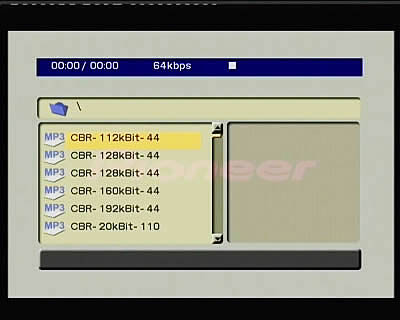
The player can play MP3 files. Pioneer provides a convenient and user-friendly menu for fast navigation through the MP3 files or folders on a data disc (CD/DVD). Below is an example with an MP3 audio CD where there are different MP3 encoding parameters.
ZoomX2,X4


Review Pages
1. Introduction
2. Unpacking - Control Menu
3. Reading Tests
4. Error Correction Tests
5. Conclusion


Pages

  • « first
  • ‹ previous
  • 1
  • 2
  • 3
  • 4
  • 5
  • next ›
  • last »

Tags:
Previous Post
BenQ DW1600A DL
Next Post
Freecom Beatman Flash MP3 Recorder

Related Posts

  • Pioneer BDR-XD08UMB-S External Blu-Ray Recorder

  • Pioneer BDR-X13U-S

  • Pioneer BDR-S13U-X Blu-Ray Recorder

  • Pioneer BDR-2207 (BDR-207M) BDXL burner review

  • Pioneer BDR-S06 XLB (BDR-206 DBK)

  • Pioneer BDR-206MBK BDXL Burner review

  • Pioneer BDR-203BK

  • Pioneer DVR-116D

Latest Reviews

Why Intelligent Firmware Matters More Than Peak Throughput in NAS Systems
Enterprise & IT

Why Intelligent Firmware Matters More Than Peak Throughput in NAS Systems

Fanxiang MP83 M.2 NVMe SSD Enclosure
Enterprise & IT

Fanxiang MP83 M.2 NVMe SSD Enclosure

Ugreen CM642 USB4.0 Enclosure
PC components

Ugreen CM642 USB4.0 Enclosure

be quiet! Dark Power 14 IO
PC components

be quiet! Dark Power 14 IO

SanDisk High Endurance 512GB microSDXC
Cameras

SanDisk High Endurance 512GB microSDXC

Popular News

MSI’s Latest AMD X870E MAX & EVO Series Motherboards

MSI’s Latest AMD X870E MAX & EVO Series Motherboards

COLORFUL Launches iGame B850M ULTRA Series Micro-ATX Motherboards

COLORFUL Launches iGame B850M ULTRA Series Micro-ATX Motherboards

COLORFUL Presents Limited Edition Chitu MAG-60 Magnetic Keyboard Inspired by the Year of the Horse

COLORFUL Presents Limited Edition Chitu MAG-60 Magnetic Keyboard Inspired by the Year of the Horse

COLORFUL Launches iGame B850I MINI OC V14 Motherboard

COLORFUL Launches iGame B850I MINI OC V14 Motherboard

COLORFUL Launches the iGame X870E VULCAN W OC Motherboard

COLORFUL Launches the iGame X870E VULCAN W OC Motherboard

COLORFUL Presents iGame Z890 ULTRA-S W and iGame Z890M ULTRA Z Motherboards

COLORFUL Presents iGame Z890 ULTRA-S W and iGame Z890M ULTRA Z Motherboards

COLORFUL Expands B850 Motherboard Lineup with New CVN, Battle-Ax, and MEOW Models

COLORFUL Expands B850 Motherboard Lineup with New CVN, Battle-Ax, and MEOW Models

ASRock Adds Support for One Sub-Channel DRAM Module on Intel DDR5 Motherboards

ASRock Adds Support for One Sub-Channel DRAM Module on Intel DDR5 Motherboards

Main menu

  • Home
  • News
  • Reviews
  • Essays
  • About
    • Submit News

    • Contact Us
    • Privacy

    • Promotion
    • Advertise

    • RSS Feed
  • About
  • Privacy
  • Contact Us
  • Promotional Opportunities @ CdrInfo.com
  • Advertise on out site
  • Submit your News to our site
  • RSS Feed