Crucial 32GB SSD
1. About SSD drives, specifications
Review Pages
2. The package, installation options
3. Installation, benchmarks
4. Conclusions
 Crucial is one of the biggest memory manufacturers around the world. The recent massive introduction of various solid state disks (SSD), especially for the notebook market, hasn't left Crucial out of the game. In fact today we will test the entry level model of Crucial's SSD line, which offers a capacity of 32GB.
Say goodbye to your hard drive: computing just took a new turn
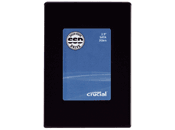 Introducing Crucial SSD (Solid State Drive) technology delivering the benefits of flash technology in a completely different way. More reliable, faster, and more durable than traditional magnetic hard drives, SSDs are a forward-thinking solution for mobile users who want longer battery life, and can't afford to lose or corrupt the data stored on their notebooks. Likewise, SSDs are a great alternative for the PC enthusiast who is always looking for the very best in system performance.
The advantages reach beyond the notebook, too. The innovative SK01 external storage kit integrates an SSD into your standard desktop PC and allows it to act as a portable USB storage device.
Why an SSD?
Put simply, SSDs are flash-based drives that offer greater reliability and faster performance than traditional magnetic hard drives. SSDs (solid state drives) are data storage devices that utilize non-volatile (do not lose data when power is removed) flash memory for computing applications that traditionally rely upon a mechanical hard disk drive. Crucial SSDs are designed as industry-standard drop-in replacements (via a SATA connection) for hard drives.
Consisting of just NAND, a controller, connectors, and a PCB, the SSD has no moving parts, creating greater stability by eliminating the mechanical delays and failures associated with a conventional magnetic hard disk drive.
What are the advantages of an SSD?
Superior reliability
The continuous motion generated by multiple moving parts creates heat, which is a leading factor in hard drive failure. In fact, hard drives are one of the notebook components most likely to fail. Because an SSD does not have moving parts, heat dissipation and noise are reduced or eliminated, resulting in a very rugged and reliable offering compared to a mechanical hard drive.
SSDs also have extreme shock and vibration tolerance, and their operating temperature ranges meet or exceed that of standard hard drives.
Increased power efficiency
Ever have your notebook battery die during a presentation? With no moving parts, SSDs require less power, improving battery operating time in notebook PCs and portable electronic devices.
Instant-load performance
Without the moving mechanical parts that cause latency issues, SSDs are not impeded by spin-up, seek time, or rotational latency. This equates to faster boot times, faster application loading, and greater overall system responsiveness. Via SATA, the Crucial 2.5-inch SSD offers a host data transfer rate of up to 3Gb/s, backward-compatible to SATA 1.5Gb/s.
Lightweight
Enjoy increased mobility with a lighter-weight SSD, which weighs less than a traditional mechanical drive.
Quiet acoustics
With no spinning parts, SSDs provide for silent operation, similar to that of a standard USB flash drive rather than the constant, noisy humming of a mechanical hard drive.
Reduced heat dissipation
Hard drives dissipate high levels of failure-inducing heat due to the parts necessary to operate the hard drive (such as the spinning platter). In contrast, SSDs produce little-to-no measurable heat because they have no moving parts, thus helping keep notebooks operating cooler.
- Full specifications
- Form factor: 2.5-inch industry-standard metal housing
- Dimensions: 100.2mm (l) x 69.85mm (w) x 9.5mm(h)
- Weight: 82g
- Available capacities: 32GB and 64GB (Actual usable memory capacity may vary. 1MB equals 1 million bytes; 1GB equals 1 billion bytes)
- Host interface: Serial ATA (SATA) 3Gb/s (backward-compatible with 1.5Gb/s)
- Host data transfer rate: 3Gb/s (backwards compatible with 1.5Gb/s)
- Read/write speeds: 32GB: up to 100MB/s (read), 60MB/s (write); 64GB: up to 100MB/s (read), 35MB/s (write)
- IOPS (inputs/outputs per second): 80K sequential read IOPS for a 512-byte transfer
- Shock: 1,500G/0.5msec
- Vibration: 20G (20-2000HZ)
- Temperature: Operating (0°C to 70°C); Non-operating (-40° to 85°C)
- Acoustics: 0dB
- MTBF (mean time between failures): > 1 million hours
- Endurance: Static & Dynamic wear-leveling with 6-bit ECC error correction
- Crucial Warranty: 5 years
Review Pages
2. The package, installation options
3. Installation, benchmarks
4. Conclusions