Breaking News

SWIT Packs 210Wh and 200W Output into Compact MINO-A Gold Mount Battery Series Fanatec and Trak Racer showcase the future of simulation at SimRacing Expo Frankfurt 2026 Razer Unveils the Barracuda V2 Pro ASUS Republic of Gamers Announces Bulwark Dock DG310 Akasa Announces Fermi CM5 Fanless Case for Raspberry Pi Compute Module 5

logo

  • Share Us
    • Facebook
    • Twitter
  • Home
  • Home
  • News
  • Reviews
  • Essays
  • About
    • Submit News

    • Contact Us
    • Privacy

    • Promotion
    • Advertise

    • RSS Feed

Search form

CROSSFIRE vs SLI

Jul 14,2005 0

2. Rendering Modes


Review Pages

1. Introduction - SLI
2. Rendering Modes
3. SuperAA
4. The mainboards
5. The cards
6. Compatibility
7. Performance
8. The future


Crossfire on the other hand, offers 4 kinds of rendering modes: AFR, Supertile, Scissor and SuperAA.

AFR works by rendering all odd frames with one GPU while all even are left to the other. The method is exactly the same as AFR used by NVidia. The main problem with this method is that if a frame contains data that affects the rendering of the next frame to come, then that data needs to be transferred between the two cards. This overhead is why AFR is not so popular.

Scissor is also similar to NVidia's SFR with a small difference. Each frame is split in two parts and each GPU is assigned with a portion to render. That way, the GPUs can share the number of triangles processed in a scene, reducing their time to present us with the final rendered frame. Scissor can cut the screen in two parts, either horizontal or vertical, (SLI can only split the screen horizontally) and can also adjust the split to be uneven if in one of the two parts the scene gets more complicated than the other.

This is where ATi comes in with its novel method, Supertile. Their idea was to efficiently share the workload among the GPUs without spending time on calculating the GPU workload. Supertile is the default rendering option for Crossfire enabled systems but you'll also be able to pick your preferred method from the ATi Catalyst driver menu.
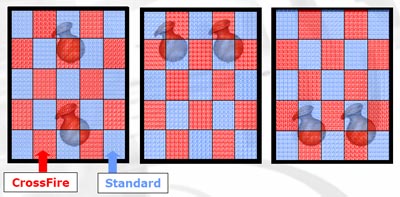
Supertile splits each frame into small tiles, just 32px by 32px in size and alternates their assignment to the GPUs just like a checkerboard. ATi has found that splitting the screen this way does not overload one GPU over another, as screen objects are usually much larger than the tiles and thus are split in two or more adjacent tiles.


Review Pages

1. Introduction - SLI
2. Rendering Modes
3. SuperAA
4. The mainboards
5. The cards
6. Compatibility
7. Performance
8. The future


Pages

  • « first
  • ‹ previous
  • 1
  • 2
  • 3
  • 4
  • 5
  • 6
  • 7
  • 8
  • next ›
  • last »

ATI

Nvidia

Tags: ATI Nvidia
Previous Post
Asus P5WD2 Premium
Next Post
Connect3D X300SE

Related Posts

  • NVIDIA and Microsoft Reinvent Windows PCs for the Age of Personal AI

  • NVIDIA introduces DLSS 4.5, Path Tracing and G-SYNC Pulsar Supercharge Gameplay

  • Intel and NVIDIA to Jointly Develop AI Infrastructure and Personal Computing Products

  • MSI Expands NVIDIA RTX PRO Server Lineup

  • PNY Announces Support for the New NVIDIA RTX PRO Blackwell Graphics Card Family

  • KIOXIA flash memory and SSD solutions empower AI applications at NVIDIA GTC 2025

  • INNO3D GEFORCE RTX 50 SERIES IS HERE!

  • VENGEANCE Gaming PCs are Ready for NVIDIA GeForce RTX 50 Series GPUs

Latest Reviews

Fanxiang MP83 M.2 NVMe SSD Enclosure
Enterprise & IT

Fanxiang MP83 M.2 NVMe SSD Enclosure

Ugreen CM642 USB4.0 Enclosure
PC components

Ugreen CM642 USB4.0 Enclosure

be quiet! Dark Power 14 IO
PC components

be quiet! Dark Power 14 IO

SanDisk High Endurance 512GB microSDXC
Cameras

SanDisk High Endurance 512GB microSDXC

Samsung PRO Ultimate 512GB microSDXC
Cameras

Samsung PRO Ultimate 512GB microSDXC

Popular News

MSI’s Latest AMD X870E MAX & EVO Series Motherboards

MSI’s Latest AMD X870E MAX & EVO Series Motherboards

COLORFUL Launches iGame B850M ULTRA Series Micro-ATX Motherboards

COLORFUL Launches iGame B850M ULTRA Series Micro-ATX Motherboards

COLORFUL Presents Limited Edition Chitu MAG-60 Magnetic Keyboard Inspired by the Year of the Horse

COLORFUL Presents Limited Edition Chitu MAG-60 Magnetic Keyboard Inspired by the Year of the Horse

COLORFUL Launches iGame B850I MINI OC V14 Motherboard

COLORFUL Launches iGame B850I MINI OC V14 Motherboard

COLORFUL Launches the iGame X870E VULCAN W OC Motherboard

COLORFUL Launches the iGame X870E VULCAN W OC Motherboard

COLORFUL Presents iGame Z890 ULTRA-S W and iGame Z890M ULTRA Z Motherboards

COLORFUL Presents iGame Z890 ULTRA-S W and iGame Z890M ULTRA Z Motherboards

COLORFUL Expands B850 Motherboard Lineup with New CVN, Battle-Ax, and MEOW Models

COLORFUL Expands B850 Motherboard Lineup with New CVN, Battle-Ax, and MEOW Models

ASRock Adds Support for One Sub-Channel DRAM Module on Intel DDR5 Motherboards

ASRock Adds Support for One Sub-Channel DRAM Module on Intel DDR5 Motherboards

Main menu

  • Home
  • News
  • Reviews
  • Essays
  • About
    • Submit News

    • Contact Us
    • Privacy

    • Promotion
    • Advertise

    • RSS Feed
  • About
  • Privacy
  • Contact Us
  • Promotional Opportunities @ CdrInfo.com
  • Advertise on out site
  • Submit your News to our site
  • RSS Feed