Breaking News

SAMA Introduces the S32 WOOD, a Compact M-ATX Case Bundled with an 80 PLUS Gold PSU Thypoch Completes Simera-C Cine Prime Lineup with New 100mm T1.9 Lens CORSAIR Launches the RM1200e Power Supply with Built-in PinProtect GPU Overcurrent Protection and Platinum-certified Efficiency CORSAIR Changes the Game with PureVector, a Science-Based Personalized Aiming Technology, Launching Exclusively in the SABRE v3 PRO PureVector Mouse Series AMD FSR Upscaling 4.1 Boosts Frames and Image Quality on More Devices

logo

  • Share Us
    • Facebook
    • Twitter
  • Home
  • Home
  • News
  • Reviews
  • Essays
  • About
    • Submit News

    • Contact Us
    • Privacy

    • Promotion
    • Advertise

    • RSS Feed

Search form

AC Ryan PlayOnHD!

Jan 11,2010 0

4. Setup Menus


Review Pages

1. Basic features
2. The package
3. Powering up the player
4. Setup Menus
5. Installing a HDD
6. Playing media files
7. Online services
8. Final words


The setup menus are easy to understand and allows you to personalize and configure the preferences for the player. There are five Setup options, including Audio, Video, Network, System, and MISC.

The 'Audio' tab includes the 'Night Mode', where you can choose between Off / On / Comfort. If the option is turned on, the audio output volume will be decreased to make you more comfortable.
The 'Digital Output' tab allows you to choose between HDMI LPCM / HDMI RAW / SPDIF LPCM / SPDIF RAW. In raw mode, Dolby Digital, DTS, or MPEG sound can be bypassed to the HDMI TV or Digital amplifier:

At the Video tab you will change the Aspect Ratio (Pan Scan 4:3, Letter Box 4:3 and 16:9), the brightness and select your TV system. Here you can also manually adjust the screen size:

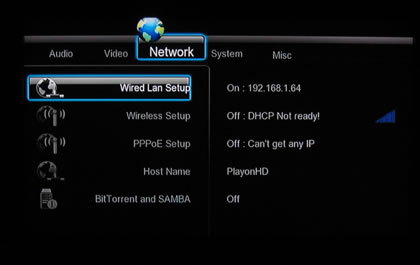
At the 'Network' menu you can configure Ethernet (WIred LAN) and WLAN (Wireless Local Area Network) settings. The Ethernet settings include the DHCP IP (AUTO) ( select to obtain IP address automatically) and the FIX IP (select to manually input the IP Address, Subnet Mask, Default Gateway, and DNS Server IP Address).

The Wireless Setup includes connection profiles - up to three wireless network connections can be stored. The connection mode allows you to choose between Infrastructure (AP) and Peer to Peer (Ad Hoc). Infrastructure mode is used to connect computers with wireless network adapters, also
known as wireless clients, to an existing wired network with the help from wireless router
or access point. WEP (Wired Equivalent Privacy) and WPA (Wi-Fi Protected
Access) can be selected to make your network encrypted.

Peer to Peer mode, which is also called Ad Hoc mode or computer-to-computer mode, is
used to connect wireless clients directly together, without the need for a wireless router or
access point.

Here you should also set the host name of the device.

The 'Network' menu also includes BitTorrent and SAMBA functions, mainly interesting for experienced users:
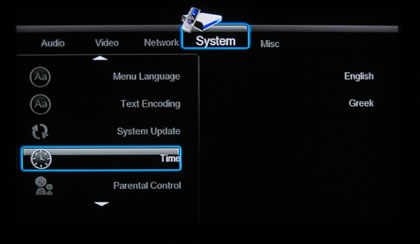
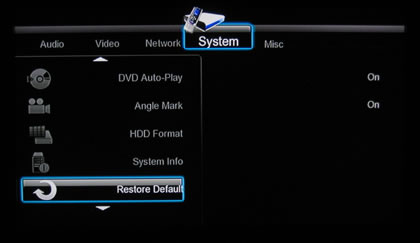
The System tab holds local system settings such as the menu language, login control (
turn on / off password protect for the Web server ), HDD format, text encoding for subtitles and firmware update.
 

At the misc tab you can disable various menu features like preview (On/Off), resumed playback (On/Off), background music options while viewing pictures and screen saver (On/Off).

 

Review Pages

1. Basic features
2. The package
3. Powering up the player
4. Setup Menus
5. Installing a HDD
6. Playing media files
7. Online services
8. Final words


Pages

  • « first
  • ‹ previous
  • 1
  • 2
  • 3
  • 4
  • 5
  • 6
  • 7
  • 8
  • next ›
  • last »

AC Ryan

Tags: AC Ryan
Previous Post
Tuniq Tower 120 Extreme
Next Post
Club3D HD5770

Related Posts

  • AC Ryan And Twentieth Century Fox To Promote X-MEN: First Class Movie

  • AC Ryan Launches VEOLO Smart Android Hub For TV

  • AC Ryan Playon!HD Mini 2 review

  • AC Ryan PlayOn!HD2 review

  • AC RYAN Launches Latest PLAYON!DVRHD Full HD Media Player And Recorder

Latest Reviews

be quiet! Light Wings Pro IO fan
Cooling Systems

be quiet! Light Wings Pro IO fan

Why Intelligent Firmware Matters More Than Peak Throughput in NAS Systems
Enterprise & IT

Why Intelligent Firmware Matters More Than Peak Throughput in NAS Systems

Fanxiang MP83 M.2 NVMe SSD Enclosure
Enterprise & IT

Fanxiang MP83 M.2 NVMe SSD Enclosure

Ugreen CM642 USB4.0 Enclosure
PC components

Ugreen CM642 USB4.0 Enclosure

be quiet! Dark Power 14 IO
PC components

be quiet! Dark Power 14 IO

Popular News

MSI’s Latest AMD X870E MAX & EVO Series Motherboards

MSI’s Latest AMD X870E MAX & EVO Series Motherboards

COLORFUL Launches iGame B850M ULTRA Series Micro-ATX Motherboards

COLORFUL Launches iGame B850M ULTRA Series Micro-ATX Motherboards

COLORFUL Presents Limited Edition Chitu MAG-60 Magnetic Keyboard Inspired by the Year of the Horse

COLORFUL Presents Limited Edition Chitu MAG-60 Magnetic Keyboard Inspired by the Year of the Horse

COLORFUL Launches iGame B850I MINI OC V14 Motherboard

COLORFUL Launches iGame B850I MINI OC V14 Motherboard

COLORFUL Launches the iGame X870E VULCAN W OC Motherboard

COLORFUL Launches the iGame X870E VULCAN W OC Motherboard

COLORFUL Presents iGame Z890 ULTRA-S W and iGame Z890M ULTRA Z Motherboards

COLORFUL Presents iGame Z890 ULTRA-S W and iGame Z890M ULTRA Z Motherboards

COLORFUL Expands B850 Motherboard Lineup with New CVN, Battle-Ax, and MEOW Models

COLORFUL Expands B850 Motherboard Lineup with New CVN, Battle-Ax, and MEOW Models

ASRock Adds Support for One Sub-Channel DRAM Module on Intel DDR5 Motherboards

ASRock Adds Support for One Sub-Channel DRAM Module on Intel DDR5 Motherboards

Main menu

  • Home
  • News
  • Reviews
  • Essays
  • About
    • Submit News

    • Contact Us
    • Privacy

    • Promotion
    • Advertise

    • RSS Feed
  • About
  • Privacy
  • Contact Us
  • Promotional Opportunities @ CdrInfo.com
  • Advertise on out site
  • Submit your News to our site
  • RSS Feed