Breaking News

LG Display launches 24.5-inch 720Hz Gaming OLED Panel Razer Unveils the Mako Desktop Gaming Speakers TerraMaster Launches 725 Series Xeon Rackmount NAS Viltrox Brings Its Full-Frame Air Series to L-Mount with Four Compact Prime Lenses CORSAIR Deploys the WARTHOG Airflow Mid-Tower PC Case

logo

  • Share Us
    • Facebook
    • Twitter
  • Home
  • Home
  • News
  • Reviews
  • Essays
  • About
    • Submit News

    • Contact Us
    • Privacy

    • Promotion
    • Advertise

    • RSS Feed

Search form

Pioneer DJS Software

Dec 20,2007 0

1. Introduction


Review Pages

1. Introduction
2. Installation
3. Main Features
4. Preferences
5. Working with the software - Conclusion


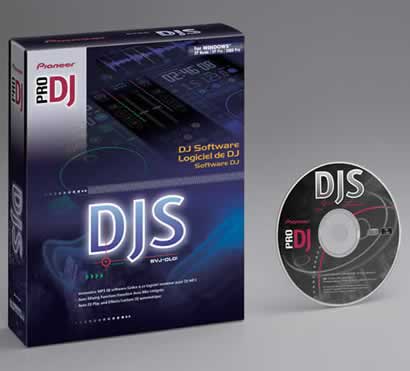
Pioneer is well known and respected among DJs for their CD Decks and Mixers. Apart from hardware products, Pioneer also offers a software solution for DJs, the Pioneer DJS Software. We decided to take a quick look and find out its good and bad points from this mid-priced software. Pioneer also offers a fully working download version for you to try out.

- Pioneer DJS Software

DJS is a PC-based software solution for the growing number of DJs who prefer mp3 files to vinyl, CD or DVD. DJS is designed for both mobile and home DJs, with full-scale DJ mixing on a PC. The software offers the same playability and functionality as Pioneer’s Pro DJ products, using a PC interface instead of the familiar hardware, CDJ turntables and DJM mixer. This new software is as intuitive as Pioneer's CDJ turntables and it offers many of the same features, including cue/loop points, scratching, beat synchronisation and more.
- Features

DJS software combines several elements of Pioneer’s professional digital CD decks and mixers with a host of features that include:

  • Auto mixing
  • Waveform display for indicating playing position and cue/loop points
  • BPM synchronisation and beat synchronisation
  • Eight effects including Delay, Echo, Auto Pan, Trans, Filter, Flanger, Reverb and Pitch Shifter
  • Fader start function for controlling the playback of two players (channel, fader and cross fader)
  • Create function for setting four points for cues or loops in a track

DJS has a ripping function for converting CD, and Wave files to mp3. It also incorporates an effects suite based on the effects of the DJM-600. The Graphical User Interface is quite straightforward and easy to understand, especially for all those who have been using Pioneer's CDJs and DJM hardware Mixers. Actually, the DJS software follows the same functional design of the pro equipment. The interface includes everything a Professional DJ needs to be able to see, including: time, BPM, mixer controls, jog dial, hot cue buttons, etc. In addition, the software has a “SYNC” feature to automatically beat match the cued track to the track that is playing.

- System requirements

Pioneer DJS does not have especially high system requirements:

  • Microsoft Windows XP Home Edition / Professional / Microsoft Windows 2000 Professional
  • Intel® Pentium® M 1.5GHz or faster (or a comparable processor at 1.7 GHz or faster)
  • 512 MB RAM or more
  • Screen resolution of 1024 X 768 pixels or better
  • Built-in or external audio output
  • CD-ROM drive 250 MB or more of free hard disk space (excluding the capacity needed for storing .mp3 and other files)


Review Pages

1. Introduction
2. Installation
3. Main Features
4. Preferences
5. Working with the software - Conclusion


Pages

  • 1
  • 2
  • 3
  • 4
  • 5
  • next ›
  • last »

Pioneer

Sound

DJ

Tags: Pioneer Sound DJ
Previous Post
Gainward 8800GT
Next Post
Daemon Tools Image Drive

Related Posts

  • Pioneer announces microSD for dashcam

  • Pioneer Japan announces BDR-WX01DM for US market

  • Pioneer Japan announces new optical storage drives for JIS X6257 archive format

  • Pioneer Japan updates its CD-DVD Software utility

  • Pioneer Japan announces new BDR-X13J-X external BD Writer and BDR-WX01DM for archiving

  • Pioneer Japan releases new firmware updates for external Blu-Ray Recorders

  • Pioneer BDR-XD08UMB-S External Blu-Ray Recorder

  • Pioneer Japan updates firmware for their X13 lineup (30-01-2023)

Latest Reviews

Fanxiang MP83 M.2 NVMe SSD Enclosure
Enterprise & IT

Fanxiang MP83 M.2 NVMe SSD Enclosure

Ugreen CM642 USB4.0 Enclosure
PC components

Ugreen CM642 USB4.0 Enclosure

be quiet! Dark Power 14 IO
PC components

be quiet! Dark Power 14 IO

SanDisk High Endurance 512GB microSDXC
Cameras

SanDisk High Endurance 512GB microSDXC

Samsung PRO Ultimate 512GB microSDXC
Cameras

Samsung PRO Ultimate 512GB microSDXC

Popular News

CORSAIR announces Vanguard Pro 96 and Vanguard 96 Gaming Keyboards

CORSAIR announces Vanguard Pro 96 and Vanguard 96 Gaming Keyboards

MSI’s Latest AMD X870E MAX & EVO Series Motherboards

MSI’s Latest AMD X870E MAX & EVO Series Motherboards

Panasonic Introduces the First Ultra-Telephoto Zoom Lens in the LUMIX S Series

Panasonic Introduces the First Ultra-Telephoto Zoom Lens in the LUMIX S Series

COLORFUL Launches iGame B850M ULTRA Series Micro-ATX Motherboards

COLORFUL Launches iGame B850M ULTRA Series Micro-ATX Motherboards

COLORFUL Presents Limited Edition Chitu MAG-60 Magnetic Keyboard Inspired by the Year of the Horse

COLORFUL Presents Limited Edition Chitu MAG-60 Magnetic Keyboard Inspired by the Year of the Horse

COLORFUL Presents iGame Z890 ULTRA-S W and iGame Z890M ULTRA Z Motherboards

COLORFUL Presents iGame Z890 ULTRA-S W and iGame Z890M ULTRA Z Motherboards

COLORFUL Launches iGame B850I MINI OC V14 Motherboard

COLORFUL Launches iGame B850I MINI OC V14 Motherboard

COLORFUL Expands B850 Motherboard Lineup with New CVN, Battle-Ax, and MEOW Models

COLORFUL Expands B850 Motherboard Lineup with New CVN, Battle-Ax, and MEOW Models

Main menu

  • Home
  • News
  • Reviews
  • Essays
  • About
    • Submit News

    • Contact Us
    • Privacy

    • Promotion
    • Advertise

    • RSS Feed
  • About
  • Privacy
  • Contact Us
  • Promotional Opportunities @ CdrInfo.com
  • Advertise on out site
  • Submit your News to our site
  • RSS Feed