VapoChill Micro series
3. Performance
Lets have a brief look at the CPU and motherboard we used for our tests...
 |
| The well known AMD 3500+ |
 |
| and the ASUS A8N-SLI Deluxe motherboard |
To measure the CPU's temperature we used SpeedFan v4.26 which provided us with real time monitoring and created a graph of temperature over time. In the following measurements, we used AMD's 3500+ with the stock cooler and the VapoChill Micro. Since we received all the available fans for all VapoChill Micro versions, we will run the tests for each separately. Moreover, using the regulator, we will test with minimum and maximum fan rotation speeds. The heat transfer compound we used, was that supplied with the VapoChill Micro cooler.
We started WinXP SP2 and after 5 mins we started the Speedfan utility. The room temperature at the time of our measurement was close to 22 °C. After 5~6min, we started the stretch test in Prime95 which we left running for about 6~7min.
| Cooler | Temperature ( from idle to full load) |
| Stock | 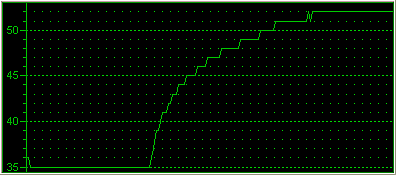 |
| HI-END (min) |
 |
| HI-END (max) |
 |
| EXTREME (min) |
 |
| EXTREME (max) |
 |
| ULTRA LOW NOISE (min) |
 |
| ULTRA LOW NOISE (max) |
 |
Beginning with the stock cooling system provided by AMD with the 3500+ processor, the temperature starts at 35 °C and after the stretch test in Prime95, it reached 52 °C.
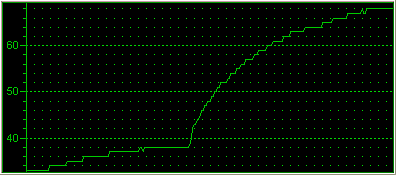
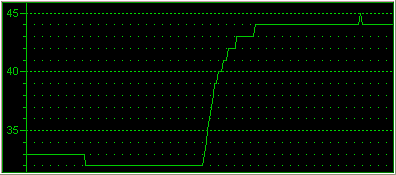
If you have chosen the VapoChill Micro HI-END, then with the fan speed set to minimum for lower noise, the CPU temperature will start at 36 °C and will reach 64 °C with Prime95. Increasing the fan speed to maximum, this will change to 34 °C and 44 °C maximum. This is very good performance but the noise is quite noticeable.
Next test, the VapoChill Micro EXTREME PERFORMANCE. The reported temperature range with the fan speed set to minimum, was from 35 °C to 56 °C while with the fan speed set to maximum, 32 °C to 43 °C which is excellent performance, but again, the noise level is high, even with the VapoChill Micro HI-END. The good thing here is that the cooler can work at minimum fan rotation speed at extremely low noise levels, almost dead quiet, with performance similar to that of the stock cooler.
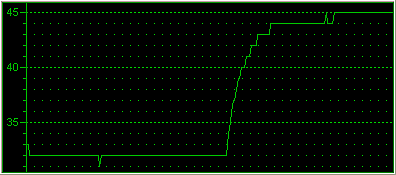
We left the VapoChill Micro ULTRA LOW NOISE for last. With the fan rotation speed set to minimum, the reported temperature range was 33 °C to 50 °C and at maximum, 32 °C to 45 °C. We believe that this is the best combination between noise and performance. Better performance with minimum fan speed than the stock cooler and the VapoChill Micro HI-END or the VapoChill Micro EXTREME PERFORMANCE. At maximum fan speed, the temperature levels were slightly higher than with the other two VapoChill Micro coolers but still very good.
As for the fan's rotation speed, this can be seen in the following table.
| Cooler | Fan rotation speed |
| Stock | 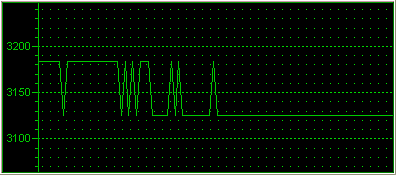 |
| HI-END | 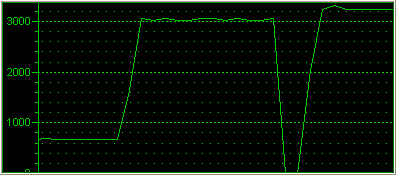 |
| EXTREME | 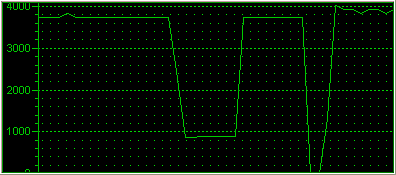 |
| ULTRA LOW NOISE |
 |
The stock cooler has no manual speed regulator and its speed is supposed to be either stable or automatic. During our tests, this was 3125~3173rpm. It is strange that during the stretch test, the fan speed was at its lowest level.
With VapoChill Micro HI-END installed, the fan speed with the regulator set to minimum, is close to 850rpm while at maximum, 3050rpm. Ignore the zero speed level, this was due to the fact we disconnected the regulator while the system was working.
After, we installed the VapoChill Micro EXTREME PERFORMANCE. With the regulator set from minimum to maximum, the speed ranged from 850rpm to3650rpm.
Finally, the reported fan speeds from the VapoChill Micro ULTRA LOW NOISE were 1000rpm and 2400rpm with the regulator set to minimum and maximum respectively.
Notice that without the regulator, the fan speed can run approximately 220rpm higher than with the regulator installed. This is something common with most regulators.
In all cases, the reported performance was rather good, especially for temperature levels. If you want to have the coolest possible processor with a VapoChill Micro product, then the EXTREME PERFORMANCE should be your choice with the regulator set to maximum or even better, without a regulator for optimum performance. However, this will produce annoying noise levels. According to our tests, it seems that the ULTRA LOW NOISE series from VapoChill Micro, has the overall best performance, a compromise between cool and quiet :-)