Breaking News

COLORFUL Launches iGame Guard G114 140W GaN Multi-Port Charger INNO3D TOWER WORKSTATION AWS-511Z-R1 Thermal Grizzly and Noctua introduce WireView Pro II Noctua Edition GPU monitoring device Nikon releases the Z5IIC full-frame mirrorless camera Announcing the New ASUS Googlebook 14

logo

  • Share Us
    • Facebook
    • Twitter
  • Home
  • Home
  • News
  • Reviews
  • Essays
  • About
    • Submit News

    • Contact Us
    • Privacy

    • Promotion
    • Advertise

    • RSS Feed

Search form

VapoChill Micro series

Nov 7,2005 0

2. Installation


Review Pages

1. Introduction
2. Installation
3. Performance
4. Conclusion


The first thing to keep in mind before getting a new CPU cooling system is how easily the new cooling system can be installed.

The Asetek VapoChill can be installed on both Intel 775 and AMD 939 sockets. Let's start with an AMD 939 socket based motherboard.
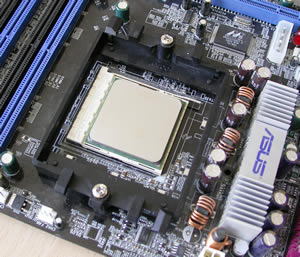
The 939 socket with the stock mounting system

Before mounting the VapoChill Micro cooler on the processor, make sure you have removed the plastic strip protecting the thermal compound on the base. Also very importantly, clean the CPU of any previous thermal compound may still be on it, making sure there aren't any traces of old compound whatsoever.
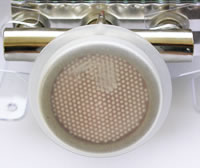
...remove the plastic cover strip...
...no extra thermal compound is necessary.

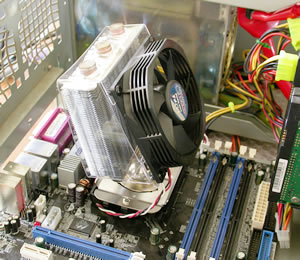
There is no need to remove the motherboard from the PC case in order to install the VapoChill Micro cooler. This is an advantage...

The above image is from the manual and describes exactly how the cooler should be installed. It is simple.
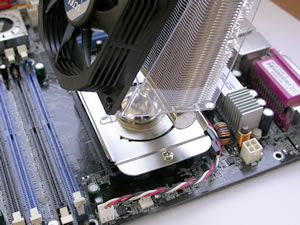
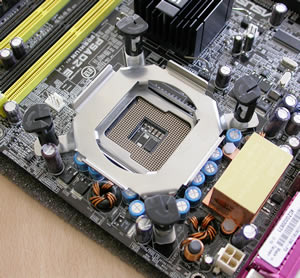
On Intel CPU based motherboards, the installation is as easy as installing the stock cooler. All you have to do is to mount the four mounting brackets and that's it.. Couldn't be simpler. :-)
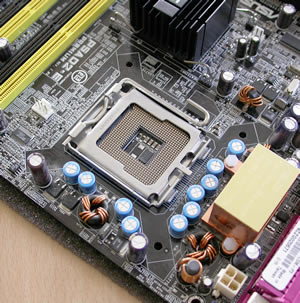
the P4 775 socket...as simple as it gets

What you don't usually see is the mounting method being the same as Intel's.

same as stock mounting method...


...remove the plastic base...

In the case of the P4 S478, the installation process is described in the following drawing from Asetek.

Exactly as in the case with the Golden Orb II

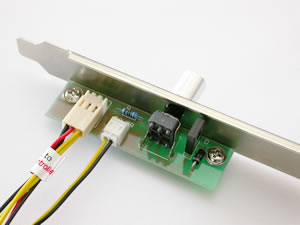
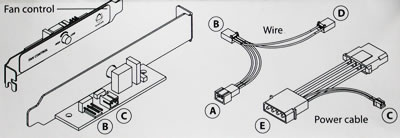
The final step is to install the fan regulator. It is not necessary to do this, the cooling system will work even without the regulator. If you read the instructions carefully, installation is simple and easy.

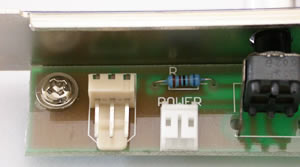
 
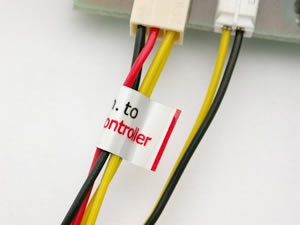
There are labels on each cable for easier installation.

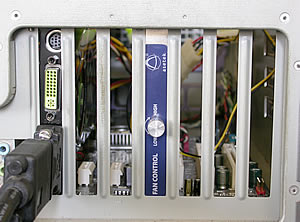
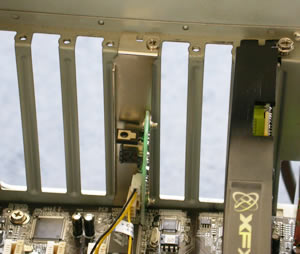
Installation of the regulator on the PC case...

The installation of the regulator on the back of the PC case is also easy. But you'll use up a PCI slot.

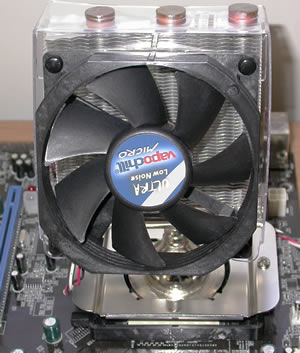
As soon as the regulator is installed, everything is ready and we can turn on our system.
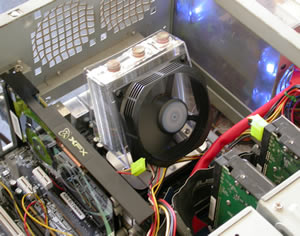
up and working...


Review Pages

1. Introduction
2. Installation
3. Performance
4. Conclusion


Pages

  • « first
  • ‹ previous
  • 1
  • 2
  • 3
  • 4
  • next ›
  • last »

asetek

Tags: asetek
Previous Post
MSI K8N Diamond
Next Post
XFX 7800GT

Related Posts

  • Noctua and Asetek Announce Flagship AIO Liquid Coolers

  • Asetek SimSports launches Next-Gen steering wheels and pedals

  • Asetek Announces Revolutionary New AI Optimized Cold Plate Solution

Latest Reviews

Fanxiang MP83 M.2 NVMe SSD Enclosure
Enterprise & IT

Fanxiang MP83 M.2 NVMe SSD Enclosure

Ugreen CM642 USB4.0 Enclosure
PC components

Ugreen CM642 USB4.0 Enclosure

be quiet! Dark Power 14 IO
PC components

be quiet! Dark Power 14 IO

SanDisk High Endurance 512GB microSDXC
Cameras

SanDisk High Endurance 512GB microSDXC

Samsung PRO Ultimate 512GB microSDXC
Cameras

Samsung PRO Ultimate 512GB microSDXC

Popular News

MSI’s Latest AMD X870E MAX & EVO Series Motherboards

MSI’s Latest AMD X870E MAX & EVO Series Motherboards

COLORFUL Launches iGame B850M ULTRA Series Micro-ATX Motherboards

COLORFUL Launches iGame B850M ULTRA Series Micro-ATX Motherboards

COLORFUL Presents Limited Edition Chitu MAG-60 Magnetic Keyboard Inspired by the Year of the Horse

COLORFUL Presents Limited Edition Chitu MAG-60 Magnetic Keyboard Inspired by the Year of the Horse

COLORFUL Presents iGame Z890 ULTRA-S W and iGame Z890M ULTRA Z Motherboards

COLORFUL Presents iGame Z890 ULTRA-S W and iGame Z890M ULTRA Z Motherboards

COLORFUL Launches iGame B850I MINI OC V14 Motherboard

COLORFUL Launches iGame B850I MINI OC V14 Motherboard

COLORFUL Expands B850 Motherboard Lineup with New CVN, Battle-Ax, and MEOW Models

COLORFUL Expands B850 Motherboard Lineup with New CVN, Battle-Ax, and MEOW Models

ASRock Adds Support for One Sub-Channel DRAM Module on Intel DDR5 Motherboards

ASRock Adds Support for One Sub-Channel DRAM Module on Intel DDR5 Motherboards

Exceed the Infinite with New ASRock X870E Taichi White Motherboard

Exceed the Infinite with New ASRock X870E Taichi White Motherboard

Main menu

  • Home
  • News
  • Reviews
  • Essays
  • About
    • Submit News

    • Contact Us
    • Privacy

    • Promotion
    • Advertise

    • RSS Feed
  • About
  • Privacy
  • Contact Us
  • Promotional Opportunities @ CdrInfo.com
  • Advertise on out site
  • Submit your News to our site
  • RSS Feed