Breaking News

DZOFILM Expands Arles Cine Lens System With 25–75mm and 65–180mm T2.6 Zooms G.SKILL Launches Trident Z5 Royal NeoX Series DDR5 Memory with AMD EXPO Technology XERON Launches NEX A61 ARGB CPU Air Cooler Viltrox to Unveil New Lenses And Production Solutions at IBC2026 ASUS Announces WiFi 8 Router

logo

  • Share Us
    • Facebook
    • Twitter
  • Home
  • Home
  • News
  • Reviews
  • Essays
  • About
    • Submit News

    • Contact Us
    • Privacy

    • Promotion
    • Advertise

    • RSS Feed

Search form

Thermaltake Element V Case review

Oct 1,2010 0

4. Final words


Review Pages

1. Features, specifications
2. Opening the package
3. Installing the components
4. Final words


The Thermaltake Element V is a well-built and solid PC case designed for powerful PC systems.

The case is made out of high-quality materials and each part of it has been carefully crafted to offer easy and accurate assembling as well as a solid and stylish look. The very handy control and I/O panel found on the top side of the case allows you to easily plug-in your USB flash drive , e-sata device or attach a headphones/mic without searching below your desk, while it also offers a large knob to control your fans' speed and back light coloring.

Speaking of the fans, the basic strength of the Thermaltake Element V is its numerous ventilation fans. There are five of them pre-installed including a 200mm fan placed on its top side, and you can optionally add three more. And with all these fans there, if you are worried about the noise coming out of the box, you'll be pleasantly surprised. The system remains very quiet.

Inside the case there is plenty of space to easily install the motherboard, graphics cards and storage devices. The system has been designed to support up to eleven internal devices. In addition, with the power supply unit installed at the bottom side of the case, you can easily arrange the power cables in order to have a clean look, with a lot of free space left for a more efficient cooling.
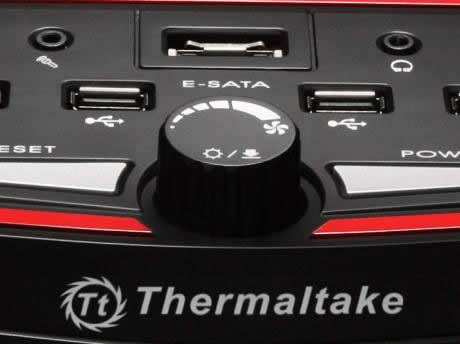
The installation of the various components of our PC was easy, with some minor issues reported in the previous pages. These issues are not enough to change our opinion about this case. We feel that the Thermaltake Element V is has solid construction, great quality and offers many extra features that will make your everyday activity with the system easy and fun. Considering what you get, the $170 needed to buy the Thermaltake Element V makes sense and it is definitely a good deal.

Positive

- Solid construction of steel
- Good overall design
- Free space inside
- Five (5) pre-installed RPM-controlled fans
- Can support up to eight (8) fans
- Included fans are backlit and can be turned off
- Supports even large power supply units
- HDD/Optical cage is easy to remove
- Top I/O panel is very useful
- Can easily be upgraded with liquid cooling system
- Good retail price for what it offers

Negative

- Very bright top system led - easy to fix by disconnecting its power cable
- USB headers should have been joined for easier installation
- HDDs could have a screw less installation system


Review Pages

1. Features, specifications
2. Opening the package
3. Installing the components
4. Final words


Pages

  • « first
  • ‹ previous
  • 1
  • 2
  • 3
  • 4

Thermaltake

Tags: Thermaltake
Previous Post
Thermaltake Massive 23 LX Notebook cooler
Next Post
Shuttle XS 3510MA ION2 mini-pc

Related Posts

  • Thermaltake Launches AW360/420 AIO Liquid Cooler and WAir CPU Cooler for Workstations

  • Begin the Racing Journey with the Thermaltake GR300 Racing Simulator Cockpit

  • Thermaltake Unveils the Massive EXTREME with Cross-flow Fan

  • Thermaltake Releases the Toughpower TF3 1300W with Support for RTX50 Series GPUs

  • Thermaltake Unveils G6 Direct Drive Racing Wheel Bundle and GM5 3DOF Motion System

  • Thermaltake Launches the TT150 LED Bag in Different Sizes and New Colors

  • Thermaltake New TH V2 Ultra EX ARGB Sync AIO – Snow Edition is Now Available Worldwide

  • Thermaltake Coolers Support New-Gen Intel and AMD CPUs

Latest Reviews

Ugreen CM642 USB4.0 Enclosure
PC components

Ugreen CM642 USB4.0 Enclosure

be quiet! Dark Power 14 IO
PC components

be quiet! Dark Power 14 IO

SanDisk High Endurance 512GB microSDXC
Cameras

SanDisk High Endurance 512GB microSDXC

Samsung PRO Ultimate 512GB microSDXC
Cameras

Samsung PRO Ultimate 512GB microSDXC

be quiet! Light Mount TKL
Consumer Electronics

be quiet! Light Mount TKL

Popular News

CORSAIR announces Vanguard Pro 96 and Vanguard 96 Gaming Keyboards

CORSAIR announces Vanguard Pro 96 and Vanguard 96 Gaming Keyboards

MSI Launches FORGE GK600 TKL WIRELESS Special Edition Compact Mechanical Keyboard

MSI Launches FORGE GK600 TKL WIRELESS Special Edition Compact Mechanical Keyboard

Panasonic Introduces the First Ultra-Telephoto Zoom Lens in the LUMIX S Series

Panasonic Introduces the First Ultra-Telephoto Zoom Lens in the LUMIX S Series

MSI’s Latest AMD X870E MAX & EVO Series Motherboards

MSI’s Latest AMD X870E MAX & EVO Series Motherboards

COLORFUL Launches iGame B850M ULTRA Series Micro-ATX Motherboards

COLORFUL Launches iGame B850M ULTRA Series Micro-ATX Motherboards

COLORFUL Presents Limited Edition Chitu MAG-60 Magnetic Keyboard Inspired by the Year of the Horse

COLORFUL Presents Limited Edition Chitu MAG-60 Magnetic Keyboard Inspired by the Year of the Horse

COLORFUL Presents iGame Z890 ULTRA-S W and iGame Z890M ULTRA Z Motherboards

COLORFUL Presents iGame Z890 ULTRA-S W and iGame Z890M ULTRA Z Motherboards

LIAN LI Launches 8.8” Universal Screen with Flexible Mounting Solution

LIAN LI Launches 8.8” Universal Screen with Flexible Mounting Solution

Main menu

  • Home
  • News
  • Reviews
  • Essays
  • About
    • Submit News

    • Contact Us
    • Privacy

    • Promotion
    • Advertise

    • RSS Feed
  • About
  • Privacy
  • Contact Us
  • Promotional Opportunities @ CdrInfo.com
  • Advertise on out site
  • Submit your News to our site
  • RSS Feed