Breaking News

Razer Unleashes the Kraken V4 X Sensa HD Haptics Sony Rewrites the Rules of Super-Telephoto: Announces World's Lightest 400mm and 600mm G Master Primes Transcend Debuts High-Performance 64GB DDR5-6400 CUDIMM & CSODIMM Embedded DRAM Modules Micron Unveils World's First 512GB Ultra-Dense DDR5 Module for Next-Gen Servers Fujifilm Officially Introduces the instax Pal 2 Digital Camera

logo

  • Share Us
    • Facebook
    • Twitter
  • Home
  • Home
  • News
  • Reviews
  • Essays
  • About
    • Submit News

    • Contact Us
    • Privacy

    • Promotion
    • Advertise

    • RSS Feed

Search form

SuperTalent Luxio 64GB

Mar 13,2009 0

2. Benchmarks, SecureLock software


Review Pages

1. Features
2. Benchmarks, SecureLock software
3. Final words


The USB flash was easily recognized under Windows after plugging it to our PC.

Two PDF manuals as well as an encryption software (SecureLock) are pre-installed on the drive. The total capacity is 62GB and the available capacity is more than 55GB, according to Windows:

For the first performance test we used the HD Tach v3.0.1.0 and selected the full length test:
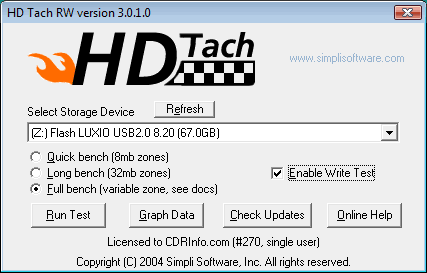
The full bench test scans the entire capacity of the module and provides a graph with the s average reading/writing performance. However, the benchmark could not start without disabling the "Enable Write Test" feature. As a result, we just got measurements for the reading task:
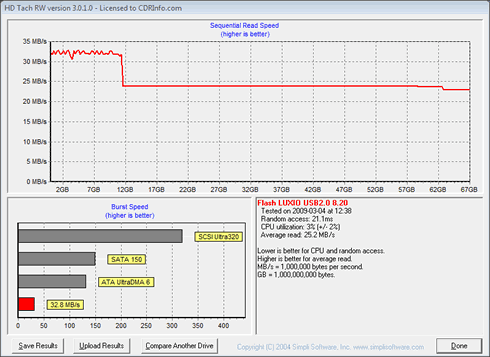
Reading started at 32MB/sec but soon after the 12GB mark it dropped to 24MB/sec, resulting an average reading speed of 25MB/sec.

The Sisoft Sandra Software gave a much lower performance for reading (18.30MB/sec):
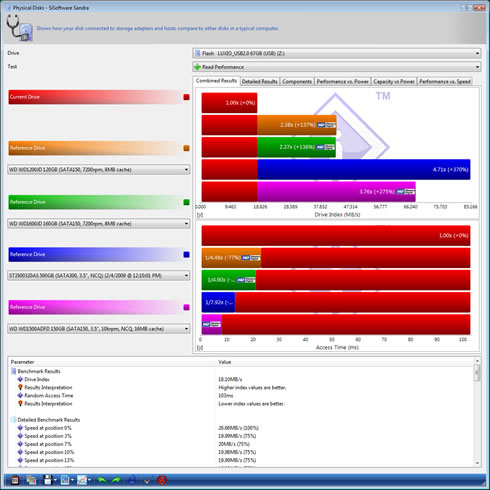
We also used the like HD Tune Pro 3.50 software but still, we could not enable the write tests. The reported reading speed was 17 MB/sec:
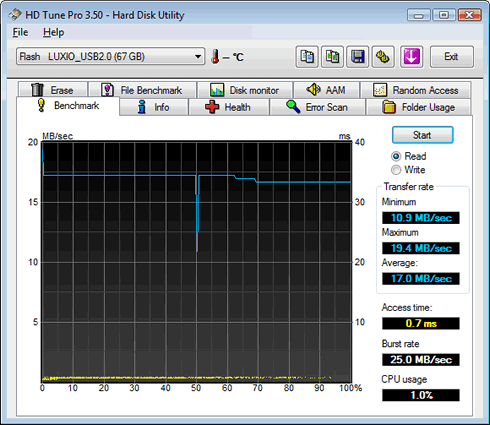
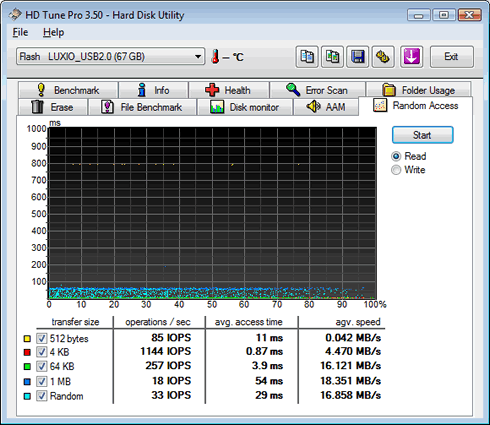
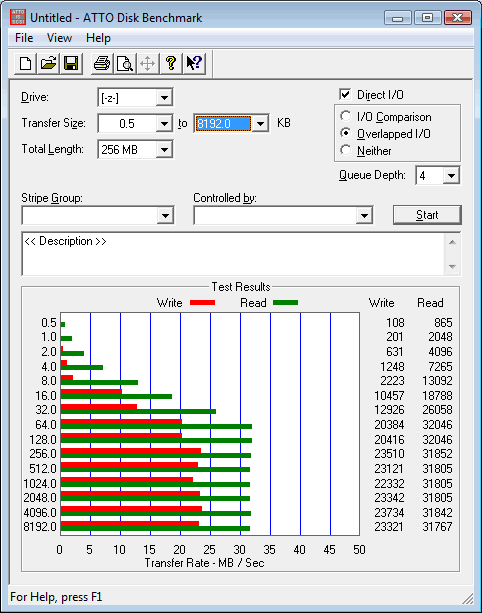
FInally we used the ATTO Disk Benchmark, which reports the transfer rates of the flash memory using files of different sizes. We cannot easily trust these results since they look quite optimistic for a flash drive. For example, the 8MB file test gave 30MB/sec for reading and 23MB for writing:
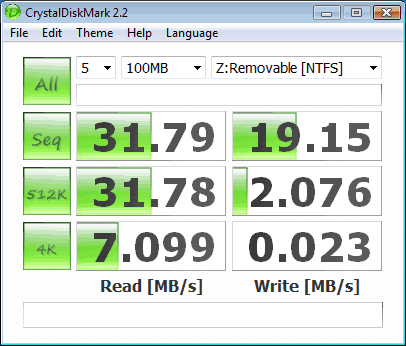
The CrystalDiskMark utility also gave 31.79MB/sec and 19.15MB/sec for the sequential reading and writing tests, respectively:
Finally, we used the SecureLock encryption software which comes pre installed with the drive as we previously mentioned. The software can be used to set password protection to a "hidden" partition the flash drive.

The first window of the software is simple and gives information about the status of the flash drive.
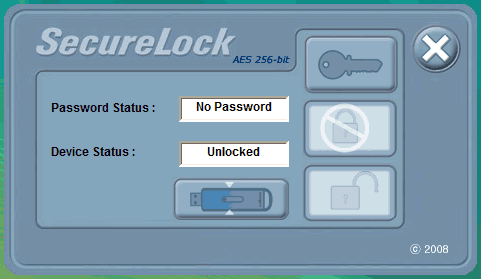
Here you can also set or change the password, adjust the partition size of the drive or even disable the password.

You can manually set the capacity of the secure area of the flash drive using the slider, as you can see in the screenshot below. For extra security, you can even secure the complete available 64GB:

The password for the secure area can be changed as many times as you wish. The software also provides a password hint that would help you remember it easier.
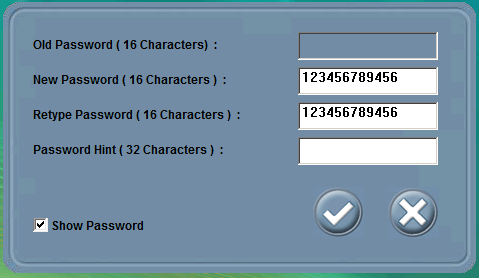
We should note here that the SecureLock tool will partition the disk to 2 partitions when password set in first time use. As a result, all the data will be deleted, so make sure to backup any data stored to the drive before setting the password.


Review Pages

1. Features
2. Benchmarks, SecureLock software
3. Final words


Pages

  • « first
  • ‹ previous
  • 1
  • 2
  • 3
  • next ›
  • last »

Super Talent

usb flash drives

Tags: Super Talent usb flash drives
Previous Post
Gainward GTX285
Next Post
PC3-12800 DDR3 Memory Roundup

Related Posts

  • Kioxia Launches “KIOXIA” Branded microSD/SD Memory Cards, USB Memory and SSDs

  • Western Digital Brings First 8TB SuperSpeed USB 20Gbps Portable SSD Prototype at CES

  • Verbatim Focuses on Encrypted Data Storage at IFA

  • Windows 10 Allows You to Safely Remove Your USB By Just Pulling It Out

  • Second-hand Thumb drives Typically Contain Data from Past Owners

  • Kingston Releases Managed Model of IronKey D300 Serialized Encrypted USB

  • WD Showcases Personal Storage Solutions at CES

  • Toshiba TransMemory U365 USB flash drive review

Latest Reviews

Fanxiang MP83 M.2 NVMe SSD Enclosure
Enterprise & IT

Fanxiang MP83 M.2 NVMe SSD Enclosure

Ugreen CM642 USB4.0 Enclosure
PC components

Ugreen CM642 USB4.0 Enclosure

be quiet! Dark Power 14 IO
PC components

be quiet! Dark Power 14 IO

SanDisk High Endurance 512GB microSDXC
Cameras

SanDisk High Endurance 512GB microSDXC

Samsung PRO Ultimate 512GB microSDXC
Cameras

Samsung PRO Ultimate 512GB microSDXC

Popular News

CORSAIR announces Vanguard Pro 96 and Vanguard 96 Gaming Keyboards

CORSAIR announces Vanguard Pro 96 and Vanguard 96 Gaming Keyboards

MSI Launches FORGE GK600 TKL WIRELESS Special Edition Compact Mechanical Keyboard

MSI Launches FORGE GK600 TKL WIRELESS Special Edition Compact Mechanical Keyboard

MSI’s Latest AMD X870E MAX & EVO Series Motherboards

MSI’s Latest AMD X870E MAX & EVO Series Motherboards

Panasonic Introduces the First Ultra-Telephoto Zoom Lens in the LUMIX S Series

Panasonic Introduces the First Ultra-Telephoto Zoom Lens in the LUMIX S Series

COLORFUL Launches iGame B850M ULTRA Series Micro-ATX Motherboards

COLORFUL Launches iGame B850M ULTRA Series Micro-ATX Motherboards

COLORFUL Presents Limited Edition Chitu MAG-60 Magnetic Keyboard Inspired by the Year of the Horse

COLORFUL Presents Limited Edition Chitu MAG-60 Magnetic Keyboard Inspired by the Year of the Horse

COLORFUL Presents iGame Z890 ULTRA-S W and iGame Z890M ULTRA Z Motherboards

COLORFUL Presents iGame Z890 ULTRA-S W and iGame Z890M ULTRA Z Motherboards

LIAN LI Launches 8.8” Universal Screen with Flexible Mounting Solution

LIAN LI Launches 8.8” Universal Screen with Flexible Mounting Solution

Main menu

  • Home
  • News
  • Reviews
  • Essays
  • About
    • Submit News

    • Contact Us
    • Privacy

    • Promotion
    • Advertise

    • RSS Feed
  • About
  • Privacy
  • Contact Us
  • Promotional Opportunities @ CdrInfo.com
  • Advertise on out site
  • Submit your News to our site
  • RSS Feed