Breaking News

ASRock Introduces Its First Taichi Flagship Monitor Lineup RICOH announces GR IV 30th Anniversary Edition Kit Samsung Begins Official Rollout of One UI 9 Canon announces EOS R8 Mark II Razer Unleashes the Kraken V4 X Sensa HD Haptics

logo

  • Share Us
    • Facebook
    • Twitter
  • Home
  • Home
  • News
  • Reviews
  • Essays
  • About
    • Submit News

    • Contact Us
    • Privacy

    • Promotion
    • Advertise

    • RSS Feed

Search form

Windows 10 Allows You to Safely Remove Your USB By Just Pulling It Out

Windows 10 Allows You to Safely Remove Your USB By Just Pulling It Out

PC components Apr 8,2019 0

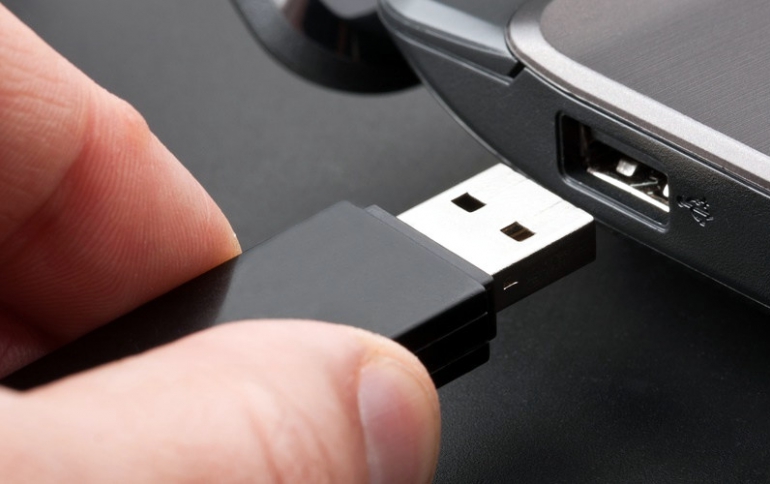
The new Microsoft Windows 1809 Version allows you to pull out your USB stick from your comouter without any hassle.

Windows usually allows two options for pen-drive usage and removal - Quick Removal and Better Performance.

Quick Removal allows the user to pull out the USB with all their might, without any trouble. However, this option also slows down the writing speed as there is no caching of files.

In the ‘Better Performance’ mode, you obvuiusly get improved performance, but you can’t remove USB safely without clicking on ‘Safely Remove Hardware’.

The Quick Removal option now comes default in the Windows 10 Version 1809.

Tags: usb flash driveswindows 10
Previous Post
New HyperX Cloud Stinger Wireless Headset Costs Less Than $100
Next Post
UK Plans Social Media Regulation, Europe Urges for Harmonized Digital Tax

Related Posts

  • Windows Search to Show COVID19 Info in Search, Your Phone App Lets You Control Music Apps

  • Kioxia Launches “KIOXIA” Branded microSD/SD Memory Cards, USB Memory and SSDs

  • Microsoft Brings More Widgets for Apps to The Xbox Game Bar

  • Microsoft Says Hackers Take Advantage of Windows Vulnerability

  • Microsoft Says Coronavirus Will Impact Windows 10 Updates

  • Windows 10 is Powering 1 Billion Active Devices

  • Windows 10 Critical Security Update Patches SMB Vulnerability

  • Microsoft Discloses Unpatched Critical SMB Vulnerability in Windows

Latest News

ASRock Introduces Its First Taichi Flagship Monitor Lineup
Consumer Electronics

ASRock Introduces Its First Taichi Flagship Monitor Lineup

RICOH announces GR IV 30th Anniversary Edition Kit
Cameras

RICOH announces GR IV 30th Anniversary Edition Kit

Samsung Begins Official Rollout of One UI 9
Smartphones

Samsung Begins Official Rollout of One UI 9

Canon announces EOS R8 Mark II
Cameras

Canon announces EOS R8 Mark II

Razer Unleashes the Kraken V4 X Sensa HD Haptics
Consumer Electronics

Razer Unleashes the Kraken V4 X Sensa HD Haptics

Popular Reviews

Endorfy Thock V2 Wireless Keyboard

Endorfy Thock V2 Wireless Keyboard

The Quiet Technology Behind the Spin

The Quiet Technology Behind the Spin

SoundPeats Cove Pro

SoundPeats Cove Pro

Akaso Brave 8 Lite

Akaso Brave 8 Lite

Kioxia Exceria Plus G3 512GB microSD

Kioxia Exceria Plus G3 512GB microSD

be quiet! Dark Perk Mice

be quiet! Dark Perk Mice

SoundPeats C30

SoundPeats C30

XbotGo Chamaleon

XbotGo Chamaleon

Main menu

  • Home
  • News
  • Reviews
  • Essays
  • About
    • Submit News

    • Contact Us
    • Privacy

    • Promotion
    • Advertise

    • RSS Feed
  • About
  • Privacy
  • Contact Us
  • Promotional Opportunities @ CdrInfo.com
  • Advertise on out site
  • Submit your News to our site
  • RSS Feed