
Snazio NetCinema HD Player SZ1350
6. Video Settings/Hacks
Review Pages
1. Introduction
2. The Package
3. Setting up the player
4. Menus
5. Firmware update
6. Video Settings/Hacks
7. Connecting with PC
8. Wireless Connection
9. The Tests - Disc compatibility
10. Playback Tests - Page 1
11. Playback Tests - Page 2
12. Playback Tests - Page 3
13. Playback Tests - Page 4
14. Playback Tests - Page 5
15. Conclusion
2. The Package
3. Setting up the player
4. Menus
5. Firmware update
6. Video Settings/Hacks
7. Connecting with PC
8. Wireless Connection
9. The Tests - Disc compatibility
10. Playback Tests - Page 1
11. Playback Tests - Page 2
12. Playback Tests - Page 3
13. Playback Tests - Page 4
14. Playback Tests - Page 5
15. Conclusion
The player supports many output modes and at various resolutions. The default selection is Composite/S-Video PAL. HDTV users can select from many different modes:
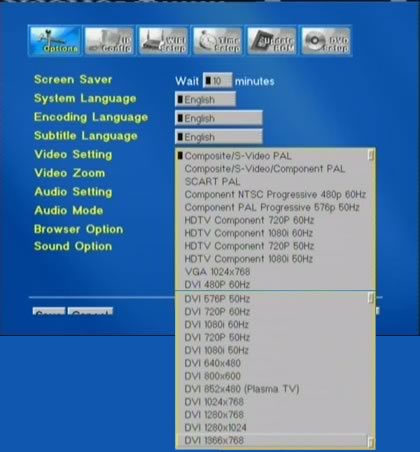
As we mentioned earlier, there are some limitations when playing back DVD and Video files:
- Supports WMA, DivX® Video version 3.11, 4.x and 5.x up to 720x576 maximum source resolution
- Supports MPEG-4.2 ASP@L5 (720p) AVI files without global motion
compensation (GMC) and 1280x720p
maximum source resolution - Decodes Analog YPbPr video (progressive or interlaced) signals scalable up to 1920x1080i or 1280x720p resolution.
- Macrovision copy protection limits CSS-protected DVD playback to 480i, 576i, 480p and 576p on YPbPr
The last one may worry HDTV users, since DVD playback through DVI is limited to 576p. To make the SnaZio* NetCinema SZ1350 play DVD over DVI without limitations, eject the tray and at the main menu page:
- Press the Slow/FWD button
- Press (in sequence) 1212
A message will appear "CSS LICENSING". Quickly press 1 to disable it (or 0 to enable).
The player can become region free if you follow another similar process:
- Press the Slow/FWD button
- Press (in sequence) 46460 (where 0 is for region free, or replace the 0 with your region of choice.)
Both "hacks" are courtesy of Video Help.
Review Pages
1. Introduction
2. The Package
3. Setting up the player
4. Menus
5. Firmware update
6. Video Settings/Hacks
7. Connecting with PC
8. Wireless Connection
9. The Tests - Disc compatibility
10. Playback Tests - Page 1
11. Playback Tests - Page 2
12. Playback Tests - Page 3
13. Playback Tests - Page 4
14. Playback Tests - Page 5
15. Conclusion
2. The Package
3. Setting up the player
4. Menus
5. Firmware update
6. Video Settings/Hacks
7. Connecting with PC
8. Wireless Connection
9. The Tests - Disc compatibility
10. Playback Tests - Page 1
11. Playback Tests - Page 2
12. Playback Tests - Page 3
13. Playback Tests - Page 4
14. Playback Tests - Page 5
15. Conclusion




