Breaking News

CORSAIR Launches ThermalProtect PCIe 5.1 600W 12V-2x6 Cable to Help Protect GPUs from Overheating Logitech announces G512 X Gaming Keyboard ASUS Announces TUF Gaming Platinum Power Supply Series TerraMaster announces D1 SSD Rugged Enclosure COLORFUL Introduces New BATTLE-AX B860M and B760M Motherboards with Wi-Fi 7 and Next-Gen CPU Support

logo

  • Share Us
    • Facebook
    • Twitter
  • Home
  • Home
  • News
  • Reviews
  • Essays
  • Forum
  • Legacy
  • About
    • Submit News

    • Contact Us
    • Privacy

    • Promotion
    • Advertise

    • RSS Feed
    • Site Map

Search form

Snazio NetCinema HD Player SZ1350

Feb 21,2006 0

3. Setting up the player


Review Pages

1. Introduction
2. The Package
3. Setting up the player
4. Menus
5. Firmware update
6. Video Settings/Hacks
7. Connecting with PC
8. Wireless Connection
9. The Tests - Disc compatibility
10. Playback Tests - Page 1
11. Playback Tests - Page 2
12. Playback Tests - Page 3
13. Playback Tests - Page 4
14. Playback Tests - Page 5
15. Conclusion


In order to start using the player, you have to decide which output connection method you will be using, according to your current TV/Audio setup. We used the composite AV output with a normal 29" CRT TV. After powering up the player, you will see the welcome message:

If you leave the player without activity for sometime, a screensaver will be enabled:

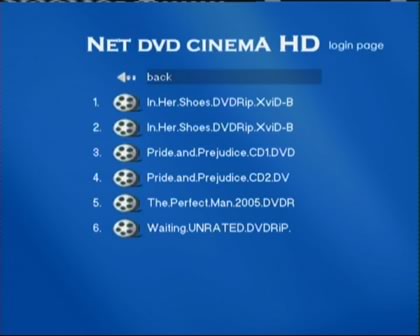
The main login page, consists of the internal DVD drive (1) and SnazziZone, a portal where Snazio posts news and interesting information on several subjects.

After selecting the DVD drive, you will see the contents. Unfortunately, the GUI doesn't use the full screen area, making long character filenames, hard to read. In order to start playing a file, just select it (up/down) and press "Enter"
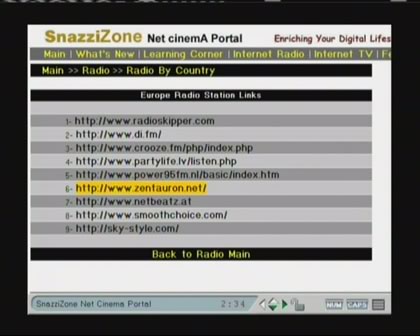
If the player is connected to the Internet, you can access Snazzizone or any other website. By pressing the URL button on the remote, you can start typing the desired address. Note, that the process is time consuming since you have to cycle through letters and numbers using the remote control which at times can be unresponsive. Perhaps a full, optional keyboard would be much better. From snazzizone.com, you can also access various Internet radio stations or Internet TV or simply download HD trailers...

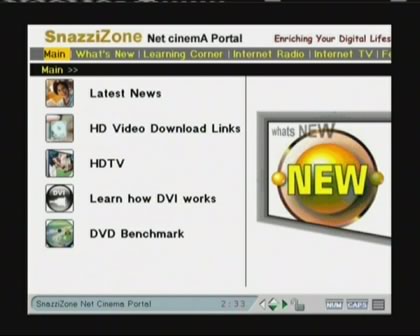
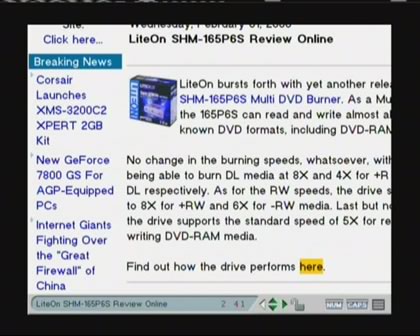
The built-in browser isn't very capable of handling most websites (like www.msn.com or www.cdrinfo.com), however you can read the basic content.


Review Pages

1. Introduction
2. The Package
3. Setting up the player
4. Menus
5. Firmware update
6. Video Settings/Hacks
7. Connecting with PC
8. Wireless Connection
9. The Tests - Disc compatibility
10. Playback Tests - Page 1
11. Playback Tests - Page 2
12. Playback Tests - Page 3
13. Playback Tests - Page 4
14. Playback Tests - Page 5
15. Conclusion


 

Pages

  • « first
  • ‹ previous
  • 1
  • 2
  • 3
  • 4
  • 5
  • 6
  • 7
  • 8
  • 9
  • …
  • next ›
  • last »

Snazio

Tags: Snazio
Previous Post
i-Blue PS3200
Next Post
Boxwave Crystal Clear Case

Related Posts

Latest Reviews

Why Low-Latency Infrastructure Matters More Than Raw Specs
Enterprise & IT

Why Low-Latency Infrastructure Matters More Than Raw Specs

In the Age of AI Phishing, the Best User Experience Might Be the One That Feels Safest
Enterprise & IT

In the Age of AI Phishing, the Best User Experience Might Be the One That Feels Safest

SoundPeats C30
Consumer Electronics

SoundPeats C30

Why Streaming Live Casino Games Demands Smarter Tech
Enterprise & IT

Why Streaming Live Casino Games Demands Smarter Tech

Kioxia Exceria Plus G3 512GB microSD
Cameras

Kioxia Exceria Plus G3 512GB microSD

Popular News

TEAMGROUP Launches EXPERT P34F Find My External SSD

TEAMGROUP Launches EXPERT P34F Find My External SSD

Samsung announces Galaxy Tab S11 and Galaxy S25 FE series

Samsung announces Galaxy Tab S11 and Galaxy S25 FE series

CORSAIR announces Vanguard Pro 96 and Vanguard 96 Gaming Keyboards

CORSAIR announces Vanguard Pro 96 and Vanguard 96 Gaming Keyboards

Viltrox Showcases Upcoming Lens Lineup and New TTL Flash at IBC 2025

Viltrox Showcases Upcoming Lens Lineup and New TTL Flash at IBC 2025

MSI Launches FORGE GK600 TKL WIRELESS Special Edition Compact Mechanical Keyboard

MSI Launches FORGE GK600 TKL WIRELESS Special Edition Compact Mechanical Keyboard

Panasonic Introduces the First Ultra-Telephoto Zoom Lens in the LUMIX S Series

Panasonic Introduces the First Ultra-Telephoto Zoom Lens in the LUMIX S Series

MSI Launches DATAMAG 40Gbps Magnetic Portable SSD

MSI Launches DATAMAG 40Gbps Magnetic Portable SSD

Viltrox Joins the L-Mount Alliance, Expanding Creative Possibilities

Viltrox Joins the L-Mount Alliance, Expanding Creative Possibilities

Main menu

  • Home
  • News
  • Reviews
  • Essays
  • Forum
  • Legacy
  • About
    • Submit News

    • Contact Us
    • Privacy

    • Promotion
    • Advertise

    • RSS Feed
    • Site Map
  • About
  • Privacy
  • Contact Us
  • Promotional Opportunities @ CdrInfo.com
  • Advertise on out site
  • Submit your News to our site
  • RSS Feed