
Snazio NetCinema HD Player SZ1350
2. The Package
Review Pages
2. The Package
3. Setting up the player
4. Menus
5. Firmware update
6. Video Settings/Hacks
7. Connecting with PC
8. Wireless Connection
9. The Tests - Disc compatibility
10. Playback Tests - Page 1
11. Playback Tests - Page 2
12. Playback Tests - Page 3
13. Playback Tests - Page 4
14. Playback Tests - Page 5
15. Conclusion
 We received at our labs, the retail version of the SZ1350. The player costs around US$350 and can be bought directly from Snazio*, at least for several European countries. The package includes the player, a printed manual, a CD with software, a network 10/100 cable, component Video(Y Pb Pr) cable, and one remote control with two AAA batteries. The included installation guide is worth reading.
The player itself is very small and lightweight. On the front, we can see the main power button, a small LED display, the disc tray and five main function buttons. The USB port is located behind the USB logo, underneath the function buttons.


The LED display is clear and provides the required information:

The five function buttons are soft touch and backlit. The USB port on the front, is useful for connecting your USB sticks or even USB HDD drives...

Going to the back, we find input and output jacks. Going from left to right, we have the ethernet 10/100 jack, the DVI output, S-Video and Video Component jacks, Coaxial and Optical digital outputs.

Moving further along, there is the 5.1 channels Audio output, the wireless antenna and the default scart output.
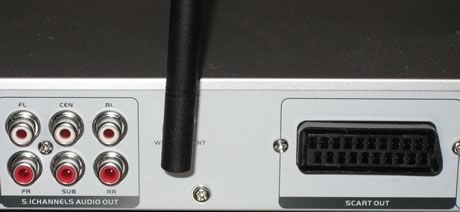
Lastly, the model ID and S/N.

The included Wi-Fi antenna can be removed and a larger one used for better transmission:

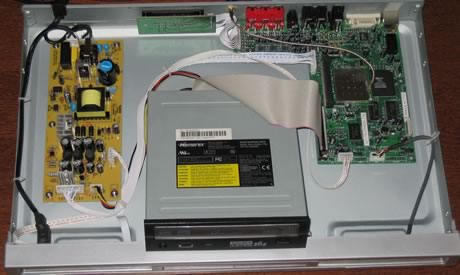
Removing the mounting screws reveals the inside layout of the player.

The various components are separated into (from left to right), the power supply converter, the CD/DVD loader and the main board that comes again from Sigma Designs (Promedia8620L) with an additional Wi-Fi 802b/g card. There are some limitations when up-scaling with several formats that will be discussed later on:


Snazio* uses only one USB Port, while the board can support an additional port, and even a smartcard reader.

The HDD cable is attached to the board and secured with glue (to prevent possible mods?)
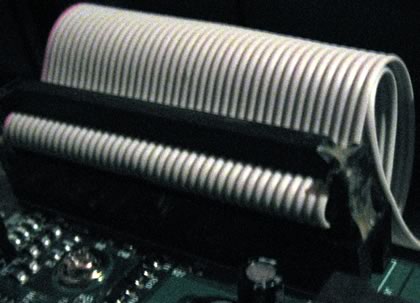
The used loader comes from Epo, the same drive found on the Iodata AvelLink2 player, with however, a newer firmware revision. The loader is based on the MediaTek chipset:


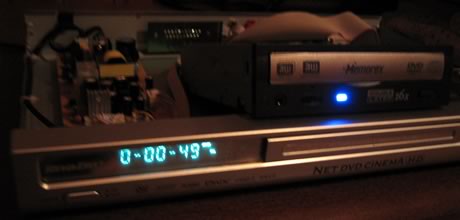
Users can use any optical drive instead of the default EPO drive. For our tests, we used a Memorex DVD Recorder (LiteON OEM) which worked perfectly. Unfortunately, there's no easy way to secure the drive since the holes are at the bottom. Of course, enthusiast users could find a way around this.
Review Pages
2. The Package
3. Setting up the player
4. Menus
5. Firmware update
6. Video Settings/Hacks
7. Connecting with PC
8. Wireless Connection
9. The Tests - Disc compatibility
10. Playback Tests - Page 1
11. Playback Tests - Page 2
12. Playback Tests - Page 3
13. Playback Tests - Page 4
14. Playback Tests - Page 5
15. Conclusion




