
Shinco 868 DVD Player
2. Installation
Review Pages
Shinco 868 DVD Player - Page 2
Installation
The player installation can be pretty straightforward, but also gives advanced users a plethora of options for optimum connectivity. First, let's take a look at the available outputs:

- 1 S-video output
- 1 composite video output
- 1 component-video output (3 RCA)
- 1 stereo composite audio output (2 RCA)
- 1 digital audio output (optical ToshLink)
- 1 digital audio output (coaxial)
- Analog Dolby Digital outputs for direct connection to power amplifiers (6
RCA: front left, center, front right, rear left, rear right, subwoofer)
- 1 composite video output for the Sega Mega Drive
- 1 stereo composite audio output for the Sega Mega Drive
The easier setup would be a composite-video and analog-audio connection to the TV (with the three supplied RCA cables). However, the use of the S-Video connector (on suitably-equipped TVs) yields far better picture quality, reaching the limits of the analog TV systems. The absolutely best option would be using the component video output, which yields the best possible picture quality, but TV sets and video projectors with suitable inputs can only be found in the hi-end market, and most of us are not likely to have one.
 As
for sound, the simplest option is connecting the analog outputs to your TV set.
For better results, you could connect the analog audio outputs to a stereo or
Dolby Surround Prologic amplifier. The best option is connecting the digital
audio outputs to a Dolby Digital and/or DTS amplifier, or the 6 analog (decoded)
outputs to a suitable line amplifier (with 6 line-in inputs). When the player
is turned on, the Shinco DVD logo appears on screen (further player actions,
depend on the kind of disc inserted).
As
for sound, the simplest option is connecting the analog outputs to your TV set.
For better results, you could connect the analog audio outputs to a stereo or
Dolby Surround Prologic amplifier. The best option is connecting the digital
audio outputs to a Dolby Digital and/or DTS amplifier, or the 6 analog (decoded)
outputs to a suitable line amplifier (with 6 line-in inputs). When the player
is turned on, the Shinco DVD logo appears on screen (further player actions,
depend on the kind of disc inserted).
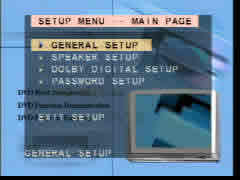 First
of all, it is suggested that you enter the Setup Menu (from the remote control)
and make any necessary changes to suit your personal setup, such as the kind
of TV in use (PAL, NTSC, AUTO), sound preferences (setup the Dolby Surround
speakers and their delay echo!) and possible passwords for restricting DVD access.
The menus have more options than the Shinco 8320's (such as the sound output
selection), and are also aesthetically improved (they are "mixed"
with the movie paused and faded in the background).
First
of all, it is suggested that you enter the Setup Menu (from the remote control)
and make any necessary changes to suit your personal setup, such as the kind
of TV in use (PAL, NTSC, AUTO), sound preferences (setup the Dolby Surround
speakers and their delay echo!) and possible passwords for restricting DVD access.
The menus have more options than the Shinco 8320's (such as the sound output
selection), and are also aesthetically improved (they are "mixed"
with the movie paused and faded in the background).
The Sega Mega drive outputs are totally separated, which means that you can't play games using the video outputs; you have to use the dedicated Sega outputs for that. This gives you the option of connecting the games output to a smaller TV set for the kids to play, leaving your home theatre screen intact, but also has the disadvantage of demanding a second screen and sound system (or at least a second set of inputs on your Audio/Video receiver/amplifier).
Review Pages





