
Breaking News

TEAMGROUP Unveils the ACE 8K MicroSDXC Memory Card ASUS Announces Ascent QN10 Mini PC CORSAIR Launches Second Generation Nautilus II AIO CPU Coolers CORSAIR Launches VOXARA USB Gaming Condenser Microphone Fanatec announces the ClubSport F1 Racing System

logo

  • Share Us
    • Facebook
    • Twitter
  • Home
  • Home
  • News
  • Reviews
  • Essays
  • About
    • Submit News

    • Contact Us
    • Privacy

    • Promotion
    • Advertise

    • RSS Feed

Search form

RikoMagic V5 Android Media Player review

Jan 13,2018 0

2. Closer look, firmware update


Review Pages

1. Meet the Rikomagic V5 media player
2. Closer look, firmware update
3. User interface
4. KODI
5. Audio and video playback tests
6. Summary


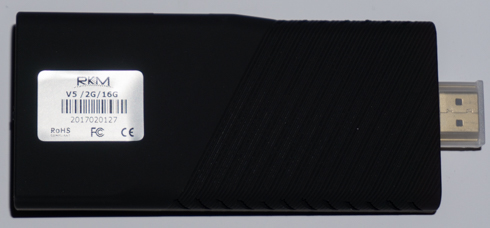
The device is made out of environmentally friendly ABS and although it could fit into your pocket, it is a bit larger that we could expect for the category.

You can directly plug it into your TVs HDMI port - an HDMI connector is found on teh edge of the V5 - or use the included HDMI extender cable.

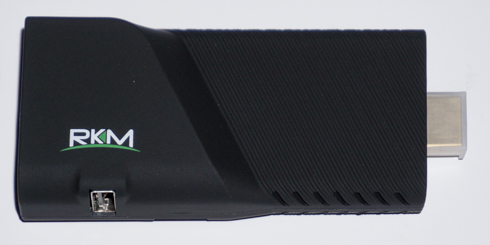
A backlighted USB OTG port, a microSD jack and the reset pinhole (useful for performing firmware update) are placed on the side of the device:
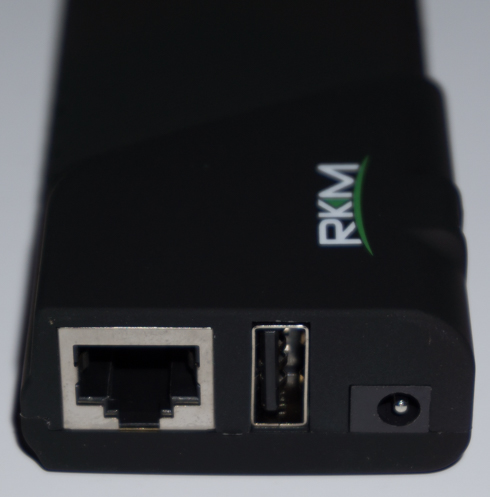
The 1Gbit LAN, USB2.0 input and the power jack are found on the other edge of the device:
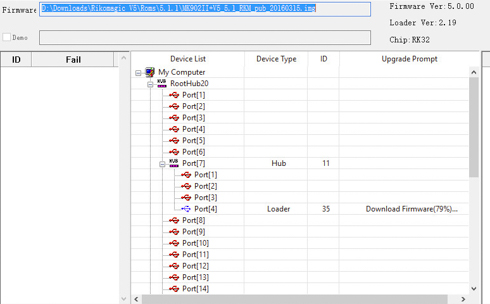
The Rikomagic V5 came with 4.0.4 firmware installed. We tested the latest available firmware, which improved the data throughput perfrormance of the device.

The firmware upgrade procedure is straightforward and easy. The official MK902II Android 5.1 FW_170808 software update package includes all the essential firmware files along with information about the upgrade procedure. Rikomagic has also released the V5 Android 5.1 FW_170626 firmware but we chose to install the MRK902II, which is the latest one. Just follow the update instructions and wait a bit for the proceedure to finish. Have in mind that upgrading the firmware will erase all the data on the V5, so it' better to do this as soon as you get your hands on your new device. There are also more firmware versions available in order to experiment wit hthe device, but the latest official firmware is the most stable.
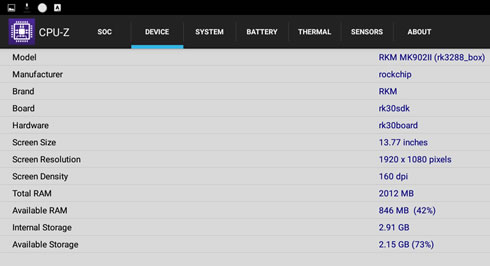
The CPU-Z Android app provides some first information about the player. The player came with firmware 4.0.4 that we later upgraded to the latest v5.1.1. The firmware comes pre-rooted.

 

Review Pages

1. Meet the Rikomagic V5 media player
2. Closer look, firmware update
3. User interface
4. KODI
5. Audio and video playback tests
6. Summary


 

Pages

  • « first
  • ‹ previous
  • 1
  • 2
  • 3
  • 4
  • 5
  • 6
  • next ›
  • last »

rikomagic

Tags: rikomagic
Previous Post
Crucial MX500 500GB SSD review
Next Post
Crucial BX300 480GB SSD review

Related Posts

  • RikoMagic MK22 Android Media Player review

Latest Reviews

Fanxiang MP83 M.2 NVMe SSD Enclosure
Enterprise & IT

Fanxiang MP83 M.2 NVMe SSD Enclosure

Ugreen CM642 USB4.0 Enclosure
PC components

Ugreen CM642 USB4.0 Enclosure

be quiet! Dark Power 14 IO
PC components

be quiet! Dark Power 14 IO

SanDisk High Endurance 512GB microSDXC
Cameras

SanDisk High Endurance 512GB microSDXC

Samsung PRO Ultimate 512GB microSDXC
Cameras

Samsung PRO Ultimate 512GB microSDXC

Popular News

CORSAIR announces Vanguard Pro 96 and Vanguard 96 Gaming Keyboards

CORSAIR announces Vanguard Pro 96 and Vanguard 96 Gaming Keyboards

MSI Launches FORGE GK600 TKL WIRELESS Special Edition Compact Mechanical Keyboard

MSI Launches FORGE GK600 TKL WIRELESS Special Edition Compact Mechanical Keyboard

MSI’s Latest AMD X870E MAX & EVO Series Motherboards

MSI’s Latest AMD X870E MAX & EVO Series Motherboards

Panasonic Introduces the First Ultra-Telephoto Zoom Lens in the LUMIX S Series

Panasonic Introduces the First Ultra-Telephoto Zoom Lens in the LUMIX S Series

COLORFUL Launches iGame B850M ULTRA Series Micro-ATX Motherboards

COLORFUL Launches iGame B850M ULTRA Series Micro-ATX Motherboards

COLORFUL Presents Limited Edition Chitu MAG-60 Magnetic Keyboard Inspired by the Year of the Horse

COLORFUL Presents Limited Edition Chitu MAG-60 Magnetic Keyboard Inspired by the Year of the Horse

COLORFUL Presents iGame Z890 ULTRA-S W and iGame Z890M ULTRA Z Motherboards

COLORFUL Presents iGame Z890 ULTRA-S W and iGame Z890M ULTRA Z Motherboards

LIAN LI Launches 8.8” Universal Screen with Flexible Mounting Solution

LIAN LI Launches 8.8” Universal Screen with Flexible Mounting Solution

Main menu

  • Home
  • News
  • Reviews
  • Essays
  • About
    • Submit News

    • Contact Us
    • Privacy

    • Promotion
    • Advertise

    • RSS Feed
  • About
  • Privacy
  • Contact Us
  • Promotional Opportunities @ CdrInfo.com
  • Advertise on out site
  • Submit your News to our site
  • RSS Feed
