Breaking News

Razer Unveils the Raiju V3 Pro Signature Edition ASUS Hardware Showcase: AI Accelerators, Collector GPUs, and Esport Monitors Apple Unveils Major Hardware and Creative Suite Ecosystem Updates XPG Launches Third-Generation CORE REACTOR III for Next-Gen Power Safety TCL’s New Monitor Range Fits Every Kind of Gaming Setup

logo

  • Share Us
    • Facebook
    • Twitter
  • Home
  • Home
  • News
  • Reviews
  • Essays
  • About
    • Submit News

    • Contact Us
    • Privacy

    • Promotion
    • Advertise

    • RSS Feed

Search form

RikoMagic V5 Android Media Player review

Jan 13,2018 0

4. KODI


Review Pages

1. Meet the Rikomagic V5 media player
2. Closer look, firmware update
3. User interface
4. KODI
5. Audio and video playback tests
6. Summary


The pre-installed KODI provides many add-ons -including the well known Exodus- which can be used to watch online material (Movies, Series, etc).

The pre-installed KODI is based on the 16.1 RC3 build, dated June 6 2016.
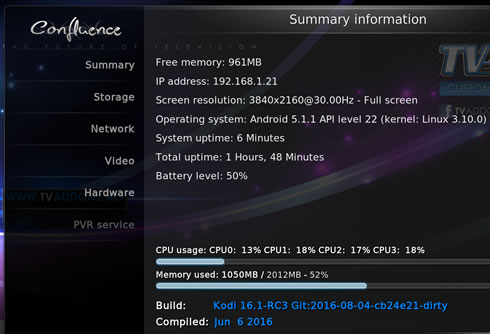
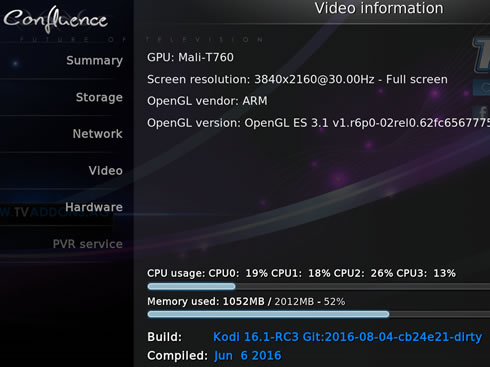
Having too many add-ons installed could lead to incompatibilities. We experienced an annoying "Search Error" message, something you can fix my disabling Twitter Addon under the Running Services menu.

Under "Video settings" there isa RKMC tab, with all options enbaled:
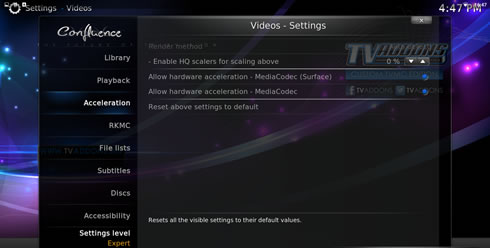
Under the "Sound settings" there are options to enable Dolby Digital (AC3) DTS, TrueHD or DTS-HD:

If you want to use any other KODI build, its suggested to get the FTMC (fork for Kodi and provides hardware acceleration and more features on the Rockchip rk3228 chips). Normal KODI wouldn't possibly have hardware acceleration enabled:


Review Pages

1. Meet the Rikomagic V5 media player
2. Closer look, firmware update
3. User interface
4. KODI
5. Audio and video playback tests
6. Summary


Pages

  • « first
  • ‹ previous
  • 1
  • 2
  • 3
  • 4
  • 5
  • 6
  • next ›
  • last »

rikomagic

Tags: rikomagic
Previous Post
Crucial MX500 500GB SSD review
Next Post
Crucial BX300 480GB SSD review

Related Posts

  • RikoMagic MK22 Android Media Player review

Latest Reviews

be quiet! Light Wings Pro IO fan
Cooling Systems

be quiet! Light Wings Pro IO fan

Why Intelligent Firmware Matters More Than Peak Throughput in NAS Systems
Enterprise & IT

Why Intelligent Firmware Matters More Than Peak Throughput in NAS Systems

Fanxiang MP83 M.2 NVMe SSD Enclosure
Enterprise & IT

Fanxiang MP83 M.2 NVMe SSD Enclosure

Ugreen CM642 USB4.0 Enclosure
PC components

Ugreen CM642 USB4.0 Enclosure

be quiet! Dark Power 14 IO
PC components

be quiet! Dark Power 14 IO

Popular News

MSI’s Latest AMD X870E MAX & EVO Series Motherboards

MSI’s Latest AMD X870E MAX & EVO Series Motherboards

COLORFUL Launches iGame B850M ULTRA Series Micro-ATX Motherboards

COLORFUL Launches iGame B850M ULTRA Series Micro-ATX Motherboards

COLORFUL Launches iGame B850I MINI OC V14 Motherboard

COLORFUL Launches iGame B850I MINI OC V14 Motherboard

COLORFUL Presents Limited Edition Chitu MAG-60 Magnetic Keyboard Inspired by the Year of the Horse

COLORFUL Presents Limited Edition Chitu MAG-60 Magnetic Keyboard Inspired by the Year of the Horse

COLORFUL Launches the iGame X870E VULCAN W OC Motherboard

COLORFUL Launches the iGame X870E VULCAN W OC Motherboard

COLORFUL Presents iGame Z890 ULTRA-S W and iGame Z890M ULTRA Z Motherboards

COLORFUL Presents iGame Z890 ULTRA-S W and iGame Z890M ULTRA Z Motherboards

COLORFUL Expands B850 Motherboard Lineup with New CVN, Battle-Ax, and MEOW Models

COLORFUL Expands B850 Motherboard Lineup with New CVN, Battle-Ax, and MEOW Models

ASRock Adds Support for One Sub-Channel DRAM Module on Intel DDR5 Motherboards

ASRock Adds Support for One Sub-Channel DRAM Module on Intel DDR5 Motherboards

Main menu

  • Home
  • News
  • Reviews
  • Essays
  • About
    • Submit News

    • Contact Us
    • Privacy

    • Promotion
    • Advertise

    • RSS Feed
  • About
  • Privacy
  • Contact Us
  • Promotional Opportunities @ CdrInfo.com
  • Advertise on out site
  • Submit your News to our site
  • RSS Feed