
Prassi PrimoCD Pro8 CD-R Software
3. Recording options
Review Pages
PrimoCD Pro Pro 8 v1.1.317 - Page 3
Make a Data CD
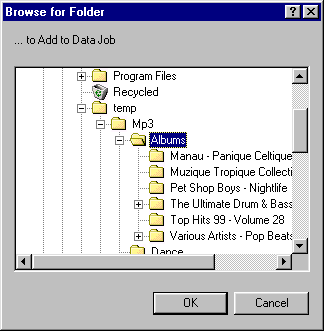 Open
PrimoCD go to File > NewJob > Data Disc. The Data CD Job window opens.
Now you can add folder and files by brownsing into local and network HD or CDs
( you cannot select both files and folders..). You can also add files and folders
with Windows Explorer by drag & drop them into Data Job window.
Open
PrimoCD go to File > NewJob > Data Disc. The Data CD Job window opens.
Now you can add folder and files by brownsing into local and network HD or CDs
( you cannot select both files and folders..). You can also add files and folders
with Windows Explorer by drag & drop them into Data Job window.
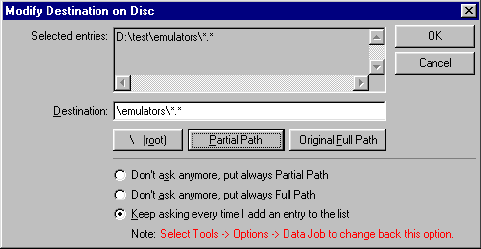
When you add a folder PrimoCD gives you the following options : You can select from moving all files (*.*) from root ( \*.*), partial path (\emulators\*.*) and original full path (\test\emulators\*.*).
From Data Job window you can select : Number of copies, writing speed, burn method. After selecting recorder from drives window you can check file names for possible violation of the System Format (changing name of the file should be added here..). After that all are set to go.
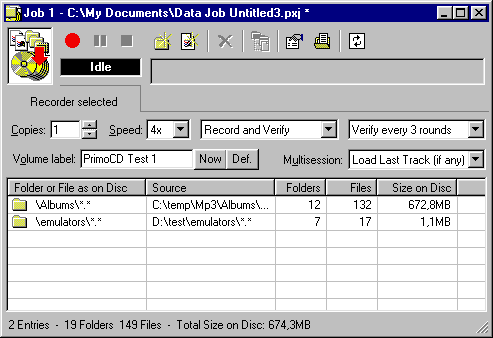
Press the red button and the burn will start..After burn is finished ,if you had selected verify option, verify will begin and compare the data from source and CD if they are identical. You will get a full report about verify and possible problems occured. Only problem with Data Job is when inserting files and folders. PrimoCD should had Window Explorer for adding folders and files more easily. With current status you cann't add a folder and select specific file(s) to burned or add several files from another folder to other easily.. You can do it but manually and not with drag&drop as in others CDR Software..
Recording options
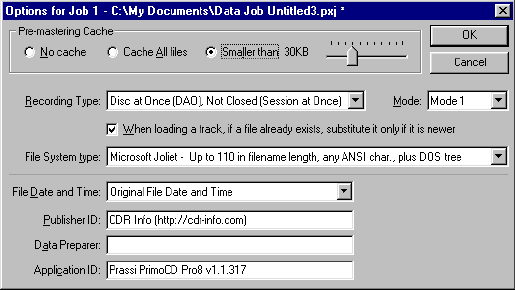
- Enable Pre-mastering cache:
This option is very important especially when you have to write a lot of
small sized files. You can select from: No cache (default), Cache all files,
Smaller than xkb (drag ruler from 1kb to 100kb)
- Recording Type:
Here you can select from 4 different recording options :
Track at Once (TAO), closed / Track at Once (TAO), not closed / Disc at Once
(DAO), closed / Disc at Once , Not closed (Session at Once)
- Mode Option:
Mode 1 and Mode 2 XA are avaible. For a single closed session, it does not
matter which one is chosen. However, if the session to be written will be appended
to existing sessions, the mode of the new session must be the same as the existing
ones. Mode 1 is generally the preferred mode for multisession due to better
error correction.
- File System Type:
 You
can select from 4 different options. For most user Microsoft Joliet option is
apropritate.
You
can select from 4 different options. For most user Microsoft Joliet option is
apropritate.
- File data and time:
"Original file date and time" or "All files set to the mastering
date and time"
- Publisher ID, Data Preparer and Application ID.
Other Type of Data CDs which can be made with PrimoCD Pro:
- Mixed Mode CD:
PrimoCD can also make Mixed mode CDs (one track of CD-ROM data followed
by n tracks of audio in a single session). Just into 1st track insert an image
(ISO) track from HD and then desired audio tracks. You can modify, for each
track, the pre-gap, the Indexes and the ISRC. These functions are available
via the Edit menu (or right-clicking on the track).
- CD Extra CD:
A CD Extra (also called Enhanced CD) is a special Audio CD that contains
also an additional data session. This disc is quite useful when you want to
carry on a single disc some standard audio CDDA tracks and also a CD-ROM content.
A CD Extra contains a first session, closed audio, with the CDDA audio tracks.
Then, there is a second session, usually closed XA, with a Mode 2 XA data track
inside.
- Create an Audio Job, with all the required Wave (or MP3) tracks.
- Select Job Options in the Edit menu and, in the field Recording Type, choose
Disc At Once (DAO) Not Closed (Session at Once).
- Record the Audio Job on a blank disc.
- Make a Data Job with the required files. In the Job Options, this time, select
to close the disc and the Mode as Mode 2 XA.
- Record the Data Job on the same disc
I think making CD-Extra CDs with PrimoCD should be more easy (maybe add a wizard ?..)
Review Pages




