
Prassi PrimoCD Pro8 CD-R Software
4. Disc Copy - Audio CD's
Review Pages
PrimoCD Pro Pro 8 v1.1.317 - Page 4
Disc Copy Job
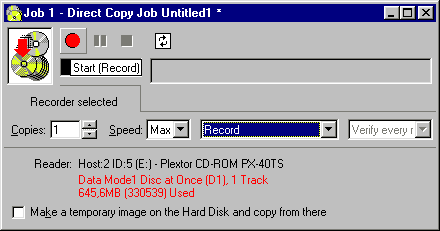
You can copy a disc directly from another drive, either a CD-ROM, DVD-ROM or an unused recorder. If you do not want to copy directly because a reliable and fast source CD drive is not available you may go via file image. PrimoCD Pro supports up to 8, 16, 32, 64 CDR-W drives working at the same time!
Positive features:
- Verify option:
It is recommended that verification be included in all job setups, since
recording on CD-R discs is a "blind" process (there is no check on
the data after it is written by the laser). Serious media defects that cause
the writer to lose track of the guide groove will cause a disc to be rejected.
However, less serious defects (fingerprints on the media, for example) may not cause a failure during writing, but the disc may not be readable on many reader drives (8X recording are more susceptible since the laser power is weakened by the defect). Read-after-write verification provides a means of determining that the written disc is readable and is the only quality-control method available with commercial CD-R drives.
- Stream job:
The stream job is available only when using an autoloader. Stream job is
useful when it is needed to minimize the user intervention and to do multiple
masters replication in a batch mode.
Missing features (or not ?): PrimoCD hasn't any advanced option like : "Ingore Read Errors", "Raw read/write", "Scan gap/indexes", "Ignore illegal TOC" or even select reading speed of CD Rom. What this mean ?...Forget PSX & Game <backups>.. For testing this i tried to backup an advanced protected CD (Bleem!) but PrimoCD had another opinion. After inserted the CD into Drive properties the drive was not ready (meaning couldn't see it..)
However all the above <desired> options are not a real problem for mastering use. All those CDs have no protection. The most important thing there is the reliablity issue (and PrimoCD is able to verify the burned CD) according to Prassi.
Make and record a Disc Image Job
 This
procedure is useful when you need to make several copies of the same disc and
you do not want to read from the source drive every time. Also, by having the
Global-Image file stored on the hard disk allows you the possibility to return
immediately the source.
This
procedure is useful when you need to make several copies of the same disc and
you do not want to read from the source drive every time. Also, by having the
Global-Image file stored on the hard disk allows you the possibility to return
immediately the source.
After insert the master disc into a drive right-click on it (from drives window) and select "Disc Explorer and Drive Properties". Press "Global-Image Panel" button and enter the name of the disc image (.GI extension) and then press "Build".
You can record image from File > New Job > Global Image or Other Image. Browse or search from local HD for an image. Then select copies, burn speed, action (Test,Verify..) and of course recorder. Press red button to finish action.
Make AudioCD
PrimoCD can make AudioCD from wav and mp3 files. We tested with all the main wav/mp3/wma sample-rates, and also with some tiny 2kbyte sized wav/mp3's. Some programs have problems with really small audio files, but this is not the case here. Decompression was also a little faster than Adaptec's EazyCD 4.0, although both programs seem to use the same codecs for the task. Mixing various compression-rates & formats as source for the same audioCD is also painless.
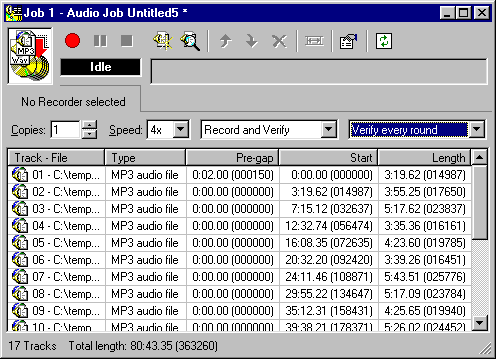
Making AudioCDs with PrimoCD is quit easy. Select from File Menu >NewJob>AudioCD Job and the AudioCD Job window will apear. You can add files (wav,wma or mp3) and PrimoCD will display the pre-gap time, start and length time.
You can move files up and down (in order to make the track list). PrimoCD can also search on all local HDs for audioCD files. From the options menu you can select the burn method (TAO,DAO,SAO), UPC and pre-emhasis. If you press right click on a file you can select also the pre-gap (sectors/second). Final you can select the burn speed, and burn method..
PrimoCD supports CD-Text (as mensioned on Homepage). Since Yamaha 4416s doesn't support it, CD-Text option didn't apear on any menu..
Review Pages




