Breaking News

Hollyland Launches Pyro 7 Ultra, an All-in-One Wireless Monitoring System for Professional Film Production ADATA Powers AI Servers, Edge Systems and Intelligent Applications with Enterprise Memory and Storage Acer Expands Gaming Handheld Portfolio with Predator Atlas 7 Sony Expands its ULT POWER SOUND series Lineup with 3 New Bass-Powered Speakers Sonos Introduces Sonos 27, the Next Generation of Its Audio Operating System

logo

  • Share Us
    • Facebook
    • Twitter
  • Home
  • Home
  • News
  • Reviews
  • Essays
  • About
    • Submit News

    • Contact Us
    • Privacy

    • Promotion
    • Advertise

    • RSS Feed

Search form

Nvidia GeForce Experience Adds OpenGL, Vulkan Support

Nvidia GeForce Experience Adds OpenGL, Vulkan Support

GPUs May 10,2017 0

Nvidia is expanding its GeForce Experience software to add gameplay recording and broadcasting support for OpenGL and Vulkan games.

In other words, you can now stream and record your Minecraft and Doom gameplay with the press of one hotkey, and use the built-in overlay to easily share to Facebook, Google, Twitch, and more. It's powered by Nvidia's ShadowPlay technology, so you can capture up to 4K 60 FPS and never miss a beat while you game.
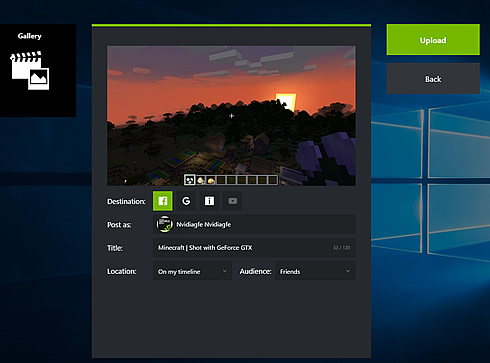

For those familiar with GeForce Experience already, Nvidia has also improved user controls for upload, broadcast, and gallery so sharing gameplay is even easier.

For starters, the Video and Screenshot upload interface is now unified, with identical controls and easy options to switch between supported sites and services. In addition, logging into sites can be done from the same screen, and options for privacy and sharing are all accessible and visible from one view.

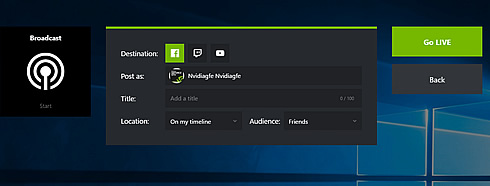
On the Broadcast screen, used for Facebook, Twitch and YouTube streaming, Nvidia has applied the same treatment, enabling you to control all broadcast options from a single screen, and to login to services from the same location.
The Gallery sees improvements too, with the addition of an 'upload history' screen showing all prior uploads, and the location they were uploaded to (accessible via a "Copy URL" button). And a button has been added to the Gallery that enables you to instantly jump to the file location of a screenshot or video in Windows Explorer.

Finally, all screenshot, video and broadcast functions are enhanced by the addition of support for native OpenGL and Vulkan capture in all screen modes, enabling you to capture content from games like Doom, Minecraft and No Man's Sky.

Tags: Nvidia
Previous Post
NVIDIA Launches Volta GPU Platform, Fueling AI and High Performance Computing
Next Post
Facebook to Reduce Links to Low-Quality Web Pages

Related Posts

  • NVIDIA and Microsoft Reinvent Windows PCs for the Age of Personal AI

  • NVIDIA introduces DLSS 4.5, Path Tracing and G-SYNC Pulsar Supercharge Gameplay

  • Intel and NVIDIA to Jointly Develop AI Infrastructure and Personal Computing Products

  • MSI Expands NVIDIA RTX PRO Server Lineup

  • PNY Announces Support for the New NVIDIA RTX PRO Blackwell Graphics Card Family

  • KIOXIA flash memory and SSD solutions empower AI applications at NVIDIA GTC 2025

  • INNO3D GEFORCE RTX 50 SERIES IS HERE!

  • VENGEANCE Gaming PCs are Ready for NVIDIA GeForce RTX 50 Series GPUs

Latest News

Hollyland Launches Pyro 7 Ultra, an All-in-One Wireless Monitoring System for Professional Film Production
Cameras

Hollyland Launches Pyro 7 Ultra, an All-in-One Wireless Monitoring System for Professional Film Production

ADATA Powers AI Servers, Edge Systems and Intelligent Applications with Enterprise Memory and Storage
Enterprise & IT

ADATA Powers AI Servers, Edge Systems and Intelligent Applications with Enterprise Memory and Storage

Acer Expands Gaming Handheld Portfolio with Predator Atlas 7
Gaming

Acer Expands Gaming Handheld Portfolio with Predator Atlas 7

Sony Expands its ULT POWER SOUND series Lineup with 3 New Bass-Powered Speakers
Consumer Electronics

Sony Expands its ULT POWER SOUND series Lineup with 3 New Bass-Powered Speakers

Sonos Introduces Sonos 27, the Next Generation of Its Audio Operating System
Consumer Electronics

Sonos Introduces Sonos 27, the Next Generation of Its Audio Operating System

Popular Reviews

Endorfy Thock V2 Wireless Keyboard

Endorfy Thock V2 Wireless Keyboard

be quiet! Pure Loop 3 280mm

be quiet! Pure Loop 3 280mm

The Quiet Technology Behind the Spin

The Quiet Technology Behind the Spin

SoundPeats Cove Pro

SoundPeats Cove Pro

Akaso Brave 8 Lite

Akaso Brave 8 Lite

Kioxia Exceria Plus G3 512GB microSD

Kioxia Exceria Plus G3 512GB microSD

be quiet! Dark Perk Mice

be quiet! Dark Perk Mice

SoundPeats C30

SoundPeats C30

Main menu

  • Home
  • News
  • Reviews
  • Essays
  • About
    • Submit News

    • Contact Us
    • Privacy

    • Promotion
    • Advertise

    • RSS Feed
  • About
  • Privacy
  • Contact Us
  • Promotional Opportunities @ CdrInfo.com
  • Advertise on out site
  • Submit your News to our site
  • RSS Feed