
Breaking News

ADATA Sparks New AI Engines at COMPUTEX 2026 Silicon Power to Showcase “InSPire with AI” at COMPUTEX 2026 COLORFUL Unveils Four-Zone Experience Showroom for COMPUTEX 2026 G.SKILL Demo New Memory Solutions for Gaming, Server, AI, Workstation Applications at Computex 2026 LIAN LI Launches HydroShift II OLED Curved 360 AIO

logo

  • Share Us
    • Facebook
    • Twitter
  • Home
  • Home
  • News
  • Reviews
  • Essays
  • Forum
  • Legacy
  • About
    • Submit News

    • Contact Us
    • Privacy

    • Promotion
    • Advertise

    • RSS Feed
    • Site Map

Search form

NTI CD Maker 2000 Professional

May 30,2001 0

5. Other features


Review Pages

1. Introduction
2. Setting the general options
3. Copying a CD
4. Creating a Video CD
5. Other features
6. Packet Writing - Conclusions


Other features

The program also offers the usual suite of utilities such as CD-RW erase, CD Drive properties utility, and Disc Info. Stand-alone file and CD comparison is a very useful tool not found on every other recording application.

As described above, this tool allows a user to compare two files or CDs easily by selecting them, as shown below:

The following Log file comes out after pressing OK. Shown are the differences among the two files or CDs. In this test-case, we compared two files and the results showed just a difference in the video CD-properties file (not found).

The utility can be very useful in CD copying as you can compare the original data in the hard disk with the recorded data on the CD. The only limitation in this case is that all files should reside in a single folder, or the root of a drive.

You can erase a CD-RW by choosing the quick or the full erasing options. The quick mode is, unfortunately, applicable only to drives that support this functionality. This is due to restrictions of some drive themselves, not a program fault.

Quick erasing applies to the disk TOC contents only and the procedure takes just a few minutes. The full erasing option erases all written areas of a disk and takes several minutes, according to the supported speed of the writer and the disk itself. It took us 2 minutes to fully erase a HS CD-RW disk.

The Disc Info & Tools utility gathers many features in just one window. Among them is the CD Info, some buttons that allow users to read a CD track, erase the CD-RW (if inserted), read the CD-Text of an audio CD and close an open session of a TAO recorded medium.

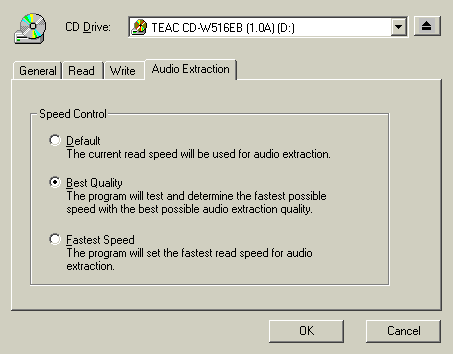
The CD Drive property window provides the general CD Drive information, its reading/writing capabilities and the audio extraction options. You can choose among the default reading speed for audio extraction, the best quality speed and the fastest speed. Default reading speed equals to the current reading speed set. Best quality reading speed allows the program to determine the fastest possible speed providing the best audio extraction quality. The fastest speed choice will adjust the reading speed according to the maximum drive capabilities.

We believe this set of options is sufficient for basic CD audio copy. Of course, more advanced and demanding users have always the option to use a more specialized ripping application, such as EAC.
 

Review Pages

1. Introduction
2. Setting the general options
3. Copying a CD
4. Creating a Video CD
5. Other features
6. Packet Writing - Conclusions


Pages

  • « first
  • ‹ previous
  • 1
  • 2
  • 3
  • 4
  • 5
  • 6
  • next ›
  • last »

NTI

Tags: NTI
Previous Post
DatOptic SpeedBurn24 CD-RW
Next Post

Related Posts

  • NTI MiST Adds Business Package

  • NTI Launches New MiST Personal File Sharing Service

  • Protect Your USB Pen Drive with NTI Pocket Ninja

  • NTI's Backup Software Transforms USB Storage Device into Backup Appliance

  • New Disk Cloning Software by NTI

  • NTI Adds Cloud Destination to Backup Now EZ Software

  • NTI Releases Shadow 5 Software For Next Version of Mac OS X

  • NTI Adds HD and Blu-ray Support to NTI Media Maker 9 Ultimate

Latest Reviews

Swit NP-FZ100 Battery
Cameras

Swit NP-FZ100 Battery

The Technology Stack Behind Modern Digital Gaming Platforms
Consumer Electronics

The Technology Stack Behind Modern Digital Gaming Platforms

be quiet! Dark Rock Pro 6
Cooling Systems

be quiet! Dark Rock Pro 6

How Online Casinos Use Encryption, Verification, and Risk Controls to Build User Trust
Enterprise & IT

How Online Casinos Use Encryption, Verification, and Risk Controls to Build User Trust

Why Low-Latency Infrastructure Matters More Than Raw Specs
Enterprise & IT

Why Low-Latency Infrastructure Matters More Than Raw Specs

Popular News

TEAMGROUP Launches EXPERT P34F Find My External SSD

TEAMGROUP Launches EXPERT P34F Find My External SSD

CORSAIR announces Vanguard Pro 96 and Vanguard 96 Gaming Keyboards

CORSAIR announces Vanguard Pro 96 and Vanguard 96 Gaming Keyboards

Samsung announces Galaxy Tab S11 and Galaxy S25 FE series

Samsung announces Galaxy Tab S11 and Galaxy S25 FE series

Viltrox Showcases Upcoming Lens Lineup and New TTL Flash at IBC 2025

Viltrox Showcases Upcoming Lens Lineup and New TTL Flash at IBC 2025

MSI Launches FORGE GK600 TKL WIRELESS Special Edition Compact Mechanical Keyboard

MSI Launches FORGE GK600 TKL WIRELESS Special Edition Compact Mechanical Keyboard

Panasonic Introduces the First Ultra-Telephoto Zoom Lens in the LUMIX S Series

Panasonic Introduces the First Ultra-Telephoto Zoom Lens in the LUMIX S Series

MSI Launches DATAMAG 40Gbps Magnetic Portable SSD

MSI Launches DATAMAG 40Gbps Magnetic Portable SSD

Viltrox Joins the L-Mount Alliance, Expanding Creative Possibilities

Viltrox Joins the L-Mount Alliance, Expanding Creative Possibilities

Main menu

  • Home
  • News
  • Reviews
  • Essays
  • Forum
  • Legacy
  • About
    • Submit News

    • Contact Us
    • Privacy

    • Promotion
    • Advertise

    • RSS Feed
    • Site Map
  • About
  • Privacy
  • Contact Us
  • Promotional Opportunities @ CdrInfo.com
  • Advertise on out site
  • Submit your News to our site
  • RSS Feed
