Breaking News

Apple introduces iPhone 17e and new new iPad Air RayNeo Unveils RayNeo Air 4 Pro with Batman Edition at MWC 2026 ZTE Showcases Full-Stack AI Innovations at MWC Barcelona 2026, Creating an Intelligent Future Akasa Launches 1U Low-Profile Vapour Chamber CPU Cooler Xiaomi and Leica Camera AG Present the Xiaomi 17 Series

logo

  • Share Us
    • Facebook
    • Twitter
  • Home
  • Home
  • News
  • Reviews
  • Essays
  • Forum
  • Legacy
  • About
    • Submit News

    • Contact Us
    • Privacy

    • Promotion
    • Advertise

    • RSS Feed
    • Site Map

Search form

Noctua NF-R8 & NF-S12

Oct 8,2007 0

2. Design and Installation


Review Pages

1. Introduction
2. Design and Installation
3. Tests and Conclusion


These also fans stand out because of their retro colouring. They consist of a dark brown fan with a creamy white casing.
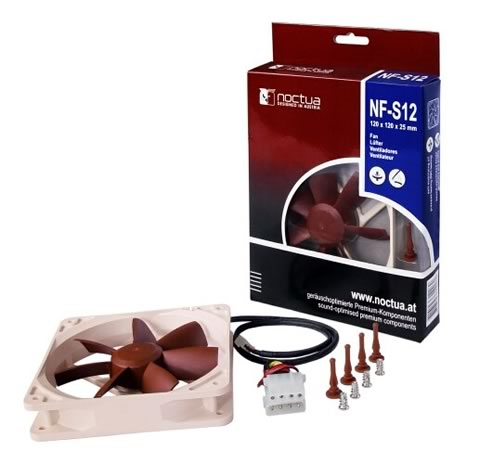
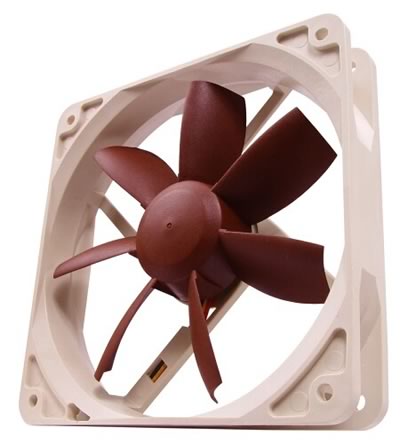
- Installation

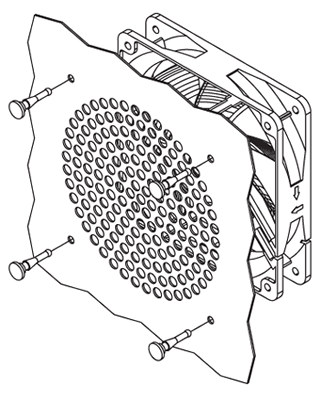
Installing the fans with the vibration compensators proved to be not an easy task because the compensators are so flexible. In order to install them properly, you have to pull the vibration compensators through the mounting holes on the PC case.

Then line up the fan with the vibration compensators and pull them through the mounting holes of the fan.
 

Review Pages

1. Introduction
2. Design and Installation
3. Tests and Conclusion


Pages

  • « first
  • ‹ previous
  • 1
  • 2
  • 3
  • next ›
  • last »

Noctua

Fans

Tags: Noctua Fans
Previous Post
Crucial BallistiX DDR3-1600
Next Post
Sennheiser MXL 51 Earphones

Related Posts

  • Noctua NH-D15 G2 Chromax.Black

  • Noctua NP-DM3 desk mat

  • Noctua presents chromax.black versions of its NH-D15 G2 and NF-A14x25 G2

  • Noctua celebrates 20-year anniversary with new website and desk mat

  • Noctua NF-A12x25 G2 fans

  • ASUS and Noctua announce ASUS GeForce RTX 5080 Noctua Edition graphics card

  • Noctua introduces NF-A12x25 G2 next-generation 120mm fan

  • Noctua at Computex 2025

Latest Reviews

Why Streaming Live Casino Games Demands Smarter Tech
Enterprise & IT

Why Streaming Live Casino Games Demands Smarter Tech

Kioxia Exceria Plus G3 512GB microSD
Cameras

Kioxia Exceria Plus G3 512GB microSD

SoundPeats Cove Pro
Consumer Electronics

SoundPeats Cove Pro

Asustor AS5404T 4-Bay NAS System
Enterprise & IT

Asustor AS5404T 4-Bay NAS System

be quiet! Pure Power 13M 1200W
PC components

be quiet! Pure Power 13M 1200W

Popular News

COLORFUL Introduces CVN B850I GAMING FROZEN Motherboard

COLORFUL Introduces CVN B850I GAMING FROZEN Motherboard

COLORFUL Presents CVN X870 ARK FROZEN Motherboard for AMD Ryzen 9000 CPUs

COLORFUL Presents CVN X870 ARK FROZEN Motherboard for AMD Ryzen 9000 CPUs

TEAMGROUP Launches EXPERT P34F Find My External SSD

TEAMGROUP Launches EXPERT P34F Find My External SSD

Samsung announces Galaxy Tab S11 and Galaxy S25 FE series

Samsung announces Galaxy Tab S11 and Galaxy S25 FE series

Viltrox Showcases Upcoming Lens Lineup and New TTL Flash at IBC 2025

Viltrox Showcases Upcoming Lens Lineup and New TTL Flash at IBC 2025

CORSAIR announces Vanguard Pro 96 and Vanguard 96 Gaming Keyboards

CORSAIR announces Vanguard Pro 96 and Vanguard 96 Gaming Keyboards

Panasonic Introduces the First Ultra-Telephoto Zoom Lens in the LUMIX S Series

Panasonic Introduces the First Ultra-Telephoto Zoom Lens in the LUMIX S Series

MSI Launches DATAMAG 40Gbps Magnetic Portable SSD

MSI Launches DATAMAG 40Gbps Magnetic Portable SSD

Main menu

  • Home
  • News
  • Reviews
  • Essays
  • Forum
  • Legacy
  • About
    • Submit News

    • Contact Us
    • Privacy

    • Promotion
    • Advertise

    • RSS Feed
    • Site Map
  • About
  • Privacy
  • Contact Us
  • Promotional Opportunities @ CdrInfo.com
  • Advertise on out site
  • Submit your News to our site
  • RSS Feed