Breaking News

ASUS Announces New 64GB Configuration of ASUS Ascent GX10 LIAN LI Announces Edge Platinum V2, Edge Gold V2, and GPU Cable Thermal Monitoring via Edge Hub ADV Razer Unveils the Huntsman V3 Pro Mini 8KHz ASRock DeskSlim Series Delivers RTX PRO Blackwell Performance in a Compact 5L Workstation Samsung Introduces Galaxy Tab S12 Series

logo

  • Share Us
    • Facebook
    • Twitter
  • Home
  • Home
  • News
  • Reviews
  • Essays
  • About
    • Submit News

    • Contact Us
    • Privacy

    • Promotion
    • Advertise

    • RSS Feed

Search form

NeuNeo HVD108 DVD Player

Oct 21,2004 0

4. Connections


Review Pages

1. Introduction
2. Main Chipset
3. HDTV
4. Connections
5. Menus - page 1
6. Menus - Page 2
7. Menus - page 3
8. Menus - Page 4
9. Reading Tests
10. Error Correction
11. Conclusion


NeuNeo HVD108 DVD Player - Page 4

Connections

The HVD108 has almost everything that a standalone player should have. Although a SCART connection interface is missing, there are several other interfaces that cannot be found on similar devices at this price.

The package includes: 1 DVD Player, 1 Remote Control, 1 pair analog Video /Audio Cables and User Manual. Power 100 ~ 240 AC/50 ~ 60Hz.
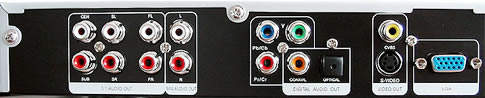
On the rear left of the device, there is the 5.1CH output, which indicates that the player has a built-in decoder for analogue multichannel sound reproduction. Next to it, as seen in the screenshot below, is the stereo output.

The provided video connections include the Component Video (PbPrY), Composite and S-Video outputs. Between these there are the coaxial and optical digital outputs for digital multichannel audio reproduction.
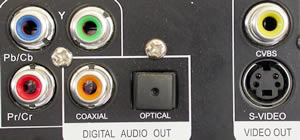
However, we consider that the most important Video connection that the HVD108 provides is the following VGA/SVGA output, which is hard to find this type of device (for the price).

On the front and top of the player there are all the appropriate function controls for using the device without the need for a remote control.

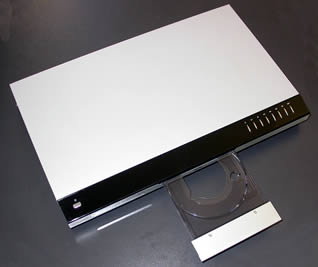
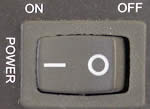
There is also a standby button on the top left, and a power switch at the back.

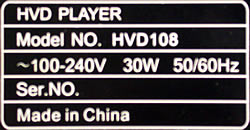
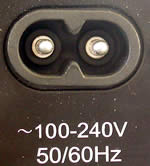
The indication under the AC input connector informs us that the unit can accept 100-240V AC.
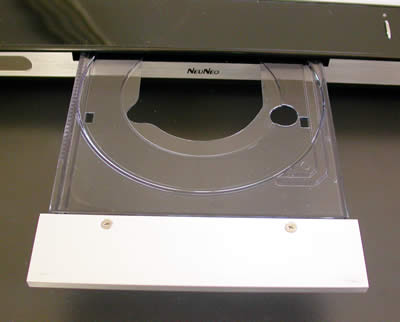
The slim, loading tray is quite impressive, combining transparent plastic and metal. However it needs extra care while placing a disc, as the plastic tray seems to be a little on the fragile side.
Below you can see the included remote control for the device. All the usual buttons are there, and it shouldn't take you long to get used to it.


Review Pages

1. Introduction
2. Main Chipset
3. HDTV
4. Connections
5. Menus - page 1
6. Menus - Page 2
7. Menus - page 3
8. Menus - Page 4
9. Reading Tests
10. Error Correction
11. Conclusion


Pages

  • « first
  • ‹ previous
  • 1
  • 2
  • 3
  • 4
  • 5
  • 6
  • 7
  • 8
  • 9
  • …
  • next ›
  • last »

NeuNeo

Tags: NeuNeo
Previous Post
PowerColor X300
Next Post
Hercules DJ Console

Related Posts

  • NeuNeo DV308 MPEG4 DVD Player

  • NeuNeos High Definition DVD player hits the market

Latest Reviews

Fanxiang MP83 M.2 NVMe SSD Enclosure
Enterprise & IT

Fanxiang MP83 M.2 NVMe SSD Enclosure

Ugreen CM642 USB4.0 Enclosure
PC components

Ugreen CM642 USB4.0 Enclosure

be quiet! Dark Power 14 IO
PC components

be quiet! Dark Power 14 IO

SanDisk High Endurance 512GB microSDXC
Cameras

SanDisk High Endurance 512GB microSDXC

Samsung PRO Ultimate 512GB microSDXC
Cameras

Samsung PRO Ultimate 512GB microSDXC

Popular News

MSI’s Latest AMD X870E MAX & EVO Series Motherboards

MSI’s Latest AMD X870E MAX & EVO Series Motherboards

COLORFUL Launches iGame B850M ULTRA Series Micro-ATX Motherboards

COLORFUL Launches iGame B850M ULTRA Series Micro-ATX Motherboards

COLORFUL Presents Limited Edition Chitu MAG-60 Magnetic Keyboard Inspired by the Year of the Horse

COLORFUL Presents Limited Edition Chitu MAG-60 Magnetic Keyboard Inspired by the Year of the Horse

COLORFUL Launches iGame B850I MINI OC V14 Motherboard

COLORFUL Launches iGame B850I MINI OC V14 Motherboard

COLORFUL Presents iGame Z890 ULTRA-S W and iGame Z890M ULTRA Z Motherboards

COLORFUL Presents iGame Z890 ULTRA-S W and iGame Z890M ULTRA Z Motherboards

COLORFUL Expands B850 Motherboard Lineup with New CVN, Battle-Ax, and MEOW Models

COLORFUL Expands B850 Motherboard Lineup with New CVN, Battle-Ax, and MEOW Models

COLORFUL Launches the iGame X870E VULCAN W OC Motherboard

COLORFUL Launches the iGame X870E VULCAN W OC Motherboard

ASRock Adds Support for One Sub-Channel DRAM Module on Intel DDR5 Motherboards

ASRock Adds Support for One Sub-Channel DRAM Module on Intel DDR5 Motherboards

Main menu

  • Home
  • News
  • Reviews
  • Essays
  • About
    • Submit News

    • Contact Us
    • Privacy

    • Promotion
    • Advertise

    • RSS Feed
  • About
  • Privacy
  • Contact Us
  • Promotional Opportunities @ CdrInfo.com
  • Advertise on out site
  • Submit your News to our site
  • RSS Feed