Breaking News

Fanatec and Trak Racer showcase the future of simulation at SimRacing Expo Frankfurt 2026 Razer Unveils the Barracuda V2 Pro ASUS Republic of Gamers Announces Bulwark Dock DG310 Akasa Announces Fermi CM5 Fanless Case for Raspberry Pi Compute Module 5 LG Electronics Advances the LG Sound Suite Experience With New DTS

logo

  • Share Us
    • Facebook
    • Twitter
  • Home
  • Home
  • News
  • Reviews
  • Essays
  • About
    • Submit News

    • Contact Us
    • Privacy

    • Promotion
    • Advertise

    • RSS Feed

Search form

Minix Neo Z83-4 Windows Mini PC review

Oct 25,2016 0

3. Booting up, BIOS, Windows


Review Pages

1. Features
2. Package
3. Booting up, BIOS, Windows
4. CPU tests
5. GPU tests
6. Storage, HD Audio/Video tests
7. Final words


The Minix Neo Z83-4 comes conveniently with Windows 10 Home x64 edition pre-installed.

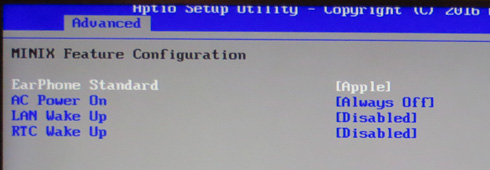
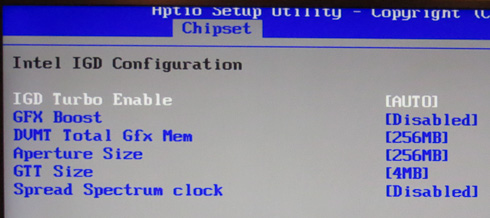
The system is based on the popular AMI BIOS and it is easy to navigate. The system came with v0.90 BIOS installed, and we updated it to the latest v1.03. You can easily update the box under Windows (double click update.bat). Here are some screenshots of the various BIOS settings:

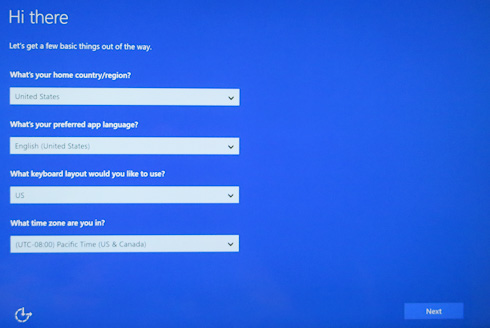
After the first boot, you will be asked to configure the Windows 10 Home x64 installation:
Following the first boot, the free space left for us was limited to 13.1GB out of the 28.6GB of the available memory:

Note here that the Windows 10 Anniversary update is NOT pre-installed on the MINIX NEO Z83-4, at least in our sample unit. Trying to use the default update method failed since there is not enough free space for the new Windows installation. A workaround for that is provided over Microsoft's forums. For our review needs, we made a clean installation of Windows 10 Home x64 with Windows 10 anniversary update included. Many device drivers were missing after the installation, but they are all available for download here . In addition, you need to make some manual adjustments as explained here. After some more re-boots, the device was fully operational.


Review Pages

1. Features
2. Package
3. Booting up, BIOS, Windows
4. CPU tests
5. GPU tests
6. Storage, HD Audio/Video tests
7. Final words


Pages

  • « first
  • ‹ previous
  • 1
  • 2
  • 3
  • 4
  • 5
  • 6
  • 7
  • next ›
  • last »

MINIX

Tags: MINIX
Previous Post
ASUS EXPEDITION GTX1050TI-4G review
Next Post
Shuttle DH110 review

Related Posts

  • Minix Neo Z83-4U Ubuntu Edition Mini PC TV Box review

  • MINIX NEO U1 Android Media Player review

  • MINIX NEO U1 Media Hub for Android Coming Next Week

Latest Reviews

Fanxiang MP83 M.2 NVMe SSD Enclosure
Enterprise & IT

Fanxiang MP83 M.2 NVMe SSD Enclosure

Ugreen CM642 USB4.0 Enclosure
PC components

Ugreen CM642 USB4.0 Enclosure

be quiet! Dark Power 14 IO
PC components

be quiet! Dark Power 14 IO

SanDisk High Endurance 512GB microSDXC
Cameras

SanDisk High Endurance 512GB microSDXC

Samsung PRO Ultimate 512GB microSDXC
Cameras

Samsung PRO Ultimate 512GB microSDXC

Popular News

MSI’s Latest AMD X870E MAX & EVO Series Motherboards

MSI’s Latest AMD X870E MAX & EVO Series Motherboards

COLORFUL Launches iGame B850M ULTRA Series Micro-ATX Motherboards

COLORFUL Launches iGame B850M ULTRA Series Micro-ATX Motherboards

COLORFUL Presents Limited Edition Chitu MAG-60 Magnetic Keyboard Inspired by the Year of the Horse

COLORFUL Presents Limited Edition Chitu MAG-60 Magnetic Keyboard Inspired by the Year of the Horse

COLORFUL Launches iGame B850I MINI OC V14 Motherboard

COLORFUL Launches iGame B850I MINI OC V14 Motherboard

COLORFUL Launches the iGame X870E VULCAN W OC Motherboard

COLORFUL Launches the iGame X870E VULCAN W OC Motherboard

COLORFUL Presents iGame Z890 ULTRA-S W and iGame Z890M ULTRA Z Motherboards

COLORFUL Presents iGame Z890 ULTRA-S W and iGame Z890M ULTRA Z Motherboards

COLORFUL Expands B850 Motherboard Lineup with New CVN, Battle-Ax, and MEOW Models

COLORFUL Expands B850 Motherboard Lineup with New CVN, Battle-Ax, and MEOW Models

ASRock Adds Support for One Sub-Channel DRAM Module on Intel DDR5 Motherboards

ASRock Adds Support for One Sub-Channel DRAM Module on Intel DDR5 Motherboards

Main menu

  • Home
  • News
  • Reviews
  • Essays
  • About
    • Submit News

    • Contact Us
    • Privacy

    • Promotion
    • Advertise

    • RSS Feed
  • About
  • Privacy
  • Contact Us
  • Promotional Opportunities @ CdrInfo.com
  • Advertise on out site
  • Submit your News to our site
  • RSS Feed