Breaking News

ENDORFY introduces Atlas Electric desks Sony Unveils LinkBuds Clip Open Earbuds be quiet! enters high-end gaming mouse market with Dark Perk Ergo and Dark Perk Sym ASUS ROG announces ROG Strix GS-BE7200 Dual-Band WiFi 7 Gaming Router Transcend Launches RDE3 microSD Express Card Reader for Next-Generation High-Speed Performance

logo

  • Share Us
    • Facebook
    • Twitter
  • Home
  • Home
  • News
  • Reviews
  • Essays
  • Forum
  • Legacy
  • About
    • Submit News

    • Contact Us
    • Privacy

    • Promotion
    • Advertise

    • RSS Feed
    • Site Map

Search form

Intel C2D E6750

Aug 23,2007 0

8. Overclocking


Review Pages

1. Introduction
2. Retail package
3. Test Configuration
4. Everest Ultimate Edition 2006 - SiSoft Sandra
5. PCMARK - 3DMARK
6. Science Mark - PovRay - Nero Digital
7. CINEBENCH -SuperPI
8. Overclocking
9. Conclusion


All currently sold Intel C2D processors are very good overclockers, this is no secret. The "new" Intel E6750 with 1333MHz FSB bus is supposed to be an especially good processor to play with and reach at very high speeds, nearly 4GHz! If that sounds impossible, read on...
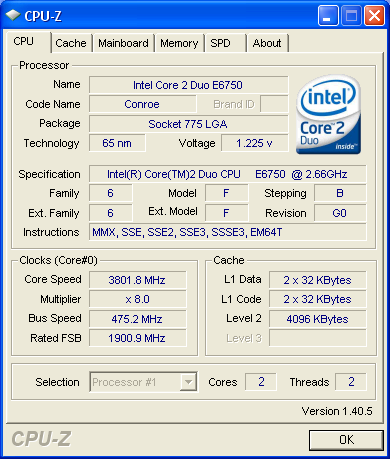
With an air cooled solution, we managed to get an impressive 3.80GHz, which however wasn't very stable. The problem was not the CPU itself but the cooling system. The processor was reaching very high temperatures resulting in not proper operation. So we had to lower the FSB and memory voltage:
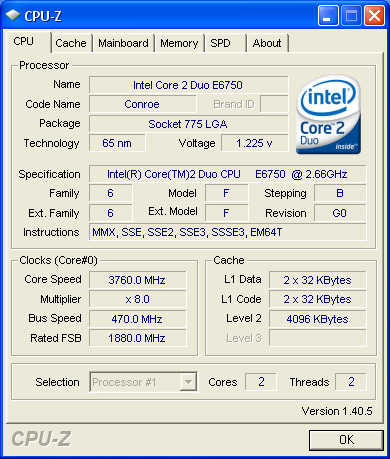
3.760 was very good, the system appeared rock solid. However, we noticed an abonrmal behaviour:
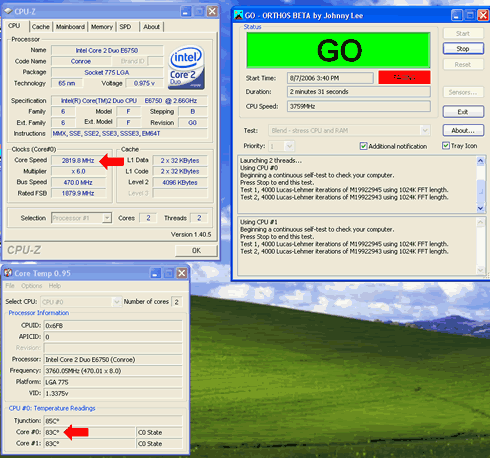
The temperatures were above 80° C resulting in an automatic reduction in CPU speed in order to avoid burning the processor. According to the specifications for an Intel Core2 Duo Desktop Processor E6750, the thermal specifiaction temperature is given as 72° C.

Finally, we managed to get a 100% stable system at 3.720GHz (465x8), with 70° C maximum temperature:
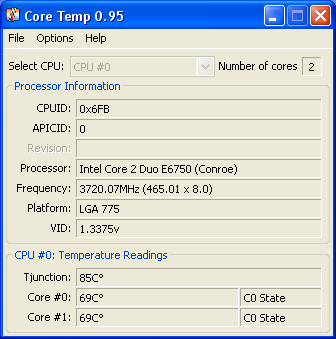
What impressed us is that the CPU cools down very quick, so in idle mode we have very low temperatures:
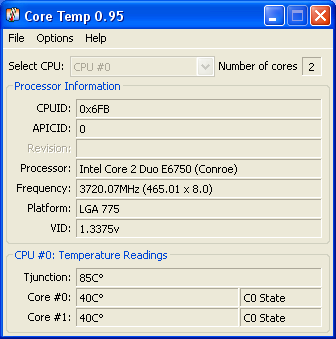
All overclocking tests were done with the following system and BIOS settings:

  • CPU Cooler: Arctic Cooling Freezer 7
  • Motherboard: Asus P5B Premium VISTA Edition BIOS 0705
  • Memory: 2x1GB Crucial PC-8000 (930Hz @ 5-5-5-15, Divider 1:1, 2.10V)
  • VGA: MSI 7600GT Silent with Nvidia 93.71 installed
  • HDD: WD 80GB SATAI (primary)
  • HDD: Seagate 80GB SATAII (secondary)
  • Operating system: Windows XP SP2 with all latest updates installed

Asus P5B Premium BIOS settings

  • FSB: 465
  • PCI-E: 100
  • PCI Clock: 33MHz
  • Spread Spectrum: Disabled
  • Memory Voltage: 2.10V (this depends on your memory)
  • CPU Core: 1.4875V
  • FSB Termination: 1.45V
  • NB Core: 1.65V
  • SB Core: 1.80V
  • ICH Chipset Voltage: 1.215V

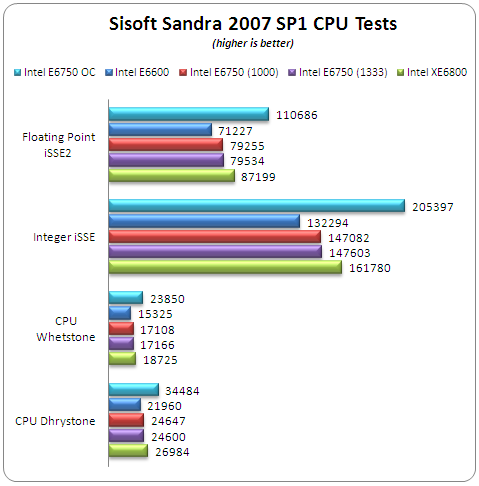
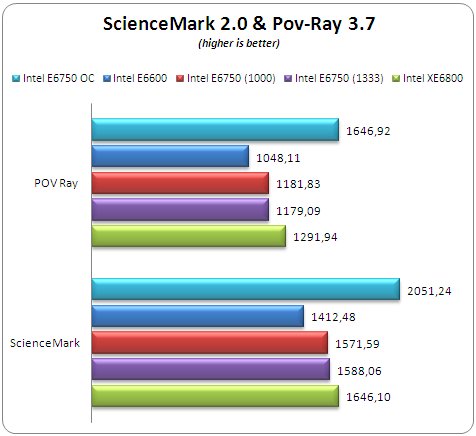
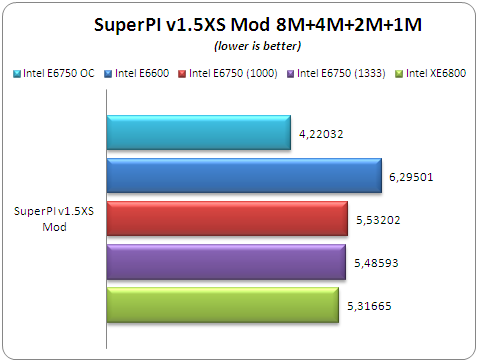
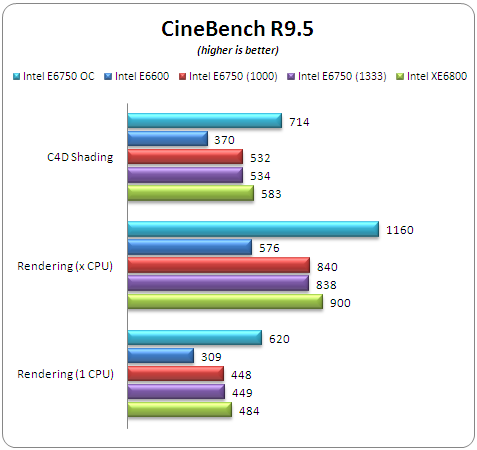
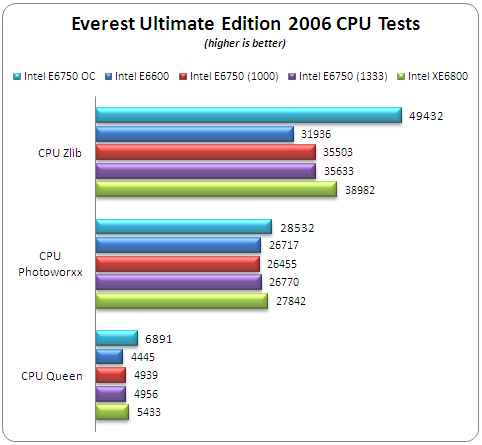
And finally, here are several test results after overclocking the Intel E6750 up to 3.72GHz. As you will notice, the performance improvement is... significant!
 

Review Pages

1. Introduction
2. Retail package
3. Test Configuration
4. Everest Ultimate Edition 2006 - SiSoft Sandra
5. PCMARK - 3DMARK
6. Science Mark - PovRay - Nero Digital
7. CINEBENCH -SuperPI
8. Overclocking
9. Conclusion


Pages

  • « first
  • ‹ previous
  • 1
  • 2
  • 3
  • 4
  • 5
  • 6
  • 7
  • 8
  • 9
  • next ›
  • last »

Intel

Core 2 Duo

Tags: Intel Core 2 Duo
Previous Post
MEX-BT2500
Next Post
Supertalent DH 2GB USB

Related Posts

  • Intel Core Ultra Series 3 Debut at CES 2026

  • Intel and NVIDIA to Jointly Develop AI Infrastructure and Personal Computing Products

  • An Intel-HP Collaboration Delivers Next-Gen AI PCs

  • New Intel Xeon 6 CPUs to Maximize GPU-Accelerated AI Performance

  • Intel Unveils New GPUs for AI and Workstations at Computex 2025

  • G.SKILL Releases DDR5 Memory Support List for Intel 200S Boost

  • Intel and its partners release BIOS update for Intel 15th Gen to increase performance

  • Intel-AMD new motherboards announced

Latest Reviews

The Difference Between American and European Stakes and Why It Changes How People Bet
Enterprise & IT

The Difference Between American and European Stakes and Why It Changes How People Bet

Endorfy Thock V2 Wireless Keyboard
PC components

Endorfy Thock V2 Wireless Keyboard

Noctua NH-D15 G2 Chromax.Black
Cooling Systems

Noctua NH-D15 G2 Chromax.Black

EnGenius ECW520 AP
Enterprise & IT

EnGenius ECW520 AP

Noctua NP-DM3 desk mat
Gaming

Noctua NP-DM3 desk mat

Popular News

COLORFUL Introduces CVN B850I GAMING FROZEN Motherboard

COLORFUL Introduces CVN B850I GAMING FROZEN Motherboard

COLORFUL Presents CVN X870 ARK FROZEN Motherboard for AMD Ryzen 9000 CPUs

COLORFUL Presents CVN X870 ARK FROZEN Motherboard for AMD Ryzen 9000 CPUs

TEAMGROUP Launches EXPERT P34F Find My External SSD

TEAMGROUP Launches EXPERT P34F Find My External SSD

ASRock AM5 Motherboards Now Fully Support AMD Ryzen 9 9950X3D & 9900X3D Processors

ASRock AM5 Motherboards Now Fully Support AMD Ryzen 9 9950X3D & 9900X3D Processors

Samsung announces Galaxy Tab S11 and Galaxy S25 FE series

Samsung announces Galaxy Tab S11 and Galaxy S25 FE series

Viltrox Showcases Upcoming Lens Lineup and New TTL Flash at IBC 2025

Viltrox Showcases Upcoming Lens Lineup and New TTL Flash at IBC 2025

CORSAIR announces Vanguard Pro 96 and Vanguard 96 Gaming Keyboards

CORSAIR announces Vanguard Pro 96 and Vanguard 96 Gaming Keyboards

Panasonic Introduces the First Ultra-Telephoto Zoom Lens in the LUMIX S Series

Panasonic Introduces the First Ultra-Telephoto Zoom Lens in the LUMIX S Series

Main menu

  • Home
  • News
  • Reviews
  • Essays
  • Forum
  • Legacy
  • About
    • Submit News

    • Contact Us
    • Privacy

    • Promotion
    • Advertise

    • RSS Feed
    • Site Map
  • About
  • Privacy
  • Contact Us
  • Promotional Opportunities @ CdrInfo.com
  • Advertise on out site
  • Submit your News to our site
  • RSS Feed