
Breaking News

COLORFUL GeForce Graphics Cards Harness NVIDIA DLSS 4.5 Cutting-Edge Gaming Technology GIGABYTE Announces World's First DDR5-7200 at Full 256GB with CQDIMM at CES 2026 GameSir at CES 2026 Asus at CES 2026 Panasonic at CES 2026

logo

  • Share Us
    • Facebook
    • Twitter
  • Home
  • Home
  • News
  • Reviews
  • Essays
  • Forum
  • Legacy
  • About
    • Submit News

    • Contact Us
    • Privacy

    • Promotion
    • Advertise

    • RSS Feed
    • Site Map

Search form

i-Blue PS3200

Feb 23,2006 0

3. Installation


Review Pages

1. Introduction
2. Features
3. Installation
4. The Tests
5. Conclusion


To begin using the device, you must first fully charge it. From our tests, it took around 3 hours to fully charge the batteries. You have to press the right slider and then perform several simple steps on your PDA device, which in our case was a Dell Axim x50V with Windows Mobile 2003 SE. Start by accessing the bluetooth manager and tap New->Connect.

The PS3200 will show up with and ID of i-Blue.

Press Next->Select GPS OUTPUT-> Next
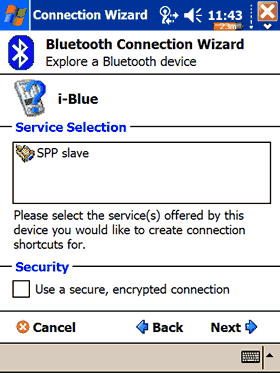
Done!
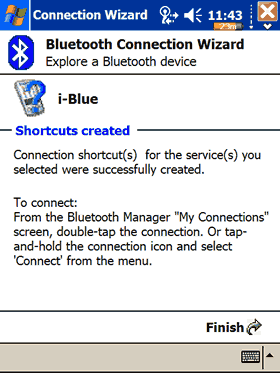
After accessing the BT Manager, right click->Connect
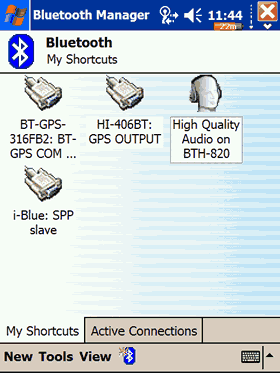
Our i-Blue was finally connected to our Dell Axim x50V PDA and ready to use! The device can be found on COM7 set to 4800 communications speed. Press the "Scan GPS" and if all goes well, you will see a lot of numbers scrolling down the screen. Unfortunately, all currently available drivers don't support the NemeriX chipsets, therefore we couldn't see the device's firmware version and other interesting info, as happens with the SiRF powered devices.


 

Review Pages

1. Introduction
2. Features
3. Installation
4. The Tests
5. Conclusion


Pages

  • « first
  • ‹ previous
  • 1
  • 2
  • 3
  • 4
  • 5
  • next ›
  • last »

i-Blue

Tags: i-Blue
Previous Post
ASUS P5N32-SLI DELUXE
Next Post
Snazio NetCinema HD Player SZ1350

Related Posts

Latest Reviews

Endorfy Thock V2 Wireless Keyboard
PC components

Endorfy Thock V2 Wireless Keyboard

Noctua NH-D15 G2 Chromax.Black
Cooling Systems

Noctua NH-D15 G2 Chromax.Black

EnGenius ECW520 AP
Enterprise & IT

EnGenius ECW520 AP

Noctua NP-DM3 desk mat
Gaming

Noctua NP-DM3 desk mat

Crucial P510 2TB NMVE
PC components

Crucial P510 2TB NMVE

Popular News

COLORFUL Introduces CVN B850I GAMING FROZEN Motherboard

COLORFUL Introduces CVN B850I GAMING FROZEN Motherboard

COLORFUL Presents CVN X870 ARK FROZEN Motherboard for AMD Ryzen 9000 CPUs

COLORFUL Presents CVN X870 ARK FROZEN Motherboard for AMD Ryzen 9000 CPUs

COLORFUL Presents the B860 Series Motherboards

COLORFUL Presents the B860 Series Motherboards

TEAMGROUP Launches EXPERT P34F Find My External SSD

TEAMGROUP Launches EXPERT P34F Find My External SSD

ASRock AM5 Motherboards Now Fully Support AMD Ryzen 9 9950X3D & 9900X3D Processors

ASRock AM5 Motherboards Now Fully Support AMD Ryzen 9 9950X3D & 9900X3D Processors

Samsung announces Galaxy Tab S11 and Galaxy S25 FE series

Samsung announces Galaxy Tab S11 and Galaxy S25 FE series

Viltrox Showcases Upcoming Lens Lineup and New TTL Flash at IBC 2025

Viltrox Showcases Upcoming Lens Lineup and New TTL Flash at IBC 2025

CORSAIR announces Vanguard Pro 96 and Vanguard 96 Gaming Keyboards

CORSAIR announces Vanguard Pro 96 and Vanguard 96 Gaming Keyboards

Main menu

  • Home
  • News
  • Reviews
  • Essays
  • Forum
  • Legacy
  • About
    • Submit News

    • Contact Us
    • Privacy

    • Promotion
    • Advertise

    • RSS Feed
    • Site Map
  • About
  • Privacy
  • Contact Us
  • Promotional Opportunities @ CdrInfo.com
  • Advertise on out site
  • Submit your News to our site
  • RSS Feed

