Breaking News

Intel Launches Intel Core Series 3 Processors Sony at NAB Show 2026 ADATA Launches URBAN TAPSAFE External SSD Sony Expands Gaming Gear Range with INZONE H6 Air and INZONE M10S II Transcend Launches RDE3 microSD Express Card Reader for Next-Generation High-Speed Performance

logo

  • Share Us
    • Facebook
    • Twitter
  • Home
  • Home
  • News
  • Reviews
  • Essays
  • Forum
  • Legacy
  • About
    • Submit News

    • Contact Us
    • Privacy

    • Promotion
    • Advertise

    • RSS Feed
    • Site Map

Search form

Endorfy LIV Plus Wireless Onyx White

Apr 6,2025 0

3. Software


Review Pages

1. Introduction
2. Retail Package
3. Software
4. Conclusion


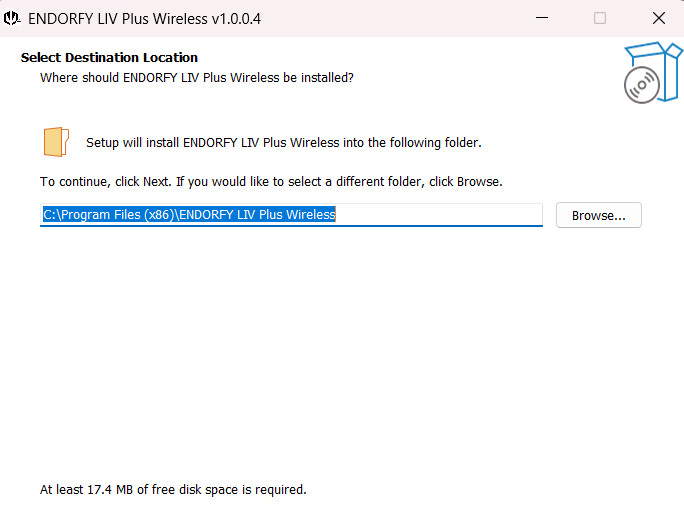
The Endorfy Windows software for the Liv Plus Wireless can be found on the official website. The download isn't big but Endorfy should update their security signature since Windows Defender doesn't recognize the software as safe.

There is no risk, just a false warning, we assume with future builds this will be solved. The installation process is very easy.
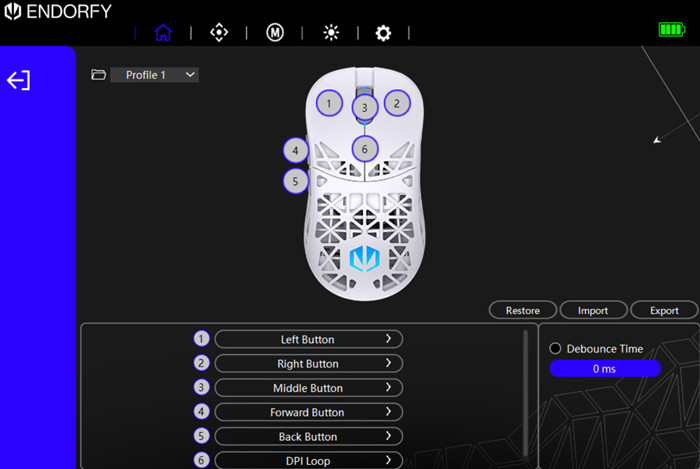
Opening the software, gives us a quick overview of the mouse buttons, the battery level (no % level, why?) and from the main page you can set up various profiles and change all buttons according to your likings.
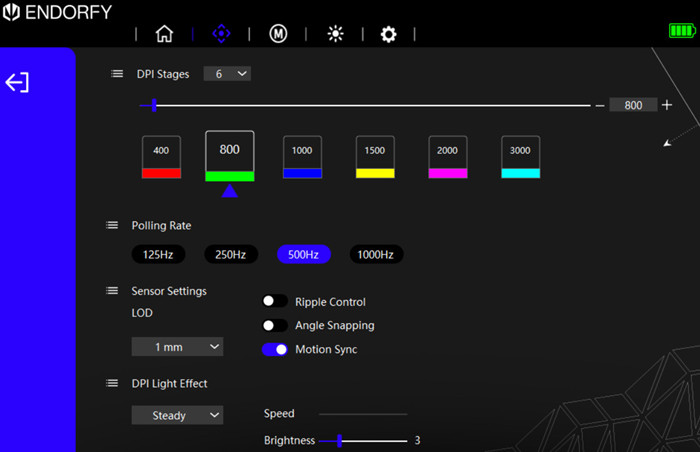
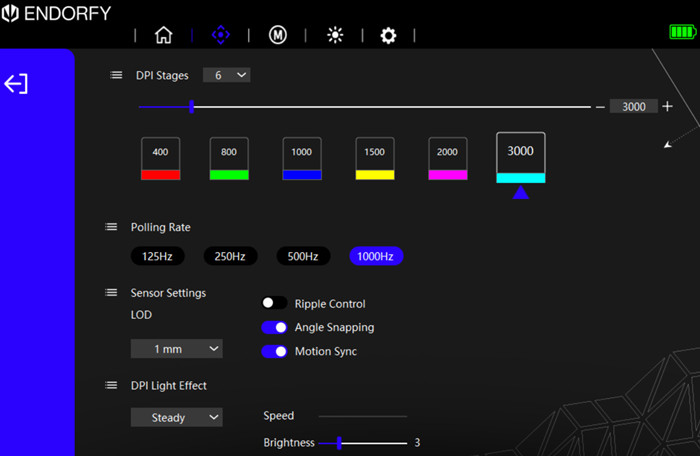
On the second screen, you will find all DPI settings. Here you can set how many DPI stages you want from 1 up to 6 stages and which DPI each stage represents. Also, you can change the color of each stage. There are also other settings for the polling rate and DPI light effects.
At the next tab users can set up macros, this function seems very powerful with many different settings.

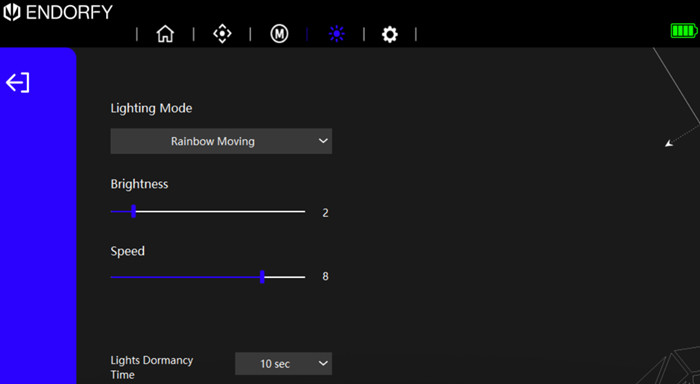
ARGB lighting is present and you can set up various lighting modes, however, you cannot sync the lighting with your systems ARGB.
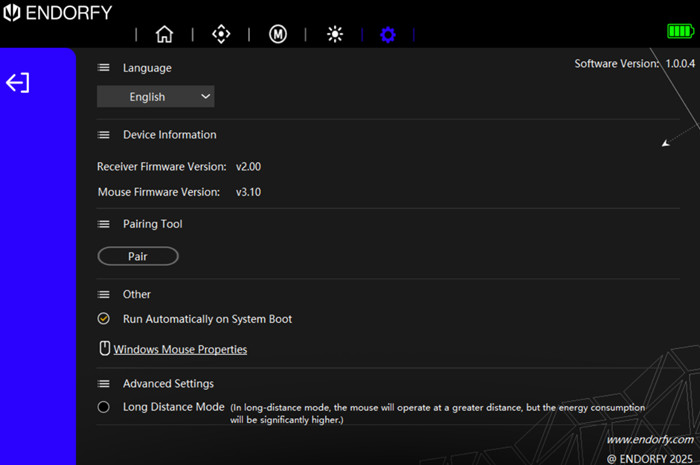
At the last tab, users can see the receiver and mouse firmware revision, use a pairing function (if something goes wrong), and set for automatic start on system boot.
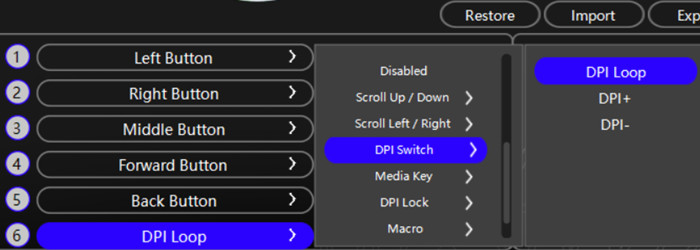
Let's now see how the button mapping works, simply select a button, and at the bottom several actions will appear, very handy and easy to understand.
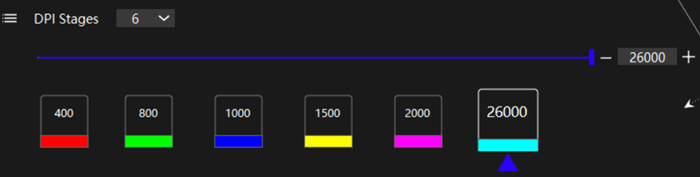
At the DPI area, users can change each stage DPI and move up to 26.000 DPI (insane!)
 

Review Pages

1. Introduction
2. Retail Package
3. Software
4. Conclusion


Pages

  • « first
  • ‹ previous
  • 1
  • 2
  • 3
  • 4
  • next ›
  • last »

ENDORFY

Tags: ENDORFY
Previous Post
be quiet! 140mm and 120mm reverse fans
Next Post
The Benefits of Gambling with Your Phone

Related Posts

  • Endorfy announces Aquarius 8000 PC cases and Corona 120 fans

  • ENDORFY introduces Signum M30 cases

  • ENDORFY introduces Atlas Electric desks

  • Endorfy Thock V2 Wireless Keyboard

  • ENDORFY Palm Rest V2 series delivers comfort with a magnetic pull

  • New Stoneflow mousepads by ENDORFY

  • New Vero L6 generation of the PSUs

  • Arx 500 White ARGB – compact form and full performance from ENDORFY

Latest Reviews

In the Age of AI Phishing, the Best User Experience Might Be the One That Feels Safest
Enterprise & IT

In the Age of AI Phishing, the Best User Experience Might Be the One That Feels Safest

SoundPeats C30
Consumer Electronics

SoundPeats C30

Why Streaming Live Casino Games Demands Smarter Tech
Enterprise & IT

Why Streaming Live Casino Games Demands Smarter Tech

Kioxia Exceria Plus G3 512GB microSD
Cameras

Kioxia Exceria Plus G3 512GB microSD

SoundPeats Cove Pro
Consumer Electronics

SoundPeats Cove Pro

Popular News

TEAMGROUP Launches EXPERT P34F Find My External SSD

TEAMGROUP Launches EXPERT P34F Find My External SSD

Samsung announces Galaxy Tab S11 and Galaxy S25 FE series

Samsung announces Galaxy Tab S11 and Galaxy S25 FE series

Viltrox Showcases Upcoming Lens Lineup and New TTL Flash at IBC 2025

Viltrox Showcases Upcoming Lens Lineup and New TTL Flash at IBC 2025

CORSAIR announces Vanguard Pro 96 and Vanguard 96 Gaming Keyboards

CORSAIR announces Vanguard Pro 96 and Vanguard 96 Gaming Keyboards

Panasonic Introduces the First Ultra-Telephoto Zoom Lens in the LUMIX S Series

Panasonic Introduces the First Ultra-Telephoto Zoom Lens in the LUMIX S Series

MSI Launches DATAMAG 40Gbps Magnetic Portable SSD

MSI Launches DATAMAG 40Gbps Magnetic Portable SSD

MSI Launches FORGE GK600 TKL WIRELESS Special Edition Compact Mechanical Keyboard

MSI Launches FORGE GK600 TKL WIRELESS Special Edition Compact Mechanical Keyboard

Viltrox Joins the L-Mount Alliance, Expanding Creative Possibilities

Viltrox Joins the L-Mount Alliance, Expanding Creative Possibilities

Main menu

  • Home
  • News
  • Reviews
  • Essays
  • Forum
  • Legacy
  • About
    • Submit News

    • Contact Us
    • Privacy

    • Promotion
    • Advertise

    • RSS Feed
    • Site Map
  • About
  • Privacy
  • Contact Us
  • Promotional Opportunities @ CdrInfo.com
  • Advertise on out site
  • Submit your News to our site
  • RSS Feed