
Breaking News

Arctic announces Senza AI 370 Under Desk PC for AI Applications CORSAIR Announces the Airflow-focused 3200D Mid Tower for Ambitious DIY PC Builds Silicon Power Launches Enterprise-Grade DDR5 RDIMM to Accelerate AI Workloads World Backup Day 2026: A Backup Doesn’t Always Need to be in the Cloud Sharkoon announces S100 ARGB AIO Cooler

logo

  • Share Us
    • Facebook
    • Twitter
  • Home
  • Home
  • News
  • Reviews
  • Essays
  • Forum
  • Legacy
  • About
    • Submit News

    • Contact Us
    • Privacy

    • Promotion
    • Advertise

    • RSS Feed
    • Site Map

Search form

Creation USB Drive

Jun 20,2005 0

3. Installation


Review Pages

1. Introduction
2. Retail Package
3. Installation
4. Performance
5. Conclusion


After plugging in the USB drive, it will be recognized immediately by the Operating System. Win98SE users maybe need to install additional drivers which can be found here.
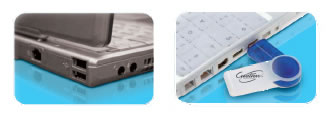
The system recognized the Creation USB drive as a Swissbit Twist USB device.

Also included with the Creation USB drive is the SecureLock software, an application that can be used to manipulate partitions and manage password protected "secret" areas on the USB drive to provide protection from unauthorised users.

After selecting the "Create Partition" function, you can set the public/private area of the USB drive and password protect it:
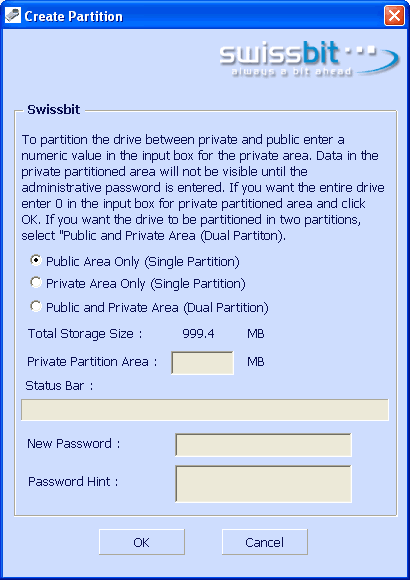
Lets create a dual partition (public and private area). The formatting process takes only few seconds, while the Securelock software replicates itself on the formatted disk so you can always have it available.

The "Manage Password" function allows you to reset the password.
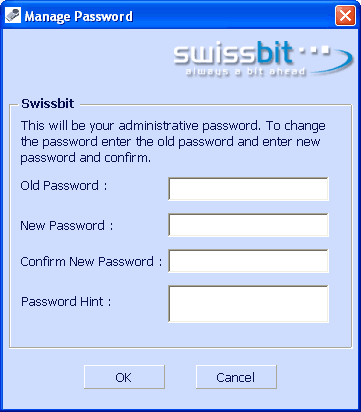
Lastly, the "Repair Disk" function can repair bad blocks. The online manual for the SecureLock application also mentions USB DOS bootable discs, but there isn't any function to implement this ...


 

Review Pages

1. Introduction
2. Retail Package
3. Installation
4. Performance
5. Conclusion


Pages

  • « first
  • ‹ previous
  • 1
  • 2
  • 3
  • 4
  • 5
  • next ›
  • last »

Creation

Tags: Creation
Previous Post
BenQ DW1625
Next Post
AOpen Aeolus 6800Ultra SLI mode

Related Posts

  • Creation announces 4x DVD+RW media

  • Creation Optical unveils "Flip'n'Go" CD-R series

  • New Creation DVD-R and DVD+R media

Latest Reviews

Why Streaming Live Casino Games Demands Smarter Tech
Enterprise & IT

Why Streaming Live Casino Games Demands Smarter Tech

Kioxia Exceria Plus G3 512GB microSD
Cameras

Kioxia Exceria Plus G3 512GB microSD

SoundPeats Cove Pro
Consumer Electronics

SoundPeats Cove Pro

Asustor AS5404T 4-Bay NAS System
Enterprise & IT

Asustor AS5404T 4-Bay NAS System

be quiet! Pure Power 13M 1200W
PC components

be quiet! Pure Power 13M 1200W

Popular News

COLORFUL Presents CVN X870 ARK FROZEN Motherboard for AMD Ryzen 9000 CPUs

COLORFUL Presents CVN X870 ARK FROZEN Motherboard for AMD Ryzen 9000 CPUs

TEAMGROUP Launches EXPERT P34F Find My External SSD

TEAMGROUP Launches EXPERT P34F Find My External SSD

Samsung announces Galaxy Tab S11 and Galaxy S25 FE series

Samsung announces Galaxy Tab S11 and Galaxy S25 FE series

Viltrox Showcases Upcoming Lens Lineup and New TTL Flash at IBC 2025

Viltrox Showcases Upcoming Lens Lineup and New TTL Flash at IBC 2025

CORSAIR announces Vanguard Pro 96 and Vanguard 96 Gaming Keyboards

CORSAIR announces Vanguard Pro 96 and Vanguard 96 Gaming Keyboards

Panasonic Introduces the First Ultra-Telephoto Zoom Lens in the LUMIX S Series

Panasonic Introduces the First Ultra-Telephoto Zoom Lens in the LUMIX S Series

MSI Launches DATAMAG 40Gbps Magnetic Portable SSD

MSI Launches DATAMAG 40Gbps Magnetic Portable SSD

MSI Launches FORGE GK600 TKL WIRELESS Special Edition Compact Mechanical Keyboard

MSI Launches FORGE GK600 TKL WIRELESS Special Edition Compact Mechanical Keyboard

Main menu

  • Home
  • News
  • Reviews
  • Essays
  • Forum
  • Legacy
  • About
    • Submit News

    • Contact Us
    • Privacy

    • Promotion
    • Advertise

    • RSS Feed
    • Site Map
  • About
  • Privacy
  • Contact Us
  • Promotional Opportunities @ CdrInfo.com
  • Advertise on out site
  • Submit your News to our site
  • RSS Feed


