
Breaking News

ASRock Introduces Its First Taichi Flagship Monitor Lineup RICOH announces GR IV 30th Anniversary Edition Kit Samsung Begins Official Rollout of One UI 9 Canon announces EOS R8 Mark II Razer Unleashes the Kraken V4 X Sensa HD Haptics

logo

  • Share Us
    • Facebook
    • Twitter
  • Home
  • Home
  • News
  • Reviews
  • Essays
  • About
    • Submit News

    • Contact Us
    • Privacy

    • Promotion
    • Advertise

    • RSS Feed

Search form

bequiet! Dark Rock TF2

Aug 10,2021 0

3. Performance


Review Pages

1. Introduction
2. Retail Package / Installation
3. Performance
4. Performance - Page 2
5. Conclusion


In order to test the CPU cooler we used the following configuration:

  • CPU: AMD Ryzen 5 5600X
  • Thermal compound: bequiet! DC1
  • Case: bequiet! Silent Base 802
  • Case fans: 3x140 bequiet! Silent Wings 3 High-Speed RPM speed controllable via SmartFan BIOS + Asus Xpert4 software
  • CPU Fan: Stock 135mm bequiet! Shadow Rock Slim 2
  • Motherboard: Asus X570 E-Gaming with 4002 BIOS
  • Memory: 2x16GB G.skill Trident Z RGB CL14 @ 3200MHz CL14 (XMP Profile) @ 1.35V
  • PSU: be quiet! Straight Power 11 650Watt
  • HDD: Crucial MX500 SSD
  • VGA: Asus 1060 6GB Dual
  • Ambient room temperature ~ 25 Celsius (with AC climate control) - Environment Temperature measurements: Precision Gold N09AQ Envirometer Meter
  • Sound measurements at 1m distance: miniDSP UMIK-1 microphone with calibration file and latest REW software
  • Operating system: Windows 10 x64 with all the latest updates installed
  • Software: AIDA64 / HWInfo / OCCT Enterprise Edition (Latest builds)

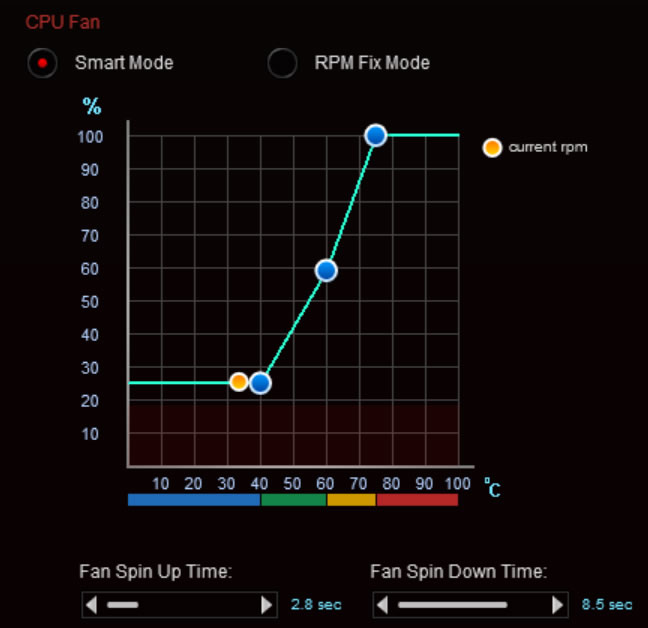
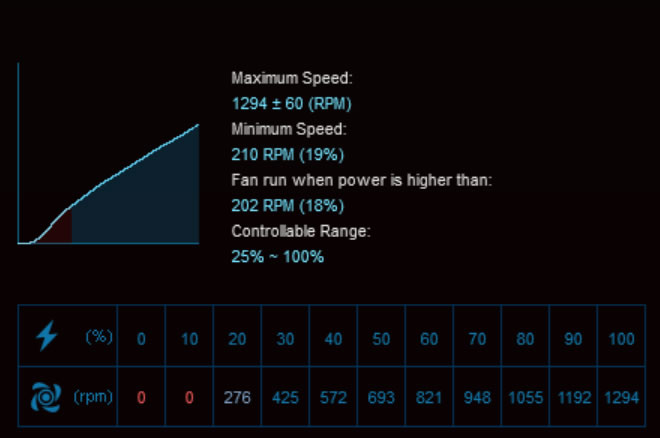
Before each run we left the CPU cooler cooled down and we reset the HWiNFO values to be accurate. Before starting our tests, we set the CPU fans speeds at "Smart Mode" with the Asus Xpert4 software. The case fans were also set at SmartFan mode with the option for Auto Fan Stop at low loads down to 0% for the two front fans and auto for the back case fan. The CPU fans were detected from them Asus motherboard and gave us the following fan curve
1st Test - Bios settings:

  • Ai Overclock Tuner: D.O.C.P -> XMP DDR-3200 CL14
  • BCLK Frequency: 100MHz
  • FCLK Frequency: 1600MHz
  • CPU core ratio: Auto
  • TPU: Keep Current Setting
  • Performance Bias: Auto
  • VDDCR CPU Voltage: 1.100V
  • VDDCD SOC Voltage: 0.900V
  • DRAM Voltage: 1.350V (XMP)
  • Precision Boost Overdrive: Auto
  • Rest BIOS options: Auto

For measuring performance, we set Air temperature at 25 Celsius via climate control and we run a 30mins run of AIDA64 software and measured the reported temperatures from HWiNFO software. AIDA64 System Stability Test uses a 64-bit multi-threaded stress testing module to drive the computer to its absolute limits. Hard disk, SSD and OpenCL GPGPU video adapter stress testing is also available. Running a 30min test run with AIDA64 Stability Test gave us very good performance.

The CPU Package gave an average of 65.6 Celsius with an average 4571.80MHz running speed during this test.

The HWiNFO gives more details about the overall working condition. We saw up to 66 Celsius but with an average of below 65 Celsius for the CPU. The average Effective Vcore was set to 1.318V from the motherboard.

2nd Test Overclocking - Bios settings:

  • Ai Overclock Tuner: D.O.C.P -> XMP DDR-3200 CL14
  • BCLK Frequency: 100MHz
  • FCLK Frequency: 1600MHz
  • CPU core ratio: 46Χ
  • TPU: Keep Current Setting
  • Performance Bias: Auto
  • VDDCR CPU Voltage: 1.250V
  • VDDCD SOC Voltage: 0.900V
  • DRAM Voltage: 1.350V (XMP)
  • Precision Boost Overdrive: Auto
  • Rest BIOS options: Auto

Placing the CPU ratio at 46X and CPU Vcore at 1.25V we got a stable system and the Dark Rock TF2 was able to keep the system at sustain loads under 80 Celsius in all cases.

All average temperatures as were reported from HWiNFO were around 71~74 Celsius which is a very good performance.


Review Pages

1. Introduction
2. Retail Package / Installation
3. Performance
4. Performance - Page 2
5. Conclusion


Pages

  • « first
  • ‹ previous
  • 1
  • 2
  • 3
  • 4
  • 5
  • next ›
  • last »

be quiet!

Tags: be quiet!
Previous Post
What is Better for Gaming – PC, Mobile, or Console?
Next Post
be quiet! Shadow Rock Slim 2

Related Posts

  • be quiet! Dark Power 14 IO

  • be quiet! Light Mount TKL

  • be quiet! raises the bar with the new Dark Power Pro 14 IO power supply series

  • be quiet! expands its peripheral lineup with Light Mount TKL and Mousepad XL

  • be quiet! Light Loop IO LCD

  • be quiet! introduces Light Loop IO LCD

  • be quiet! unveils new power, cooling, and peripheral lineup

  • be quiet! Dark Rock Pro 6

Latest Reviews

Fanxiang MP83 M.2 NVMe SSD Enclosure
Enterprise & IT

Fanxiang MP83 M.2 NVMe SSD Enclosure

Ugreen CM642 USB4.0 Enclosure
PC components

Ugreen CM642 USB4.0 Enclosure

be quiet! Dark Power 14 IO
PC components

be quiet! Dark Power 14 IO

SanDisk High Endurance 512GB microSDXC
Cameras

SanDisk High Endurance 512GB microSDXC

Samsung PRO Ultimate 512GB microSDXC
Cameras

Samsung PRO Ultimate 512GB microSDXC

Popular News

CORSAIR announces Vanguard Pro 96 and Vanguard 96 Gaming Keyboards

CORSAIR announces Vanguard Pro 96 and Vanguard 96 Gaming Keyboards

MSI Launches FORGE GK600 TKL WIRELESS Special Edition Compact Mechanical Keyboard

MSI Launches FORGE GK600 TKL WIRELESS Special Edition Compact Mechanical Keyboard

MSI’s Latest AMD X870E MAX & EVO Series Motherboards

MSI’s Latest AMD X870E MAX & EVO Series Motherboards

Panasonic Introduces the First Ultra-Telephoto Zoom Lens in the LUMIX S Series

Panasonic Introduces the First Ultra-Telephoto Zoom Lens in the LUMIX S Series

COLORFUL Launches iGame B850M ULTRA Series Micro-ATX Motherboards

COLORFUL Launches iGame B850M ULTRA Series Micro-ATX Motherboards

COLORFUL Presents Limited Edition Chitu MAG-60 Magnetic Keyboard Inspired by the Year of the Horse

COLORFUL Presents Limited Edition Chitu MAG-60 Magnetic Keyboard Inspired by the Year of the Horse

COLORFUL Presents iGame Z890 ULTRA-S W and iGame Z890M ULTRA Z Motherboards

COLORFUL Presents iGame Z890 ULTRA-S W and iGame Z890M ULTRA Z Motherboards

LIAN LI Launches 8.8” Universal Screen with Flexible Mounting Solution

LIAN LI Launches 8.8” Universal Screen with Flexible Mounting Solution

Main menu

  • Home
  • News
  • Reviews
  • Essays
  • About
    • Submit News

    • Contact Us
    • Privacy

    • Promotion
    • Advertise

    • RSS Feed
  • About
  • Privacy
  • Contact Us
  • Promotional Opportunities @ CdrInfo.com
  • Advertise on out site
  • Submit your News to our site
  • RSS Feed