Breaking News

TEAMGROUP Unveils the ACE 8K MicroSDXC Memory Card ASUS Announces Ascent QN10 Mini PC CORSAIR Launches Second Generation Nautilus II AIO CPU Coolers CORSAIR Launches VOXARA USB Gaming Condenser Microphone Fanatec announces the ClubSport F1 Racing System

logo

  • Share Us
    • Facebook
    • Twitter
  • Home
  • Home
  • News
  • Reviews
  • Essays
  • About
    • Submit News

    • Contact Us
    • Privacy

    • Promotion
    • Advertise

    • RSS Feed

Search form

Bad Copy Pro

Mar 10,2004 0

2. CD-R Recovery Test - page 1


Review Pages

1. Introduction
2. CD-R Recovery Test - page 1
3. CD-R Recovery Test - page 2
4. CD-RW Recovery Test
5. Hard Disk Recovery Test
6. Floppy Recovery Test - page 1
7. Floppy Recovery Test - page 2
8. Floppy Recovery Test - page 3
9. Conlusion


Bad Copy Pro - Page 2

CDR TEST

Starting the first test, with our CDR, we choose from recovery source board on the left,CD-ROM/CD-R/CD-RW source, for CD-ROM, CD-R, CD-RW discs.

Notice that under Windows we can see the media and corrupted files, but we can not have access to them, us we can`t see the images or write them to hard disk.

Bad Copy Pro features for CDs

1. Damaged or defective CD-ROM/CD-R/CD-RW data recovery

2. Inaccessible data on CD, CDR, CDRW recovery, CD Data Rescue

3. Lost files or folders from CD-ROM/CD-R/CD-RW rescue

4. CD-R or CD-RW burning problems and data loss recovery

5. Corrupted and unopenable, unreadable files recovery

6. Session selector to retrieve the data from multisession CDs

7. Recovers data created by all disc writing software including:

Ahead Nero Burning Rom or FileCD, Roxio Easy CD Creator or DirectCD etc.

The Test

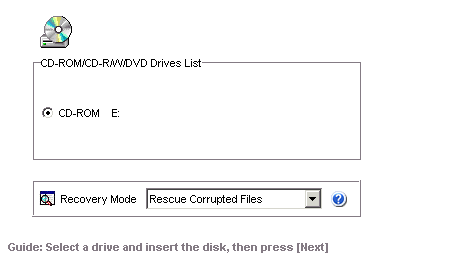
The first step is to select the device were our media used and the recovery mode. For our test we select rescue corrupted files, us we can see the file icons under Windows.
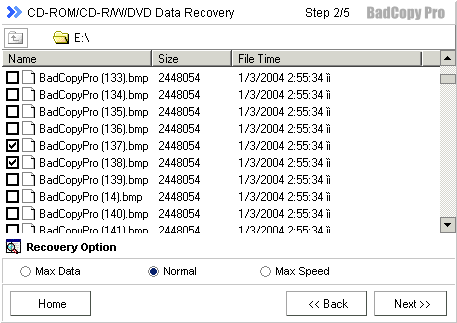
Second step, call the user to choose corrupted files. Hence, we choose our corrupted photos using the default recovery option and after that we click next button to continue.
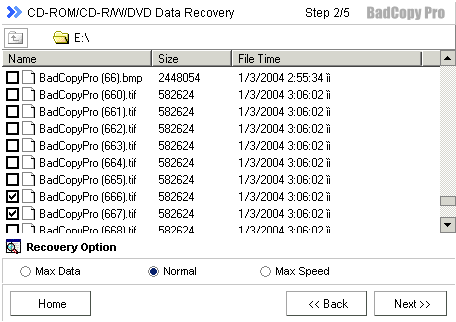
Now Bad copy attempts to recover the files, but first has to read and analyze them. User have also the option to skip a file or to stop recovery, as we can see from the picture below.
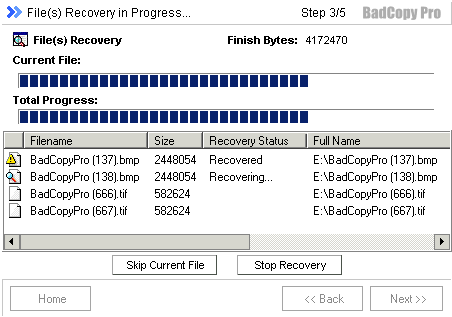
During the recovery process we could see recovery status at the status bar and also the bytes that the software has managed to recover until that point. At the status bar, program notifies that the corrupted data replaced by other random valid bytes with Auto Fill Function, which fill any missing (corrupted) bytes to reach the appropriate 2048 bytes per scrambled frame (Main data Bytes).

Doing this step, Windows environment become slow to any response (about 10 sec. to open internet explorer).


 

Review Pages

1. Introduction
2. CD-R Recovery Test - page 1
3. CD-R Recovery Test - page 2
4. CD-RW Recovery Test
5. Hard Disk Recovery Test
6. Floppy Recovery Test - page 1
7. Floppy Recovery Test - page 2
8. Floppy Recovery Test - page 3
9. Conlusion


Pages

  • « first
  • ‹ previous
  • 1
  • 2
  • 3
  • 4
  • 5
  • 6
  • 7
  • 8
  • 9
  • next ›
  • last »

Tags:
Previous Post
Memorex True-8x
Next Post
LiteOn SOHC-5232K combo

Related Posts

Latest Reviews

Fanxiang MP83 M.2 NVMe SSD Enclosure
Enterprise & IT

Fanxiang MP83 M.2 NVMe SSD Enclosure

Ugreen CM642 USB4.0 Enclosure
PC components

Ugreen CM642 USB4.0 Enclosure

be quiet! Dark Power 14 IO
PC components

be quiet! Dark Power 14 IO

SanDisk High Endurance 512GB microSDXC
Cameras

SanDisk High Endurance 512GB microSDXC

Samsung PRO Ultimate 512GB microSDXC
Cameras

Samsung PRO Ultimate 512GB microSDXC

Popular News

CORSAIR announces Vanguard Pro 96 and Vanguard 96 Gaming Keyboards

CORSAIR announces Vanguard Pro 96 and Vanguard 96 Gaming Keyboards

MSI Launches FORGE GK600 TKL WIRELESS Special Edition Compact Mechanical Keyboard

MSI Launches FORGE GK600 TKL WIRELESS Special Edition Compact Mechanical Keyboard

MSI’s Latest AMD X870E MAX & EVO Series Motherboards

MSI’s Latest AMD X870E MAX & EVO Series Motherboards

Panasonic Introduces the First Ultra-Telephoto Zoom Lens in the LUMIX S Series

Panasonic Introduces the First Ultra-Telephoto Zoom Lens in the LUMIX S Series

COLORFUL Launches iGame B850M ULTRA Series Micro-ATX Motherboards

COLORFUL Launches iGame B850M ULTRA Series Micro-ATX Motherboards

COLORFUL Presents Limited Edition Chitu MAG-60 Magnetic Keyboard Inspired by the Year of the Horse

COLORFUL Presents Limited Edition Chitu MAG-60 Magnetic Keyboard Inspired by the Year of the Horse

COLORFUL Presents iGame Z890 ULTRA-S W and iGame Z890M ULTRA Z Motherboards

COLORFUL Presents iGame Z890 ULTRA-S W and iGame Z890M ULTRA Z Motherboards

LIAN LI Launches 8.8” Universal Screen with Flexible Mounting Solution

LIAN LI Launches 8.8” Universal Screen with Flexible Mounting Solution

Main menu

  • Home
  • News
  • Reviews
  • Essays
  • About
    • Submit News

    • Contact Us
    • Privacy

    • Promotion
    • Advertise

    • RSS Feed
  • About
  • Privacy
  • Contact Us
  • Promotional Opportunities @ CdrInfo.com
  • Advertise on out site
  • Submit your News to our site
  • RSS Feed