Breaking News

Sony Announces the Launch of Xperia 1 VIII Kioxia Unveils High Performance KIOXIA XG10 Series SSDs for PC OEMs AMD Expands AMD Ryzen PRO 9000 Series Processor Lineup Thypoch enters autofocus market with Voyager 24-50mm f/2.8 for Sony E-mount PlayStation Plus Game Catalog for May 2026

logo

  • Share Us
    • Facebook
    • Twitter
  • Home
  • Home
  • News
  • Reviews
  • Essays
  • Forum
  • Legacy
  • About
    • Submit News

    • Contact Us
    • Privacy

    • Promotion
    • Advertise

    • RSS Feed
    • Site Map

Search form

Bad Copy Pro

Mar 10,2004 0

2. CD-R Recovery Test - page 1


Review Pages

1. Introduction
2. CD-R Recovery Test - page 1
3. CD-R Recovery Test - page 2
4. CD-RW Recovery Test
5. Hard Disk Recovery Test
6. Floppy Recovery Test - page 1
7. Floppy Recovery Test - page 2
8. Floppy Recovery Test - page 3
9. Conlusion


Bad Copy Pro - Page 2

CDR TEST

Starting the first test, with our CDR, we choose from recovery source board on the left,CD-ROM/CD-R/CD-RW source, for CD-ROM, CD-R, CD-RW discs.

Notice that under Windows we can see the media and corrupted files, but we can not have access to them, us we can`t see the images or write them to hard disk.

Bad Copy Pro features for CDs

1. Damaged or defective CD-ROM/CD-R/CD-RW data recovery

2. Inaccessible data on CD, CDR, CDRW recovery, CD Data Rescue

3. Lost files or folders from CD-ROM/CD-R/CD-RW rescue

4. CD-R or CD-RW burning problems and data loss recovery

5. Corrupted and unopenable, unreadable files recovery

6. Session selector to retrieve the data from multisession CDs

7. Recovers data created by all disc writing software including:

Ahead Nero Burning Rom or FileCD, Roxio Easy CD Creator or DirectCD etc.

The Test

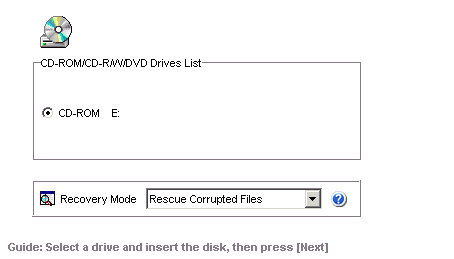
The first step is to select the device were our media used and the recovery mode. For our test we select rescue corrupted files, us we can see the file icons under Windows.
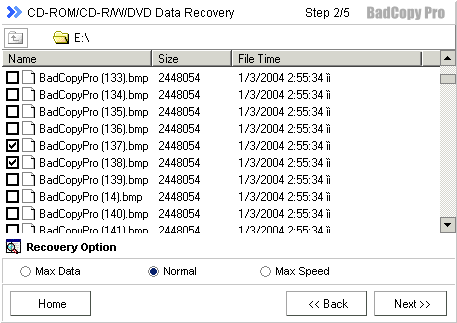
Second step, call the user to choose corrupted files. Hence, we choose our corrupted photos using the default recovery option and after that we click next button to continue.
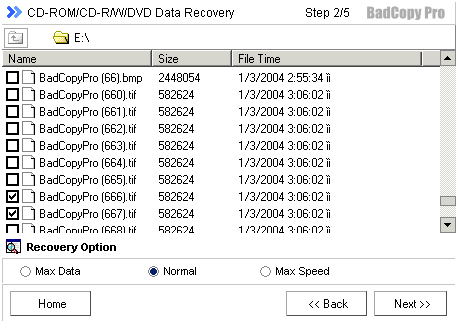
Now Bad copy attempts to recover the files, but first has to read and analyze them. User have also the option to skip a file or to stop recovery, as we can see from the picture below.
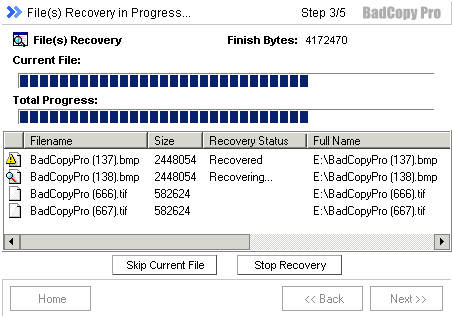
During the recovery process we could see recovery status at the status bar and also the bytes that the software has managed to recover until that point. At the status bar, program notifies that the corrupted data replaced by other random valid bytes with Auto Fill Function, which fill any missing (corrupted) bytes to reach the appropriate 2048 bytes per scrambled frame (Main data Bytes).

Doing this step, Windows environment become slow to any response (about 10 sec. to open internet explorer).


 

Review Pages

1. Introduction
2. CD-R Recovery Test - page 1
3. CD-R Recovery Test - page 2
4. CD-RW Recovery Test
5. Hard Disk Recovery Test
6. Floppy Recovery Test - page 1
7. Floppy Recovery Test - page 2
8. Floppy Recovery Test - page 3
9. Conlusion


Pages

  • « first
  • ‹ previous
  • 1
  • 2
  • 3
  • 4
  • 5
  • 6
  • 7
  • 8
  • 9
  • next ›
  • last »

Tags:
Previous Post
Memorex True-8x
Next Post
LiteOn SOHC-5232K combo

Related Posts

Latest Reviews

How Online Casinos Use Encryption, Verification, and Risk Controls to Build User Trust
Enterprise & IT

How Online Casinos Use Encryption, Verification, and Risk Controls to Build User Trust

Why Low-Latency Infrastructure Matters More Than Raw Specs
Enterprise & IT

Why Low-Latency Infrastructure Matters More Than Raw Specs

In the Age of AI Phishing, the Best User Experience Might Be the One That Feels Safest
Enterprise & IT

In the Age of AI Phishing, the Best User Experience Might Be the One That Feels Safest

SoundPeats C30
Consumer Electronics

SoundPeats C30

Why Streaming Live Casino Games Demands Smarter Tech
Enterprise & IT

Why Streaming Live Casino Games Demands Smarter Tech

Popular News

TEAMGROUP Launches EXPERT P34F Find My External SSD

TEAMGROUP Launches EXPERT P34F Find My External SSD

CORSAIR announces Vanguard Pro 96 and Vanguard 96 Gaming Keyboards

CORSAIR announces Vanguard Pro 96 and Vanguard 96 Gaming Keyboards

Samsung announces Galaxy Tab S11 and Galaxy S25 FE series

Samsung announces Galaxy Tab S11 and Galaxy S25 FE series

Viltrox Showcases Upcoming Lens Lineup and New TTL Flash at IBC 2025

Viltrox Showcases Upcoming Lens Lineup and New TTL Flash at IBC 2025

MSI Launches FORGE GK600 TKL WIRELESS Special Edition Compact Mechanical Keyboard

MSI Launches FORGE GK600 TKL WIRELESS Special Edition Compact Mechanical Keyboard

Panasonic Introduces the First Ultra-Telephoto Zoom Lens in the LUMIX S Series

Panasonic Introduces the First Ultra-Telephoto Zoom Lens in the LUMIX S Series

MSI Launches DATAMAG 40Gbps Magnetic Portable SSD

MSI Launches DATAMAG 40Gbps Magnetic Portable SSD

Viltrox Joins the L-Mount Alliance, Expanding Creative Possibilities

Viltrox Joins the L-Mount Alliance, Expanding Creative Possibilities

Main menu

  • Home
  • News
  • Reviews
  • Essays
  • Forum
  • Legacy
  • About
    • Submit News

    • Contact Us
    • Privacy

    • Promotion
    • Advertise

    • RSS Feed
    • Site Map
  • About
  • Privacy
  • Contact Us
  • Promotional Opportunities @ CdrInfo.com
  • Advertise on out site
  • Submit your News to our site
  • RSS Feed