Breaking News

ASUS Announces Intel Core Ultra 200S Plus Series Support on W880, Z890, Q870, B860 and H810 Motherboards G.SKILL DDR5 Memory Kits Confirmed as Intel XMP 3.0 'Ready' for Intel Core Ultra 200S Plus Series Processors ASUS Unveils Complete Portfolio Support for Intel Core 200S Series Samsung Brings AirDrop Support to Quick Share with Galaxy S26 Series TerraMaster Spring Sale 2026 Upgraded Up To 30%

logo

  • Share Us
    • Facebook
    • Twitter
  • Home
  • Home
  • News
  • Reviews
  • Essays
  • Forum
  • Legacy
  • About
    • Submit News

    • Contact Us
    • Privacy

    • Promotion
    • Advertise

    • RSS Feed
    • Site Map

Search form

ASUS PhysX P1 Card

Oct 10,2006 0

5. CellFactor - Page 1


Review Pages

1. Introduction
2. ASUS PhysX P1
3. Retail package
4. Installation
5. CellFactor - Page 1
6. CellFactor - Page 2
7. GRAW - Page 1
8. GRAW - Page 2
9. GRAW - Page 3
10. GRAW - Page 4
11. Reality Mark - Page 1
12. Reality Mark - Page 2
13. Conclusion


PhysX Owners can now get in on the action with the hot new hardware physics accelerated title: CellFactor: Combat Training from Artificial Studios and Immersion Games. All you need is a PhysX accelerator and a decent gaming rig, and you're ready to get fragging. This beta demo is both multiplayer and single player enabled with customizable bots. It includes one level for play plus Reality Builder software for creating your own levels.

Note: CellFactor Beta R36 includes a number of performance and file management improvements.

After downloading CellFactor R36, we used the built-in installer and after a while, we saw two icons on our desktop.
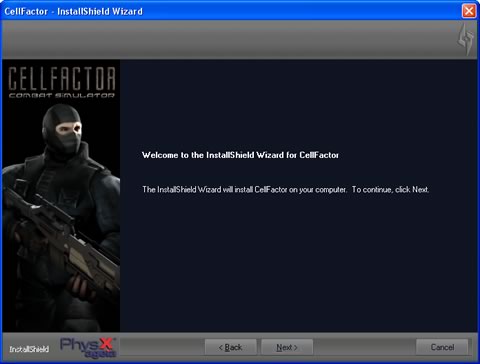
The final CellFactor version is expected to arrive in 2007. The game's engine would require an AGEIA PhysX card installed in order to run. Even the beta we tried warned us that it would not run if we didn't have an Ageia PhysX card on board. However, users can test CellFactor by adding "EnablePhysX=false" at the end of the game's shortcut.


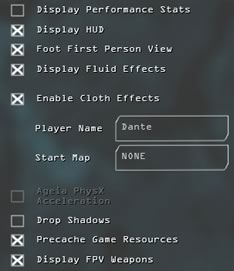
The game uses HDR, that gives a huge performance hit overall. For our review, we tried to find an acceptable frame rate at 1024x768 with mostly basic visual improvements enabled. In the game options, we found the selection box where Ageia PhysX acceleration is by default enabled and grayed out, Physics acceleration is on:
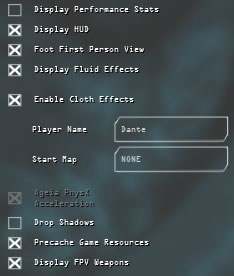
We could also disable physics acceleration using the above mentioned command parameter when running CellFactor so that it operates in software rendering mode.
 

Review Pages

1. Introduction
2. ASUS PhysX P1
3. Retail package
4. Installation
5. CellFactor - Page 1
6. CellFactor - Page 2
7. GRAW - Page 1
8. GRAW - Page 2
9. GRAW - Page 3
10. GRAW - Page 4
11. Reality Mark - Page 1
12. Reality Mark - Page 2
13. Conclusion


Pages

  • « first
  • ‹ previous
  • 1
  • 2
  • 3
  • 4
  • 5
  • 6
  • 7
  • 8
  • 9
  • …
  • next ›
  • last »

ASUS

AGEIA Technologies

Tags: ASUS AGEIA Technologies
Previous Post
The ZyXEL P-2000W V2 VoIP WiFi Phone
Next Post
Alk Technolgies CoPilot 6 Q Edition

Related Posts

  • ASUS Announces Intel Core Ultra 200S Plus Series Support on W880, Z890, Q870, B860 and H810 Motherboards

  • ASUS Unveils Complete Portfolio Support for Intel Core 200S Series

  • ASUS Announces 2026 TUF Gaming Laptop Lineup

  • ASUS Announces New-Gen NUC 16 Pro Mini PC

  • ASUS Unveils ExpertBook B3 G2

  • Announcing ASUS ExpertBook B5 G2

  • ASUS Unveils Mac-Friendly Features on ProArt Displays to Enhance Workflows

  • Asus at CES 2026

Latest Reviews

Why Streaming Live Casino Games Demands Smarter Tech
Enterprise & IT

Why Streaming Live Casino Games Demands Smarter Tech

Kioxia Exceria Plus G3 512GB microSD
Cameras

Kioxia Exceria Plus G3 512GB microSD

SoundPeats Cove Pro
Consumer Electronics

SoundPeats Cove Pro

Asustor AS5404T 4-Bay NAS System
Enterprise & IT

Asustor AS5404T 4-Bay NAS System

be quiet! Pure Power 13M 1200W
PC components

be quiet! Pure Power 13M 1200W

Popular News

COLORFUL Presents CVN X870 ARK FROZEN Motherboard for AMD Ryzen 9000 CPUs

COLORFUL Presents CVN X870 ARK FROZEN Motherboard for AMD Ryzen 9000 CPUs

TEAMGROUP Launches EXPERT P34F Find My External SSD

TEAMGROUP Launches EXPERT P34F Find My External SSD

Samsung announces Galaxy Tab S11 and Galaxy S25 FE series

Samsung announces Galaxy Tab S11 and Galaxy S25 FE series

Viltrox Showcases Upcoming Lens Lineup and New TTL Flash at IBC 2025

Viltrox Showcases Upcoming Lens Lineup and New TTL Flash at IBC 2025

CORSAIR announces Vanguard Pro 96 and Vanguard 96 Gaming Keyboards

CORSAIR announces Vanguard Pro 96 and Vanguard 96 Gaming Keyboards

Panasonic Introduces the First Ultra-Telephoto Zoom Lens in the LUMIX S Series

Panasonic Introduces the First Ultra-Telephoto Zoom Lens in the LUMIX S Series

MSI Launches DATAMAG 40Gbps Magnetic Portable SSD

MSI Launches DATAMAG 40Gbps Magnetic Portable SSD

MSI Launches FORGE GK600 TKL WIRELESS Special Edition Compact Mechanical Keyboard

MSI Launches FORGE GK600 TKL WIRELESS Special Edition Compact Mechanical Keyboard

Main menu

  • Home
  • News
  • Reviews
  • Essays
  • Forum
  • Legacy
  • About
    • Submit News

    • Contact Us
    • Privacy

    • Promotion
    • Advertise

    • RSS Feed
    • Site Map
  • About
  • Privacy
  • Contact Us
  • Promotional Opportunities @ CdrInfo.com
  • Advertise on out site
  • Submit your News to our site
  • RSS Feed