Breaking News

God of War Greek trilogy remake in development & God of War Sons of Sparta out now Sony Launches WF-1000XM6 Truly Wireless Earbuds EnGenius ECW515 Brings Wi-Fi 7 Performance to In-Room and In-Unit Deployments MSI Strengthens Strategic Partnership with Samsung Display Razer Introduces the BlackShark V3 for Xbox – White Edition

logo

  • Share Us
    • Facebook
    • Twitter
  • Home
  • Home
  • News
  • Reviews
  • Essays
  • Forum
  • Legacy
  • About
    • Submit News

    • Contact Us
    • Privacy

    • Promotion
    • Advertise

    • RSS Feed
    • Site Map

Search form

ASUS PhysX P1 Card

Oct 10,2006 0

4. Installation


Review Pages

1. Introduction
2. ASUS PhysX P1
3. Retail package
4. Installation
5. CellFactor - Page 1
6. CellFactor - Page 2
7. GRAW - Page 1
8. GRAW - Page 2
9. GRAW - Page 3
10. GRAW - Page 4
11. Reality Mark - Page 1
12. Reality Mark - Page 2
13. Conclusion


After installing the card in a free PCI bus slot, Windows prompts for the drivers (unknown PCI device). We used the latest available driver pack ( v2.51) for all tests. The installation wizard is easy and shortly after rebooting, you can begin exploring what the Asus PhysX P1 card has to offer.

After rebooting, you can check the various properties of the AGEIA PhysX card, like the installed Windows driver and PhysX engine:

There is a demo included that works both with the card installed (hardware) or not (software mode):
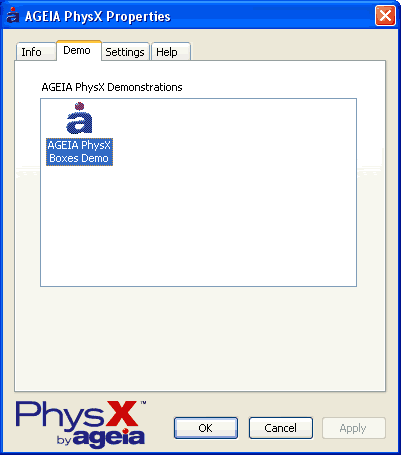
A screenshot from the demo is shown below. You hit a pack of boxes with balls and see how each box reacts.

The CPU load was around 53%:
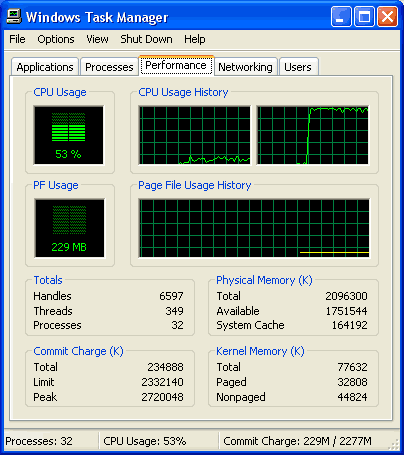
Disabling the PhysX card (software mode), the CPU load increased up to 73% (max):

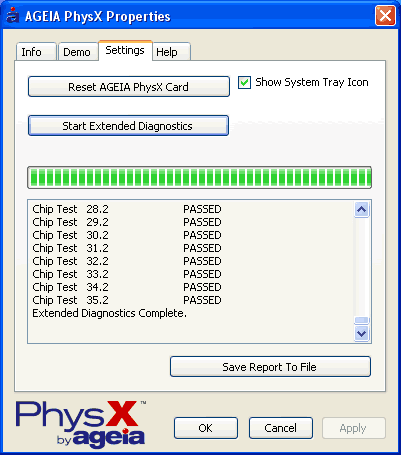
The card can also be reset or can perform extended diagnostics,
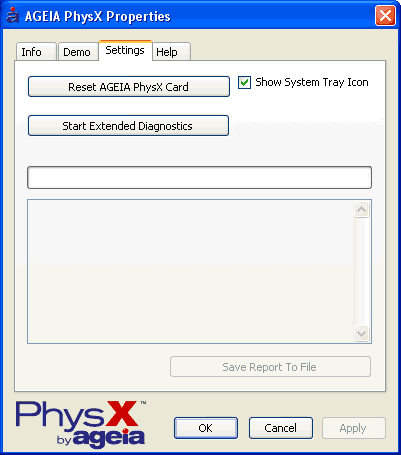
that validates your card is working just fine.
 

Review Pages

1. Introduction
2. ASUS PhysX P1
3. Retail package
4. Installation
5. CellFactor - Page 1
6. CellFactor - Page 2
7. GRAW - Page 1
8. GRAW - Page 2
9. GRAW - Page 3
10. GRAW - Page 4
11. Reality Mark - Page 1
12. Reality Mark - Page 2
13. Conclusion


Pages

  • « first
  • ‹ previous
  • 1
  • 2
  • 3
  • 4
  • 5
  • 6
  • 7
  • 8
  • 9
  • …
  • next ›
  • last »

ASUS

AGEIA Technologies

Tags: ASUS AGEIA Technologies
Previous Post
The ZyXEL P-2000W V2 VoIP WiFi Phone
Next Post
Alk Technolgies CoPilot 6 Q Edition

Related Posts

  • Announcing ASUS ExpertBook B5 G2

  • ASUS Unveils Mac-Friendly Features on ProArt Displays to Enhance Workflows

  • Asus at CES 2026

  • ASUS Announces ProArt PF120 Case Fan

  • ASUS Announces Prime AP303 Compact Mid-Tower ATX Case

  • ASUS TUF Gaming Unveils Call of Duty Black Ops 7 Edition AMD Radeon RX 9070 XT

  • ASUS Announces October Availability of ProArt Display 8K PA32KCX

  • ASUS Unveils ProArt PA401, PA602 Wood Edition PC Cases with Retro Colors

Latest Reviews

Asustor AS5404T 4-Bay NAS System
Enterprise & IT

Asustor AS5404T 4-Bay NAS System

be quiet! Pure Power 13M 1200W
PC components

be quiet! Pure Power 13M 1200W

Server-Side Gaming Why Canadian Online Casinos Are Abandoning Local Clients for HTML5 Clouds
Enterprise & IT

Server-Side Gaming Why Canadian Online Casinos Are Abandoning Local Clients for HTML5 Clouds

Airfanta 3 Pro Air
Consumer Electronics

Airfanta 3 Pro Air

Akaso Brave 8 Lite
Cameras

Akaso Brave 8 Lite

Popular News

COLORFUL Introduces CVN B850I GAMING FROZEN Motherboard

COLORFUL Introduces CVN B850I GAMING FROZEN Motherboard

COLORFUL Presents CVN X870 ARK FROZEN Motherboard for AMD Ryzen 9000 CPUs

COLORFUL Presents CVN X870 ARK FROZEN Motherboard for AMD Ryzen 9000 CPUs

TEAMGROUP Launches EXPERT P34F Find My External SSD

TEAMGROUP Launches EXPERT P34F Find My External SSD

Samsung announces Galaxy Tab S11 and Galaxy S25 FE series

Samsung announces Galaxy Tab S11 and Galaxy S25 FE series

Viltrox Showcases Upcoming Lens Lineup and New TTL Flash at IBC 2025

Viltrox Showcases Upcoming Lens Lineup and New TTL Flash at IBC 2025

CORSAIR announces Vanguard Pro 96 and Vanguard 96 Gaming Keyboards

CORSAIR announces Vanguard Pro 96 and Vanguard 96 Gaming Keyboards

Panasonic Introduces the First Ultra-Telephoto Zoom Lens in the LUMIX S Series

Panasonic Introduces the First Ultra-Telephoto Zoom Lens in the LUMIX S Series

MSI Launches DATAMAG 40Gbps Magnetic Portable SSD

MSI Launches DATAMAG 40Gbps Magnetic Portable SSD

Main menu

  • Home
  • News
  • Reviews
  • Essays
  • Forum
  • Legacy
  • About
    • Submit News

    • Contact Us
    • Privacy

    • Promotion
    • Advertise

    • RSS Feed
    • Site Map
  • About
  • Privacy
  • Contact Us
  • Promotional Opportunities @ CdrInfo.com
  • Advertise on out site
  • Submit your News to our site
  • RSS Feed