Breaking News

Toshiba to Showcase High-Performance AI and Petabyte-Scale Storage Solutions at Cloudfest 2026 The SAMA V62 brings panoramic design to modern PC builds ASUS Republic of Gamers Announces New Strix OLED monitors PlayStation Plus Game Catalog for March 2026 Intel Announces New Intel Core Ultra 200S Plus Series Desktop Processors

logo

  • Share Us
    • Facebook
    • Twitter
  • Home
  • Home
  • News
  • Reviews
  • Essays
  • Forum
  • Legacy
  • About
    • Submit News

    • Contact Us
    • Privacy

    • Promotion
    • Advertise

    • RSS Feed
    • Site Map

Search form

Asus P5WDH Deluxe

Feb 8,2007 0

3. BIOS


Review Pages

1. Introduction
2. The Package
3. BIOS
4. Installation
5. Everest Ultimate Edition 2006
6. PCMARK - 3DMARK
7. Science Mark - Nero Digital
8. CINEBENCH -SuperPI
9. F.E.A.R - Prey
10. Splinter Cell Chaos Theory - Half Life
11. Overclocking
12. Conclusion


The BIOS is that typically found on ASUS motherboards. The first tab includes the system time/date and storage devices:
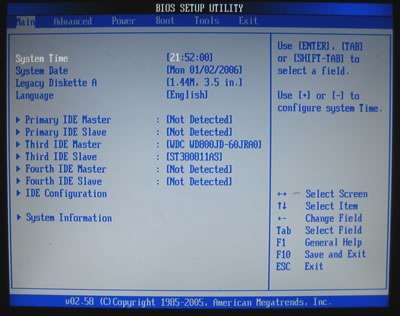
The second tab includes the Advanced configurations for the board.

Below we can see the settings under JumperFree Configuration. FSB can be raised up to 550, a rather un-realistic number as we will see later on:

The DRAM Frequency has 8 settings ranging from Auto to DDR2-1067MHz.
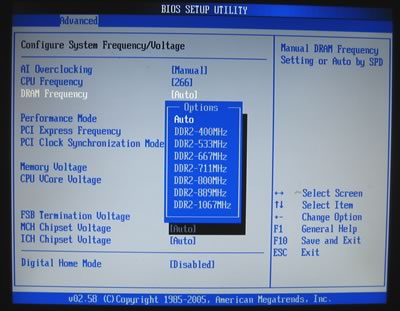
Each setting represents a different FSB:RAM ratio, so be careful what to select:

  • DDR2-400 (4:3)
  • DDR2-533 (1:1)
  • DDR2-667 (4:5)
  • DDR2-771 (3:4)
  • DDR2-800 (2:3)
  • DDR2-889 (3:5)
  • DDR2-1067 (1:2)

If you decide to overclock, increasing the FSB changes the DRAM Frequency automatically, a very useful feature. Memory, CPU, FSB, NB, SB and ICH voltages can be set according to the following table.

BIOS Setting Feature:
CPU bus frequency
100 to 550MHz in 1MHz steps
CPU voltage
1.2875V to 1.7000V in 0.0125V steps
DRAM voltage
1.80V to 2.40V in 0.5V steps
PCI Express frequency
90 to 104MHz in 1MHz steps
i975X MCH voltage
1.50V to 1.80V in 0.10V steps
FSB voltage
1.20V to 1.50V in 0.10V steps
ICH7R voltage
1.05V and 1.20V only

From the Advanced CPU settings, we can set important parameters for our processor. If you install a Core2Duo CPU, you can set the Ratio status (set Ratio Support to Enabled) and disable SpeedStep Technology (set C1 Support to Disabled):

The North Bridge chipset controls DRAM. By default, all settings are left at Auto. Of course, users can take control and adjust the memory timings. There are two settings for higher memory performance (Hyper Path 3 and DRAM Throttling Threshold):

Hardware monitor allows you to see how hot your CPU runs:


Review Pages

1. Introduction
2. The Package
3. BIOS
4. Installation
5. Everest Ultimate Edition 2006
6. PCMARK - 3DMARK
7. Science Mark - Nero Digital
8. CINEBENCH -SuperPI
9. F.E.A.R - Prey
10. Splinter Cell Chaos Theory - Half Life
11. Overclocking
12. Conclusion


Pages

  • « first
  • ‹ previous
  • 1
  • 2
  • 3
  • 4
  • 5
  • 6
  • 7
  • 8
  • 9
  • …
  • next ›
  • last »

ASUS

ATI

Intel

AMD

Tags: ASUS ATI Intel AMD
Previous Post
F-Tech Solar MT
Next Post
LG GBW-H10N

Related Posts

  • Intel Announces New Intel Core Ultra 200S Plus Series Desktop Processors

  • Intel Launches Core Series 2 Processor with Real-Time Performance and Expands Edge AI Portfolio

  • ASUS Announces New-Gen NUC 16 Pro Mini PC

  • AMD Ryzen AI PRO 400 Series CPUs Deliver Advanced AI for Desktops

  • ASUS Unveils ExpertBook B3 G2

  • Announcing ASUS ExpertBook B5 G2

  • Intel Launches new Intel Xeon 600 Processors for Workstation

  • ASUS Unveils Mac-Friendly Features on ProArt Displays to Enhance Workflows

Latest Reviews

Why Streaming Live Casino Games Demands Smarter Tech
Enterprise & IT

Why Streaming Live Casino Games Demands Smarter Tech

Kioxia Exceria Plus G3 512GB microSD
Cameras

Kioxia Exceria Plus G3 512GB microSD

SoundPeats Cove Pro
Consumer Electronics

SoundPeats Cove Pro

Asustor AS5404T 4-Bay NAS System
Enterprise & IT

Asustor AS5404T 4-Bay NAS System

be quiet! Pure Power 13M 1200W
PC components

be quiet! Pure Power 13M 1200W

Popular News

COLORFUL Presents CVN X870 ARK FROZEN Motherboard for AMD Ryzen 9000 CPUs

COLORFUL Presents CVN X870 ARK FROZEN Motherboard for AMD Ryzen 9000 CPUs

TEAMGROUP Launches EXPERT P34F Find My External SSD

TEAMGROUP Launches EXPERT P34F Find My External SSD

Samsung announces Galaxy Tab S11 and Galaxy S25 FE series

Samsung announces Galaxy Tab S11 and Galaxy S25 FE series

Viltrox Showcases Upcoming Lens Lineup and New TTL Flash at IBC 2025

Viltrox Showcases Upcoming Lens Lineup and New TTL Flash at IBC 2025

CORSAIR announces Vanguard Pro 96 and Vanguard 96 Gaming Keyboards

CORSAIR announces Vanguard Pro 96 and Vanguard 96 Gaming Keyboards

Panasonic Introduces the First Ultra-Telephoto Zoom Lens in the LUMIX S Series

Panasonic Introduces the First Ultra-Telephoto Zoom Lens in the LUMIX S Series

MSI Launches DATAMAG 40Gbps Magnetic Portable SSD

MSI Launches DATAMAG 40Gbps Magnetic Portable SSD

MSI Launches FORGE GK600 TKL WIRELESS Special Edition Compact Mechanical Keyboard

MSI Launches FORGE GK600 TKL WIRELESS Special Edition Compact Mechanical Keyboard

Main menu

  • Home
  • News
  • Reviews
  • Essays
  • Forum
  • Legacy
  • About
    • Submit News

    • Contact Us
    • Privacy

    • Promotion
    • Advertise

    • RSS Feed
    • Site Map
  • About
  • Privacy
  • Contact Us
  • Promotional Opportunities @ CdrInfo.com
  • Advertise on out site
  • Submit your News to our site
  • RSS Feed