Breaking News

Kioxia and Dell Technologies First to Deliver High-Density Server with 9.8 PB of Flash Storage ASUS Republic of Gamers Announces ROG NUC 16 Silicon Power Launches CreatePro Series Newtro Cooling Series and Next-Gen LCD Coolers at Computex 2026 Sony Announces the Launch of Xperia 1 VIII

logo

  • Share Us
    • Facebook
    • Twitter
  • Home
  • Home
  • News
  • Reviews
  • Essays
  • Forum
  • Legacy
  • About
    • Submit News

    • Contact Us
    • Privacy

    • Promotion
    • Advertise

    • RSS Feed
    • Site Map

Search form

Asus P5W64WS Pro

Feb 11,2007 0

11. Overclocking


Review Pages

1. Introduction
2. The Package
3. Bios
4. Installation
5. Everest Ultimate Edition 2006 - Sisoft Sandra
6. PC Mark05 - 3D Mark06
7. Scienc Mark - Pov Ray
8. CineBench - SuperPi
9. F.E.A.R. - Prey
10. Splinter Cell Chaos Theory - Half Life 2
11. Overclocking
12. Working with 8 monitors
13. Conclusion


- Overclocking

The Asus P5W64WS Pro isn't advertised as an overclocking champion. Regardless, Asus provides all the necessary options for users to tweak their system and discover just how high they can go. As we saw in the BIOS page, the FSB on the Asus P5W64WS can go up to 550MHz. Our first experiment was to find out just how high we could push the FSB, without any voltage tweaks. We set Intel's E6600 internal CPU multiplier to 6x and got a stable system at 395MHz.
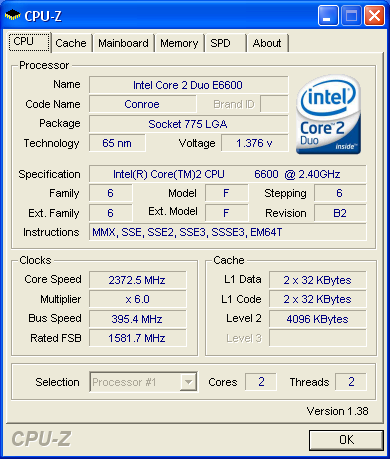
It's not as high as the P5B Deluxe which reached 430MHz with the exactly same components. Of course, overclocking depends on several factors such as CPU, cooling system and RAM.

We then tried to find the maximum FSB after setting the internal CPU multiplier to 9x and raising the FSB. We managed to get a stable system at 3.110GHz with FSB at 345MHz. While it's impressive, the P5B Deluxe was somewhat better managing 350MHz FSB.

Concluding our overclocking attempts, without any voltage tweaks we raised the FSB up to 400MHz. However, there are reports from our publications and forums indicating that the P5W64 WS Pro can go up to 470~500FSB (with the proper voltage tweaks and the selected CPU/RAM combination). The Asus P5B Deluxe can go at least that high, maybe even higher...


Review Pages
1. Introduction
2. The Package
3. Bios
4. Installation
5. Everest Ultimate Edition 2006 - Sisoft Sandra
6. PC Mark05 - 3D Mark06
7. Scienc Mark - Pov Ray
8. CineBench - SuperPi
9. F.E.A.R. - Prey
10. Splinter Cell Chaos Theory - Half Life 2
11. Overclocking
12. Working with 8 monitors
13. Conclusion


Pages

  • « first
  • ‹ previous
  • …
  • 5
  • 6
  • 7
  • 8
  • 9
  • 10
  • 11
  • 12
  • 13
  • next ›
  • last »

ASUS

MotherBoards

Tags: ASUS MotherBoards
Previous Post
Linux Raid Guide
Next Post
SuperTalent MegaScreen

Related Posts

  • ASUS Announces ProArt GeForce RTX 5090 Graphics Card

  • ASUS Announces ProArt Display OLED PA27USD and PA32USD

  • ASUS Announces TUF Gaming Platinum Power Supply Series

  • ASUS Announces ProArt PA40SU USB4 SSD Enclosure

  • ASUS Showcases Comprehensive AI-Powered Creator Workflows at NAB Show 2026

  • ASUS Announces ProArt Router PRT-BE5000 and ProArt Switch PQG-U1080

  • ASUS Announces Intel Core Ultra 200S Plus Series Support on W880, Z890, Q870, B860 and H810 Motherboards

  • ASUS Unveils Complete Portfolio Support for Intel Core 200S Series

Latest Reviews

How Online Casinos Use Encryption, Verification, and Risk Controls to Build User Trust
Enterprise & IT

How Online Casinos Use Encryption, Verification, and Risk Controls to Build User Trust

Why Low-Latency Infrastructure Matters More Than Raw Specs
Enterprise & IT

Why Low-Latency Infrastructure Matters More Than Raw Specs

In the Age of AI Phishing, the Best User Experience Might Be the One That Feels Safest
Enterprise & IT

In the Age of AI Phishing, the Best User Experience Might Be the One That Feels Safest

SoundPeats C30
Consumer Electronics

SoundPeats C30

Why Streaming Live Casino Games Demands Smarter Tech
Enterprise & IT

Why Streaming Live Casino Games Demands Smarter Tech

Popular News

TEAMGROUP Launches EXPERT P34F Find My External SSD

TEAMGROUP Launches EXPERT P34F Find My External SSD

CORSAIR announces Vanguard Pro 96 and Vanguard 96 Gaming Keyboards

CORSAIR announces Vanguard Pro 96 and Vanguard 96 Gaming Keyboards

Samsung announces Galaxy Tab S11 and Galaxy S25 FE series

Samsung announces Galaxy Tab S11 and Galaxy S25 FE series

Viltrox Showcases Upcoming Lens Lineup and New TTL Flash at IBC 2025

Viltrox Showcases Upcoming Lens Lineup and New TTL Flash at IBC 2025

MSI Launches FORGE GK600 TKL WIRELESS Special Edition Compact Mechanical Keyboard

MSI Launches FORGE GK600 TKL WIRELESS Special Edition Compact Mechanical Keyboard

Panasonic Introduces the First Ultra-Telephoto Zoom Lens in the LUMIX S Series

Panasonic Introduces the First Ultra-Telephoto Zoom Lens in the LUMIX S Series

MSI Launches DATAMAG 40Gbps Magnetic Portable SSD

MSI Launches DATAMAG 40Gbps Magnetic Portable SSD

Viltrox Joins the L-Mount Alliance, Expanding Creative Possibilities

Viltrox Joins the L-Mount Alliance, Expanding Creative Possibilities

Main menu

  • Home
  • News
  • Reviews
  • Essays
  • Forum
  • Legacy
  • About
    • Submit News

    • Contact Us
    • Privacy

    • Promotion
    • Advertise

    • RSS Feed
    • Site Map
  • About
  • Privacy
  • Contact Us
  • Promotional Opportunities @ CdrInfo.com
  • Advertise on out site
  • Submit your News to our site
  • RSS Feed