Breaking News

Samsung Showcases Glasses-Free 3D and HDR10+ GAMING ASRock Z890I Nova WiFi R2.0 Supports CQDIMM GoPro Unveils GP3 Lenovo Unveils Adaptive AI PCs, Modular Concepts, and Lenovo Qira Rollout at MWC 2026 Say hello to MacBook Neo

logo

  • Share Us
    • Facebook
    • Twitter
  • Home
  • Home
  • News
  • Reviews
  • Essays
  • Forum
  • Legacy
  • About
    • Submit News

    • Contact Us
    • Privacy

    • Promotion
    • Advertise

    • RSS Feed
    • Site Map

Search form

Asus P5B Deluxe/WiFi-AP

Nov 28,2006 0

2. The Package


Review Pages

1. Introduction
2. The Package
3. BIOS
4. Installation
5. Tests - Page 1
6. Tests - Page 2
7. Tests - Page 3
8. F.E.A.R.
9. Splinter Cell Chaos Theory
10. Overclocking - Page 1
11. WiFi-AP
12. Crossfire/SLI or both
13. Conclusion


The Asus P5B Deluxe package is quite big. It can be found at a price ranging from US $200~250, making it an expensive solution for entry level users. On the other hand, enthusiast users will find the price very affordable:

The package includes all information about the board's design and special features
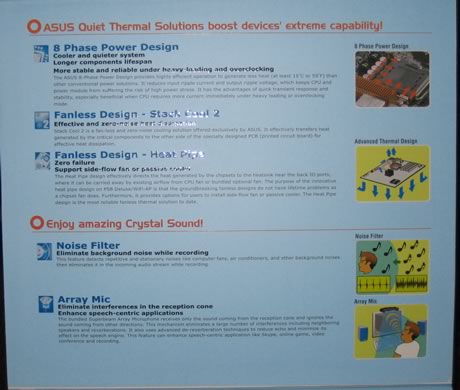
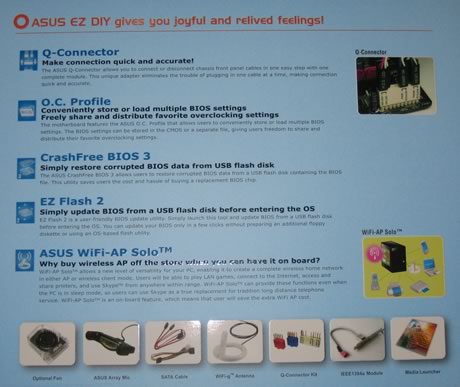
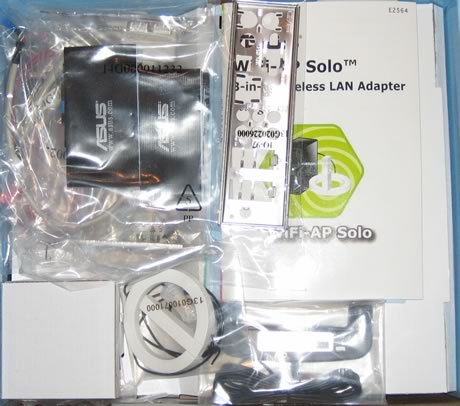
Below is a list of what's included in the retail package

  • 1x UltraDMA 133/100/66 cable
  • 1x FDD cable
  • 3x SATA cables
  • 3x SATA power cables
  • 1x I/O Shield
  • 1x Motherboard Printed User's manual
  • 1x WiFi-AP Solo User's manual
  • 1x USB2.0 port module
  • 1x 3 in 1 Q-connector
  • 1x IEEE1394 port module
  • 1x Optional Fan for Water-Cooling or Passive-Cooling only
  • 1x ASUS WiFi-AP Solo omni-directional antenna
  • 1x Array Mic
  • 1x CD-ROM with InterVideo® Media Launcher (WinDVD Creator 2, InterVideo PhotoAlbum, DiscMaster 2.5 Platinum, DVD Copy 2.5 Platinum)
    A flyer with installation and motherboard information
  • 1x CD-ROM with drivers

The board itself, looks very "tidy" and most parts can be identified easily:

Let's zoom- in on the CPU area. We can clearly notice the passive cooling solution for the northbridge. As Asus comments "...The Heat Pipe design effectively directs the heat generated by the chipsets to the heatsink near the back IO ports, where it can be carried away by existing airflow from CPU fan or bundled optional fan...". Nearby components are low profile so there shouldn't be any problem with large 3rd party cooling solutions:

Click to Enlarge!

Moving to the southbridge, we can see the passive heatsink and the eight SATA 2 connections

The Asus P5B Deluxe board is ATI Crossfire enabled, hence the two PCI-E slots for your Crossfire setup. Between the two PCI-E slots, we find two PCI slots and in total, the P5B Deluxe has three.

There are several extra connections for USB, Front Panel Audio, COM2 and Firewire on the rear. Asus has include all port modules in the retail package. The back I/O panel has the usual connectors

  • 1 x PS/2 Keyboard
  • 1 x PS/2 Mouse
  • 1 x Serial port
  • 1 x S/PDIF Out (Coaxial + Optical)
  • 1 x External SATA
  • 1 x IEEE1394a
  • 2 x RJ45 port (1GBit LAN)
  • 4 x USB 2.0/1.1
  • 1 x WiFi-AP Solo antenna jack
  • 8-Channel Audio I/O

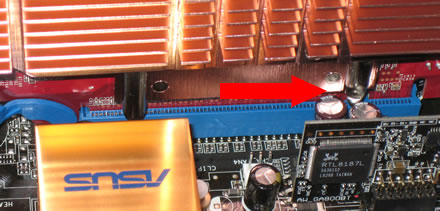
We notices what could lead to a rather difficult situation, if you decide to install a large sized VGA card, like the MSI 7600GT Silent. There are two capacitors very close to the PCI-E slot that may get damaged if you aren't careful when installing and removing the VGA card. On the other hand, using a passively cooled card, won't present any problems:
 

Review Pages

1. Introduction
2. The Package
3. BIOS
4. Installation
5. Tests - Page 1
6. Tests - Page 2
7. Tests - Page 3
8. F.E.A.R.
9. Splinter Cell Chaos Theory
10. Overclocking - Page 1
11. WiFi-AP
12. Crossfire/SLI or both
13. Conclusion


Pages

  • « first
  • ‹ previous
  • 1
  • 2
  • 3
  • 4
  • 5
  • 6
  • 7
  • 8
  • 9
  • …
  • next ›
  • last »

Tags:
Previous Post
Mushkin HP2-6400
Next Post
TeleType GPS WorldNav 3100 Portable GPS - Premium Edition

Related Posts

  • ASUS EXPEDITION GTX1050TI-4G review

  • ASUS STRIX R9 380X OC review

  • Asus Maximus IV Gene-Z review

  • Asus SaberTooth P67 B3 review

  • Asus P6T Deluxe Vs Foxconn Renaissance

  • Asus Rampage Extreme

  • Asus P5Q Deluxe

  • Asus Xonar DX

Latest Reviews

Why Streaming Live Casino Games Demands Smarter Tech
Enterprise & IT

Why Streaming Live Casino Games Demands Smarter Tech

Kioxia Exceria Plus G3 512GB microSD
Cameras

Kioxia Exceria Plus G3 512GB microSD

SoundPeats Cove Pro
Consumer Electronics

SoundPeats Cove Pro

Asustor AS5404T 4-Bay NAS System
Enterprise & IT

Asustor AS5404T 4-Bay NAS System

be quiet! Pure Power 13M 1200W
PC components

be quiet! Pure Power 13M 1200W

Popular News

COLORFUL Presents CVN X870 ARK FROZEN Motherboard for AMD Ryzen 9000 CPUs

COLORFUL Presents CVN X870 ARK FROZEN Motherboard for AMD Ryzen 9000 CPUs

TEAMGROUP Launches EXPERT P34F Find My External SSD

TEAMGROUP Launches EXPERT P34F Find My External SSD

Samsung announces Galaxy Tab S11 and Galaxy S25 FE series

Samsung announces Galaxy Tab S11 and Galaxy S25 FE series

Viltrox Showcases Upcoming Lens Lineup and New TTL Flash at IBC 2025

Viltrox Showcases Upcoming Lens Lineup and New TTL Flash at IBC 2025

CORSAIR announces Vanguard Pro 96 and Vanguard 96 Gaming Keyboards

CORSAIR announces Vanguard Pro 96 and Vanguard 96 Gaming Keyboards

Panasonic Introduces the First Ultra-Telephoto Zoom Lens in the LUMIX S Series

Panasonic Introduces the First Ultra-Telephoto Zoom Lens in the LUMIX S Series

MSI Launches DATAMAG 40Gbps Magnetic Portable SSD

MSI Launches DATAMAG 40Gbps Magnetic Portable SSD

MSI Launches FORGE GK600 TKL WIRELESS Special Edition Compact Mechanical Keyboard

MSI Launches FORGE GK600 TKL WIRELESS Special Edition Compact Mechanical Keyboard

Main menu

  • Home
  • News
  • Reviews
  • Essays
  • Forum
  • Legacy
  • About
    • Submit News

    • Contact Us
    • Privacy

    • Promotion
    • Advertise

    • RSS Feed
    • Site Map
  • About
  • Privacy
  • Contact Us
  • Promotional Opportunities @ CdrInfo.com
  • Advertise on out site
  • Submit your News to our site
  • RSS Feed