Breaking News

Intel Announces New Intel Core Ultra 200S Plus Series Desktop Processors Sharkoon announces OfficePal KB70W Akasa Unveils Pascal MX Mini-ITX Fanless Case Intel Launches Core Series 2 Processor with Real-Time Performance and Expands Edge AI Portfolio ASUS Announces New-Gen NUC 16 Pro Mini PC

logo

  • Share Us
    • Facebook
    • Twitter
  • Home
  • Home
  • News
  • Reviews
  • Essays
  • Forum
  • Legacy
  • About
    • Submit News

    • Contact Us
    • Privacy

    • Promotion
    • Advertise

    • RSS Feed
    • Site Map

Search form

Asus P5AD2-E Premium

Feb 3,2005 0

3. Board Layout


Review Pages

1. Introduction
2. Features
3. Board Layout
4. Performance Part 1
5. Half Life 2
6. Ground Control II
7. Bios & Overclocking
8. Software
9. Conclusion


003 - Asus P5AD2-E Premium - Board Layout

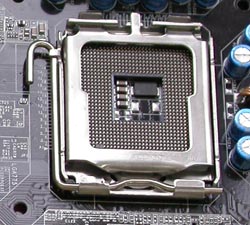
CPU Socket

In the socket 775 architecture, the pins have moved from the processor and onto the motherboard socket. This way, breaking one of the pins no longer results in a destroyed processor but a destroyed motherboard, which is easier and cheaper to replace.
Memory Banks

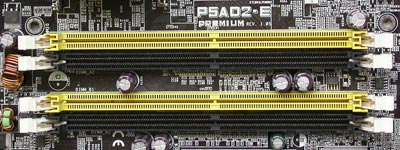
The memory module slots come in two colors, yellow and black which highlights the mainboard's Dual Channel memory support and suggests the best way to place your memory modules. Furthermore, even if your memory parts have different MB capacities, the board still takes advantage of the dual channel and running under assymetry mode, it lowers the fetch time of memory data.
 

Back Panel

The rear panel input / output provides the following connections:

From left to right and top to bottom:

  • parallel connection
  • the mouse PS/2 female connection
  • the keyboard connection
  • two SPDIF ports
  • one firewire IEEE 1394a and two USB 2.0 ports
  • one gigabyte lan port and two USB 2.0
  • Rear/Side/Center Speaker Out
  • Line In/Line Out/Mic In
  • Wireless LAN led and Antenna connection
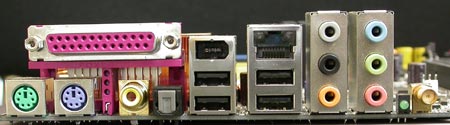
One thing to notice here is the lack of a serial COM port. However, if you are really in need of such a port, you can construct it yourself using a serial COM cable from an older computer and connecting it on the available pins located at the southeast corner of the motherboard.


Drive Connectors

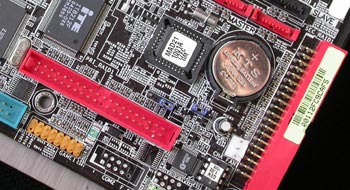
As we mentioned earlier, the motherboard features 3 IDE connectors and 8 for Serial ATA drives.

The primary connector is coloured blue and located just below the floppy connector.
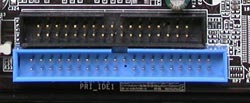
The remaining two connectors are supported by a RAID controller and can be set up to form RAID 0, RAID 1 and RAID 0+1 disk arrays. However, there is no problem if you try using them as regular IDE connectors for your drives.
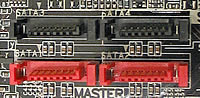
The SATA connectors are divided into two sets of four. The first set is controllled by a Silicon Image chip and supports RAID 0, RAID 1, RAID 10 and software RAID 5.

The second set, being controlled by the ICH6 chipset on the southbridge, is only capable of supporting RAID 0 and RAID 1 disk arrays.
Slots

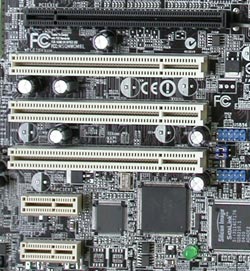
Below you can see the Extension slots for the P2AD2-E Premium. At the top you'll find the x16 PCI-Express slot intended for your VGA card. Below that, there are three PCI slots followed by two x1 PCI-Express slots.
 

Review Pages

1. Introduction
2. Features
3. Board Layout
4. Performance Part 1
5. Half Life 2
6. Ground Control II
7. Bios & Overclocking
8. Software
9. Conclusion


Pages

  • « first
  • ‹ previous
  • 1
  • 2
  • 3
  • 4
  • 5
  • 6
  • 7
  • 8
  • 9
  • next ›
  • last »

ASUS

Tags: ASUS
Previous Post
ASUS A8N-SLI Deluxe
Next Post
LG GSA-4163B

Related Posts

  • ASUS Announces New-Gen NUC 16 Pro Mini PC

  • ASUS Unveils ExpertBook B3 G2

  • Announcing ASUS ExpertBook B5 G2

  • ASUS Unveils Mac-Friendly Features on ProArt Displays to Enhance Workflows

  • Asus at CES 2026

  • ASUS Announces ProArt PF120 Case Fan

  • ASUS Announces Prime AP303 Compact Mid-Tower ATX Case

  • ASUS TUF Gaming Unveils Call of Duty Black Ops 7 Edition AMD Radeon RX 9070 XT

Latest Reviews

Why Streaming Live Casino Games Demands Smarter Tech
Enterprise & IT

Why Streaming Live Casino Games Demands Smarter Tech

Kioxia Exceria Plus G3 512GB microSD
Cameras

Kioxia Exceria Plus G3 512GB microSD

SoundPeats Cove Pro
Consumer Electronics

SoundPeats Cove Pro

Asustor AS5404T 4-Bay NAS System
Enterprise & IT

Asustor AS5404T 4-Bay NAS System

be quiet! Pure Power 13M 1200W
PC components

be quiet! Pure Power 13M 1200W

Popular News

COLORFUL Presents CVN X870 ARK FROZEN Motherboard for AMD Ryzen 9000 CPUs

COLORFUL Presents CVN X870 ARK FROZEN Motherboard for AMD Ryzen 9000 CPUs

TEAMGROUP Launches EXPERT P34F Find My External SSD

TEAMGROUP Launches EXPERT P34F Find My External SSD

Samsung announces Galaxy Tab S11 and Galaxy S25 FE series

Samsung announces Galaxy Tab S11 and Galaxy S25 FE series

Viltrox Showcases Upcoming Lens Lineup and New TTL Flash at IBC 2025

Viltrox Showcases Upcoming Lens Lineup and New TTL Flash at IBC 2025

CORSAIR announces Vanguard Pro 96 and Vanguard 96 Gaming Keyboards

CORSAIR announces Vanguard Pro 96 and Vanguard 96 Gaming Keyboards

Panasonic Introduces the First Ultra-Telephoto Zoom Lens in the LUMIX S Series

Panasonic Introduces the First Ultra-Telephoto Zoom Lens in the LUMIX S Series

MSI Launches DATAMAG 40Gbps Magnetic Portable SSD

MSI Launches DATAMAG 40Gbps Magnetic Portable SSD

MSI Launches FORGE GK600 TKL WIRELESS Special Edition Compact Mechanical Keyboard

MSI Launches FORGE GK600 TKL WIRELESS Special Edition Compact Mechanical Keyboard

Main menu

  • Home
  • News
  • Reviews
  • Essays
  • Forum
  • Legacy
  • About
    • Submit News

    • Contact Us
    • Privacy

    • Promotion
    • Advertise

    • RSS Feed
    • Site Map
  • About
  • Privacy
  • Contact Us
  • Promotional Opportunities @ CdrInfo.com
  • Advertise on out site
  • Submit your News to our site
  • RSS Feed