ASUS A8N-SLI Deluxe
4. A look in the past
Review Pages
2. The mainboard - Packaging
3. ASUS Extreme N6600GT - SLI enabled
4. A look in the past
5. Installation
6. Test System
7. 3DMark05
8. 3DMark 2003
9. Codecreatures
10. Half life 2
11. Doom 3
12. Far Cry
13. Thief 3
14. Colin McRae 05
15. Ground Control II
16. Other Motherboard Benchmarks
17. BIOS & Overclocking
18. Bundled Software & Overclocking
19. GPU Overclocking
20. Conclusion
ASUS A8N-SLI Deluxe - Page 4
- A look in the past
Back in 1998, 3dfx introduced the Voodoo2 graphics chipset, offering twice the performance of all other graphics chipsets available at that time. The Voodoo2 graphics cards also included the TexelFX2 chip, pushing performance even further with the ability to render multiple textures per pixel in one pass.

The first reference to "SLI cards" was made by 3dfx. By SLI, they meant scan-line interleaving, promising double the performance when two cards were combined. A normal 2D card was needed for non-3D applications, and two Voodoo2 cards to handle 3D applications. The work that needed to be done by the cards was split in two where one card would render the odd lines, while the second card rendered the even.
First Voodoo2 card |
Second Voodoo2 card |
Final results of Scan-Line Interleaving |
|


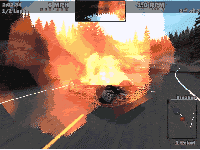
With the appearance of AGP, the whole SLI concept was put aside, while several attempts at AGP+PCI combinations were not as effective as they should have been. In the end, end users preferred to buy one card that did it all rather than getting two cards which meant increased cost.
- NVidia's Scalable Link Interface (SLI™)
 With
the appearance of the PCI Express x16 bus architecture, NVidia realized that
the main idea of using DUAL GPUs to share the load of today's high demand
graphical environments could be applied once again, with amazing results.
As NVidia says: NVIDIA® SLI™ (Scalable Link Interface) technology
is a revolutionary approach to scalability and increased performance. NVIDIA
SLI takes advantage of the increased bandwidth of the PCI Express™ bus
architecture, and features hardware and software innovations within NVIDIA
GPUs (graphics processing units) and NVIDIA MCPs (media and communications
processors). Together the NVIDIA SLI patent-pending technologies work seamlessly
to deliver heart-pounding PC performance. And depending on the application,
NVIDIA SLI can deliver as much as 2x the performance of a single GPU configuration
for unparalleled gaming experiences.
With
the appearance of the PCI Express x16 bus architecture, NVidia realized that
the main idea of using DUAL GPUs to share the load of today's high demand
graphical environments could be applied once again, with amazing results.
As NVidia says: NVIDIA® SLI™ (Scalable Link Interface) technology
is a revolutionary approach to scalability and increased performance. NVIDIA
SLI takes advantage of the increased bandwidth of the PCI Express™ bus
architecture, and features hardware and software innovations within NVIDIA
GPUs (graphics processing units) and NVIDIA MCPs (media and communications
processors). Together the NVIDIA SLI patent-pending technologies work seamlessly
to deliver heart-pounding PC performance. And depending on the application,
NVIDIA SLI can deliver as much as 2x the performance of a single GPU configuration
for unparalleled gaming experiences.
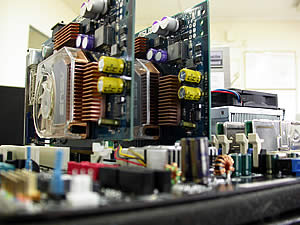
First GPU |
Second GPU |
Final results of Scalable Link Interface (SLI™) |
|
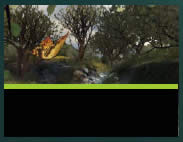


The graphics load that the two GPUs undertake are not always the same. You can see that the graphics load in our example above is not 50% for both GPUs. NVidia uses advanced dynamic load balancing algorithms that are responsible for splitting the load into two. This is a very clever approach, since in most games and applications, the upper part of an image might need more processing power than the lower. Having this in mind, NVidia decided to share the GPU load according to the GPU power needs of the game/application.
NVidia uses a digital SLI connector (3dfx's connectors were analog connectors) to connect the two cards. You will find this connector provided by ASUS in the retail package.


On the other hand, power requirements are increased since the two GPUs need more power to function efficiently. The following table indicates the power requirements suggested by ASUS.
| Configuration | Heavy Load | Normal Load | Light Load | |
| AMD K8 939 CPU Type | FX-55 |
3800+ |
3500+ |
|
| PCIe x16 Video Cards | 6800Ultra x2 |
6800GT x2 |
6600GT x2 |
|
| DDR DIMM Modules | 4 |
2 |
2 |
|
| HDD(IDE or SATA) | 4 |
2 |
2 |
|
| CD/DVD (IDE or SATA) | 2 |
2 |
1 |
|
| PCIe x1 Cards | 1 |
0 |
0 |
|
| PCI Cards | 3 |
2 |
1 |
|
| 1394 Devices | 1 |
0 |
0 |
|
| USB Devices | 6 |
4 |
3 |
|
| Required + 12V current | > (25A) |
> (20A) |
> (17A) |
|
| Required wattage | >= 500W |
>= 400W |
>= 350W |
|
According to NVidia, available GPUs featuring SLI support are the GeForce 6800 Ultra, GeForce 6800 GT, GeForce 6800 and GeForce 6600 GT GPUs. On the other hand, ASUS released a list of certified add-in SLI VGA cards that are recommended for the A8N-SLI Deluxe. This list is shown below:
| Company | Model Number |
| ASUS | Extreme N6600GT |
| ASUS | Extreme N6800Ultra (EN6800Ultra) |
| Leadtek | WinFast PX6600GT |
| Leadtek | WinFast PX6800GT |
| Elsa | ELSA GLADIAC™ 660GT |
| MSI | MS-8983 NX6600GT-VTD128E / NX6600GT-TD128E |
| Albatron | Albatron GF6600GT |
You can always find more information on Scalable Link Interface in the NVidia web page.
Review Pages
2. The mainboard - Packaging
3. ASUS Extreme N6600GT - SLI enabled
4. A look in the past
5. Installation
6. Test System
7. 3DMark05
8. 3DMark 2003
9. Codecreatures
10. Half life 2
11. Doom 3
12. Far Cry
13. Thief 3
14. Colin McRae 05
15. Ground Control II
16. Other Motherboard Benchmarks
17. BIOS & Overclocking
18. Bundled Software & Overclocking
19. GPU Overclocking
20. Conclusion