ASUS A8N-SLI Deluxe
2. The mainboard - Packaging
Review Pages
2. The mainboard - Packaging
3. ASUS Extreme N6600GT - SLI enabled
4. A look in the past
5. Installation
6. Test System
7. 3DMark05
8. 3DMark 2003
9. Codecreatures
10. Half life 2
11. Doom 3
12. Far Cry
13. Thief 3
14. Colin McRae 05
15. Ground Control II
16. Other Motherboard Benchmarks
17. BIOS & Overclocking
18. Bundled Software & Overclocking
19. GPU Overclocking
20. Conclusion
ASUS A8N-SLI Deluxe - Page 2
- The mainboard - Packaging
ASUSTek includes in the package almost everything a user will ever need for this motherboard, from the IEEE1394 modules to Serial ATA and IDE cables. There's an 80 conductor cable included for hard disk connections, while a 40 conductor cable is provided for your CD/DVD burner/reader needs. You'll also find a Serial ATA extension module so that you can install Serial ATA devices without having to open the case.

The A8N-SLI Deluxe is designed on a black PCB with coloured components. This way, you can easily identify all the connection interfaces, without the danger of confusing different memory banks or IDE channels. There are also several led which indicate stability/problems on the mainboard. For example, if the EZ Plug is not connected, a red colored led will light up to notify the user. If the motherboard lights up green, then you are ready to fire it up. A list of all the accessories that come with the A8N-SLI Deluxe is shown below.
| Accessories | SLI connector 1 x 1-port IEEE1394 module 1 x SLI retention bracket 8 x Serial ATA cables 1 x SATA Extension module for external devices 4 x 2-port SATA power cable 1 x 2-port USB2.0 / Game module 1 x 2-port USB2.0 module 1 x COM Port module 1 x UltraDMA 133/100/66 cable 1 x IDE cable 1 x FDD cable 1 x I/O Shield User's manual Instant Music Setting Sticker WinDVD Suite |
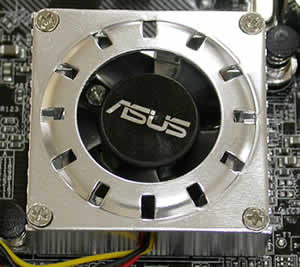
The latest NVidia chipset, the nForce4, is cooled with a small fan to reduce heat and increase performance, with no danger of damaging your system.
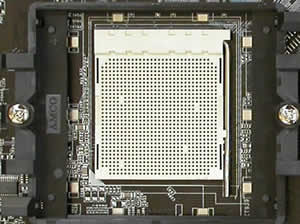
You can see the CPU motherboard socket that supports AMD64/FX 939 socketed processors.
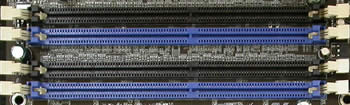
The memory module slots are coloured black and blue. You can always put two memory modules of the same memory size on the same coloured slots and enable the Dual Channel's symmetry mode support, or even use two memory modules of different memory size and use the asymmetric mode.
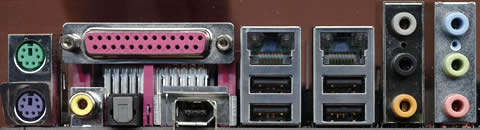
On the inputs panel located on the rear, you will find the keyboard and mouse (PS2) ports, parallel port, audio ports (digital, analog and coaxial), one IEEE1394a port, 4 USB2.0 ports and two ethernet RJ-45 inputs.
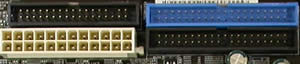
Below you can see the standard IDE channel and Serial ATA connectors.

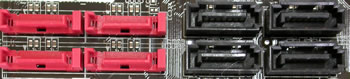
By combining the nForce4 with the Silicon Image storage capacities, you can connect up to 8 SATA devices. The NVRAID storage (nForce4) supports RAID0, RAID1, RAID 0+1 and JBOD span cross SATA and PATA, while the Silicon Image 3114R RAID controller offers 4 x Serial ATA with RAID0, 1, 0+1, and RAID5.
The A8N-SLI Deluxe offers two PCI Express slots used for graphics cards and two PCI Express x1 slots. Here, the two PCI Express x16 slots are colored. In SLI mode, the user should always remember that the graphics card is connected to the blue PCI slot which should be considered as the primary VGA card that will handle all signal transfers to the monitors. The secondary card (black slot), is used only for graphics acceleration. The monitor connected to the secondary VGA card will go blank in SLI mode.
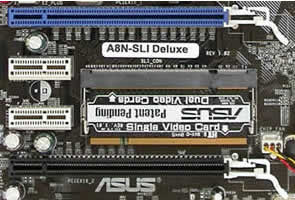
In order to switch from single VGA mode to SLI mode and vice-versa, the A8N-SLI Deluxe uses a small interface card that needs to be inserted accordingly. Looking at the picture below, notice the indications on the inserted card for "Single Video Card" and "Dual Video Cards". This card is removed and inserted in the correct direction depending on the mode desired. You also need to be wary of the fact that despite there being an option in the motherboard's BIOS to enable/disable SLI mode, the interface card still needs to be inserted correctly.
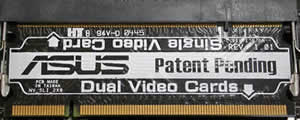
When two VGA cards are used, the PCI Express slots share the graphics acceleration speed. So, you can have two PCI Express x8 slots, or in Single VGA mode, you can have one PCI Express x16 slot (blue) and one PCI Express x1 slot (black).
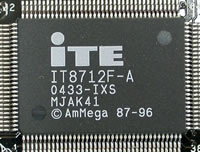
The IT8712F is the newest member of ITE Tech's growing family of Low Pin Count Interface-based Super I/O devices with Environment Controller integration. It provides enhanced hardware monitoring, fan speed control, SmartGuardian control and it can also support SmartCard reader, has two 16C550 UARTs, one Game port, one parallel port, floppy disk controller, keyboard controller and one ITE innovative automatic power-failure resume & power button debounce.
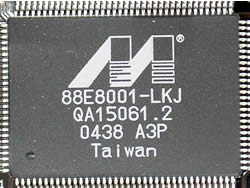
The Marvell Yukon 32-bit 88E8001 offers an additional network connectivity solution, the Yukon Gigabit Ethernet controller with Intergrated PHY. It also provides an advanced cable diagnostics function, (Virtual Cable Tester technology) that will enable IT managers to easily pinpoint the location of cable problems.

This small Winbond chip will give to your system the ability to speak. It is a programmable speech synthesizer that will inform you if any errors occur during the BIOS self test scanning process. Users can edit and change the voices and even add their own voice for every error that might occur.
For this review, we tested the ASUS A8N-SLI Deluxe motherboard with two ASUS Extreme N6600GT graphics cards. You can always see how this card performed in Single VGA mode here. On the following page we provide some background information on these graphic cards for reference reasons.
Review Pages
2. The mainboard - Packaging
3. ASUS Extreme N6600GT - SLI enabled
4. A look in the past
5. Installation
6. Test System
7. 3DMark05
8. 3DMark 2003
9. Codecreatures
10. Half life 2
11. Doom 3
12. Far Cry
13. Thief 3
14. Colin McRae 05
15. Ground Control II
16. Other Motherboard Benchmarks
17. BIOS & Overclocking
18. Bundled Software & Overclocking
19. GPU Overclocking
20. Conclusion