
Breaking News

G.SKILL Demo New Memory Solutions for Gaming, Server, AI, Workstation Applications at Computex 2026 LIAN LI Launches HydroShift II OLED Curved 360 AIO LIAN LI Unveils O11 VISION-M CORSAIR PRO launches AI Workstations and Servers ASUS Announces T1 GeForce RTX 5070 and RTX 5060 Ti Graphics Cards

logo

  • Share Us
    • Facebook
    • Twitter
  • Home
  • Home
  • News
  • Reviews
  • Essays
  • Forum
  • Legacy
  • About
    • Submit News

    • Contact Us
    • Privacy

    • Promotion
    • Advertise

    • RSS Feed
    • Site Map

Search form

Ahead NeroMix Software

Feb 17,2002 0

4. Creating MP3/TwinVQ audio files


Review Pages

1. Recording an Audio / Data CD
2. Playlist Tool-Icons - Conclusion
3. Introduction
4. Creating MP3/TwinVQ audio files


NeroMIX - Page 4

by Costas Sgantzos

- Playlist Tool-Icons

Something significant about the NeroMIX is the playlist manager and the tool-icons which it has. These can be found on the right of the playlist window into the NeroMIX main window. Passing the mouse over each one could reveal each button's job. Starting from the top you have:
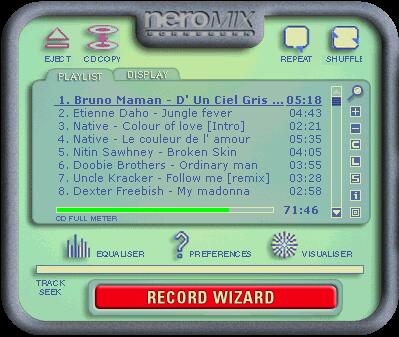
Playlist

1 . Magnifier icon = Start External Playlist Manager
2. "+" icon = Add to playlist
3. "-" icon = Remove from playlist
4. "C" icon = Clear playlist
5. "L" icon = Load playlist
6. "S" icon = Save playlist
7. "i" icon = (highlighted) Track info
8. Square icon = Cover editor

By pressing the last icon you have the well known Nero Cover Designer V.2.0 from Nero Burning rom.

Skins

NeroMIX comes with 5 different skins to choose from...

Coin Skin
Flame Skin

PDA
GREEN PDA

And 'Remote' which is the default.

Conclusion

NeroMix is a fairly good package. It can help you create your MP3s, VQFs or even burn your custom made compilation cds. It's starting fast when you double click on an audible file -unlike some other similar but 'heavy' applications- and the only drawback we have noticed was that it's kinda CPU intensive.

What does this mean? You cannot play your Q3 demo while having NeroMIX to reproduce your chosen mp3 files (at least not in our P-III, 866 MHz machine).

Why one should buy it? There is a main reason: It's ONE program doing a pile of tasks that you normally need three or four different packages to make. Up until now there's no street price announcement from Ahead Software, but I would care to know how much does it costs to have my personal copy installed ;-)


Review Pages

1. Recording an Audio / Data CD
2. Playlist Tool-Icons - Conclusion
3. Introduction
4. Creating MP3/TwinVQ audio files

 

Pages

  • « first
  • ‹ previous
  • 1
  • 2
  • 3
  • 4

Tags:
Previous Post
Mp3 NetBurner Software
Next Post
PleXWriter PX-W4012A CD-RW

Related Posts

Latest Reviews

Swit NP-FZ100 Battery
Cameras

Swit NP-FZ100 Battery

The Technology Stack Behind Modern Digital Gaming Platforms
Consumer Electronics

The Technology Stack Behind Modern Digital Gaming Platforms

be quiet! Dark Rock Pro 6
Cooling Systems

be quiet! Dark Rock Pro 6

How Online Casinos Use Encryption, Verification, and Risk Controls to Build User Trust
Enterprise & IT

How Online Casinos Use Encryption, Verification, and Risk Controls to Build User Trust

Why Low-Latency Infrastructure Matters More Than Raw Specs
Enterprise & IT

Why Low-Latency Infrastructure Matters More Than Raw Specs

Popular News

TEAMGROUP Launches EXPERT P34F Find My External SSD

TEAMGROUP Launches EXPERT P34F Find My External SSD

CORSAIR announces Vanguard Pro 96 and Vanguard 96 Gaming Keyboards

CORSAIR announces Vanguard Pro 96 and Vanguard 96 Gaming Keyboards

Samsung announces Galaxy Tab S11 and Galaxy S25 FE series

Samsung announces Galaxy Tab S11 and Galaxy S25 FE series

Viltrox Showcases Upcoming Lens Lineup and New TTL Flash at IBC 2025

Viltrox Showcases Upcoming Lens Lineup and New TTL Flash at IBC 2025

MSI Launches FORGE GK600 TKL WIRELESS Special Edition Compact Mechanical Keyboard

MSI Launches FORGE GK600 TKL WIRELESS Special Edition Compact Mechanical Keyboard

Panasonic Introduces the First Ultra-Telephoto Zoom Lens in the LUMIX S Series

Panasonic Introduces the First Ultra-Telephoto Zoom Lens in the LUMIX S Series

MSI Launches DATAMAG 40Gbps Magnetic Portable SSD

MSI Launches DATAMAG 40Gbps Magnetic Portable SSD

Viltrox Joins the L-Mount Alliance, Expanding Creative Possibilities

Viltrox Joins the L-Mount Alliance, Expanding Creative Possibilities

Main menu

  • Home
  • News
  • Reviews
  • Essays
  • Forum
  • Legacy
  • About
    • Submit News

    • Contact Us
    • Privacy

    • Promotion
    • Advertise

    • RSS Feed
    • Site Map
  • About
  • Privacy
  • Contact Us
  • Promotional Opportunities @ CdrInfo.com
  • Advertise on out site
  • Submit your News to our site
  • RSS Feed


