Breaking News

ASUS Announces Intel Core Ultra 200S Plus Series Support on W880, Z890, Q870, B860 and H810 Motherboards G.SKILL DDR5 Memory Kits Confirmed as Intel XMP 3.0 'Ready' for Intel Core Ultra 200S Plus Series Processors ASUS Unveils Complete Portfolio Support for Intel Core 200S Series Samsung Brings AirDrop Support to Quick Share with Galaxy S26 Series TerraMaster Spring Sale 2026 Upgraded Up To 30%

logo

  • Share Us
    • Facebook
    • Twitter
  • Home
  • Home
  • News
  • Reviews
  • Essays
  • Forum
  • Legacy
  • About
    • Submit News

    • Contact Us
    • Privacy

    • Promotion
    • Advertise

    • RSS Feed
    • Site Map

Search form

Ahead Nero 5.5 CD-R Software

Feb 17,2002 0

7. Nero Wave Editor / Cover Designer


Review Pages

1. The Press Release
2. New Features/Menu changes
3. Menu Changes - Page 2
4. VCD Menus Creation
5. Nero Mpeg 1 Encoder
6. SVCD/CD-Extra Authoring
7. Nero Wave Editor / Cover Designer
8. Additional Tools
9. Multiple Recorders
10. Final Conclusion


Nero 5.5 preview - Page 7

Nero Wave Editor / Cover Designer

Features:
- Non-destructive editing lets you try many options and undo all changes.
- A range of audio-processing options gives you complete control over your audio files before you record them to disc.
- Real-time "audition" lets you select and hear effects in real time, as your soundfile plays.
- Preset Manager lets you save your frequently-used settings.
- Sample format conversion, anti-aliasing filters, dithering, noise shaping... and much more!

When you press edit the nero Wave Editor window opens and the creating of the peak file begins. After it finishes you can see the main window:
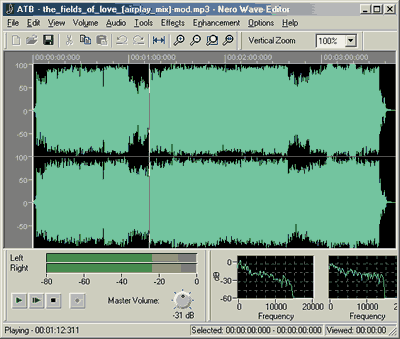
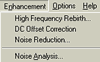
Here we can do various jobs as add effects or improve our audio file attributes. All effects are done in real time and of course you can preview them before implement:

>

>

Nero 5.5 comes with a new cover Designer. The Designer helps you produce impressive, professional-looking layouts for your CD booklets and inserts.

The Cover Designer includes:

- Assorted graphic effects
- Customizable design templates
- Multi / Maxi album support
- Predefined paper stocks
- Starter label pack (in Retail Package version)


Let's select the build-in Audio template.

Nothing here is added. In order to add the wanted tracks just go to Data>>Document Data. There in the AudioCD Data press "Add" and the program will insert auto the first track in which we can put more details. In case you have a regognized CD from the FreeDB or the Nero Database, and then open the Cover Designer, the data will be taken from Nero:
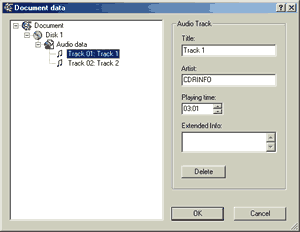
Let see how the Disk1 template now looks like:

f we press double click in the background image the "Properties" menu will appear in which we can do several nice effects (mostly in the image):


 

Review Pages

1. The Press Release
2. New Features/Menu changes
3. Menu Changes - Page 2
4. VCD Menus Creation
5. Nero Mpeg 1 Encoder
6. SVCD/CD-Extra Authoring
7. Nero Wave Editor / Cover Designer
8. Additional Tools
9. Multiple Recorders
10. Final Conclusion


Pages

  • « first
  • ‹ previous
  • …
  • 2
  • 3
  • 4
  • 5
  • 6
  • 7
  • 8
  • 9
  • 10
  • next ›
  • last »

Tags:
Previous Post
Mp3 NetBurner Software
Next Post
PleXWriter PX-W4012A CD-RW

Related Posts

Latest Reviews

Why Streaming Live Casino Games Demands Smarter Tech
Enterprise & IT

Why Streaming Live Casino Games Demands Smarter Tech

Kioxia Exceria Plus G3 512GB microSD
Cameras

Kioxia Exceria Plus G3 512GB microSD

SoundPeats Cove Pro
Consumer Electronics

SoundPeats Cove Pro

Asustor AS5404T 4-Bay NAS System
Enterprise & IT

Asustor AS5404T 4-Bay NAS System

be quiet! Pure Power 13M 1200W
PC components

be quiet! Pure Power 13M 1200W

Popular News

COLORFUL Presents CVN X870 ARK FROZEN Motherboard for AMD Ryzen 9000 CPUs

COLORFUL Presents CVN X870 ARK FROZEN Motherboard for AMD Ryzen 9000 CPUs

TEAMGROUP Launches EXPERT P34F Find My External SSD

TEAMGROUP Launches EXPERT P34F Find My External SSD

Samsung announces Galaxy Tab S11 and Galaxy S25 FE series

Samsung announces Galaxy Tab S11 and Galaxy S25 FE series

Viltrox Showcases Upcoming Lens Lineup and New TTL Flash at IBC 2025

Viltrox Showcases Upcoming Lens Lineup and New TTL Flash at IBC 2025

CORSAIR announces Vanguard Pro 96 and Vanguard 96 Gaming Keyboards

CORSAIR announces Vanguard Pro 96 and Vanguard 96 Gaming Keyboards

Panasonic Introduces the First Ultra-Telephoto Zoom Lens in the LUMIX S Series

Panasonic Introduces the First Ultra-Telephoto Zoom Lens in the LUMIX S Series

MSI Launches DATAMAG 40Gbps Magnetic Portable SSD

MSI Launches DATAMAG 40Gbps Magnetic Portable SSD

MSI Launches FORGE GK600 TKL WIRELESS Special Edition Compact Mechanical Keyboard

MSI Launches FORGE GK600 TKL WIRELESS Special Edition Compact Mechanical Keyboard

Main menu

  • Home
  • News
  • Reviews
  • Essays
  • Forum
  • Legacy
  • About
    • Submit News

    • Contact Us
    • Privacy

    • Promotion
    • Advertise

    • RSS Feed
    • Site Map
  • About
  • Privacy
  • Contact Us
  • Promotional Opportunities @ CdrInfo.com
  • Advertise on out site
  • Submit your News to our site
  • RSS Feed