
Breaking News

Nikon releases the Z5IIC full-frame mirrorless camera Announcing the New ASUS Googlebook 14 Razer Unveils Kiyo V2 Pro 4K Webcam Transcend Launches 64GB DDR5-6400 Embedded DRAM Modules for High-Speed Performance and Enhanced System Stability Hollyland Introduces LARK M3 Wireless Audio System

logo

  • Share Us
    • Facebook
    • Twitter
  • Home
  • Home
  • News
  • Reviews
  • Essays
  • About
    • Submit News

    • Contact Us
    • Privacy

    • Promotion
    • Advertise

    • RSS Feed

Search form

Ahead Nero 5.5 CD-R Software

Feb 17,2002 0

4. VCD Menus Creation


Review Pages

1. The Press Release
2. New Features/Menu changes
3. Menu Changes - Page 2
4. VCD Menus Creation
5. Nero Mpeg 1 Encoder
6. SVCD/CD-Extra Authoring
7. Nero Wave Editor / Cover Designer
8. Additional Tools
9. Multiple Recorders
10. Final Conclusion


Nero 5.5 preview - Page 4

VCD Menus Creation

New Jobs

In Nero 5.5 several new jobs have been added. The most interesting are the adoption of Mpeg1 Encoder among with VCD/SVCD menu creation. Also the new CD-Extra authoring task will be useful for audio cd users.

VCD/SVCD Menu creation:

As we have earlier said, maybe this is one of the most desired features from VCD users..The ability to create easily menus for the various stored tracks. Let's start a new VCD job:
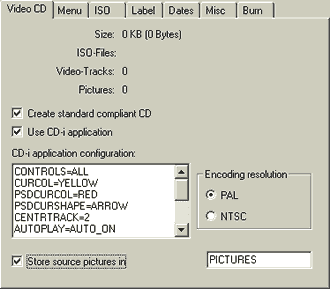
As you can see there are a lot of new features..Now you can select if your VCD creation would include CD-i application, what would be the encoding resolution (PAL,NTSC) and last where the source pictures would be stored. Note that the "Create standard compliant CD" option is from default checked but can be unchecked when the input doens't comply with the VCD encoded standards.

Let's pass over the interesting part..The menu creation. Now you can add onscreen menus to your Video and Super Video CDs. These menus are like "cover pages" for your discs, making it easy to select tracks for playback. Your menus can even include "thumbnail" previews-small, clickable still-images from your tracks.

The steps are simple. Choose how the layout will be (for the available modes check the right picture), if the menu will have a background picture, the background mode, the header, footer text and the color/font for all the above. If you check the "preview first page" you will get the following result (mpegs are from Matrix movie):
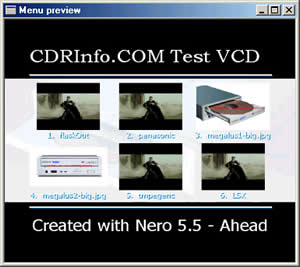
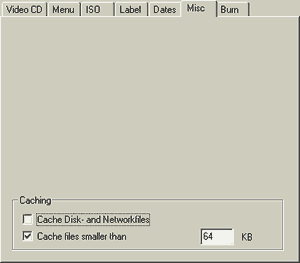
The final result seems very good :).. The Menu takes snapshot from the attached mpeg files (first frame) and also displays the pictures. The rest ISO/Label/Dates submenus are exactly the same as with Nero 5.0.4.4. A new tab has been added which include the Caching options - previous was in the "BURN" tab:
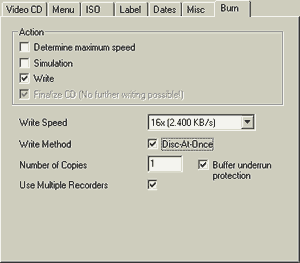
Final the "Burn" tab. Nothing here has changed..:
If you press the BURN button you will notice 2 additional features (Verify and Shut down the PC):

Our VCD project had the following stracture:

You can preview the Mpeg1 videos if you press play. However if you try to maximize the playback window it will close (another bug). Further you can adjust the properties of the Menu Page (infinite/limited display time):


 

Review Pages

1. The Press Release
2. New Features/Menu changes
3. Menu Changes - Page 2
4. VCD Menus Creation
5. Nero Mpeg 1 Encoder
6. SVCD/CD-Extra Authoring
7. Nero Wave Editor / Cover Designer
8. Additional Tools
9. Multiple Recorders
10. Final Conclusion


Pages

  • « first
  • ‹ previous
  • 1
  • 2
  • 3
  • 4
  • 5
  • 6
  • 7
  • 8
  • 9
  • next ›
  • last »

Tags:
Previous Post
Mp3 NetBurner Software
Next Post
PleXWriter PX-W4012A CD-RW

Related Posts

Latest Reviews

Fanxiang MP83 M.2 NVMe SSD Enclosure
Enterprise & IT

Fanxiang MP83 M.2 NVMe SSD Enclosure

Ugreen CM642 USB4.0 Enclosure
PC components

Ugreen CM642 USB4.0 Enclosure

be quiet! Dark Power 14 IO
PC components

be quiet! Dark Power 14 IO

SanDisk High Endurance 512GB microSDXC
Cameras

SanDisk High Endurance 512GB microSDXC

Samsung PRO Ultimate 512GB microSDXC
Cameras

Samsung PRO Ultimate 512GB microSDXC

Popular News

MSI’s Latest AMD X870E MAX & EVO Series Motherboards

MSI’s Latest AMD X870E MAX & EVO Series Motherboards

COLORFUL Launches iGame B850M ULTRA Series Micro-ATX Motherboards

COLORFUL Launches iGame B850M ULTRA Series Micro-ATX Motherboards

COLORFUL Presents Limited Edition Chitu MAG-60 Magnetic Keyboard Inspired by the Year of the Horse

COLORFUL Presents Limited Edition Chitu MAG-60 Magnetic Keyboard Inspired by the Year of the Horse

COLORFUL Presents iGame Z890 ULTRA-S W and iGame Z890M ULTRA Z Motherboards

COLORFUL Presents iGame Z890 ULTRA-S W and iGame Z890M ULTRA Z Motherboards

COLORFUL Launches iGame B850I MINI OC V14 Motherboard

COLORFUL Launches iGame B850I MINI OC V14 Motherboard

COLORFUL Expands B850 Motherboard Lineup with New CVN, Battle-Ax, and MEOW Models

COLORFUL Expands B850 Motherboard Lineup with New CVN, Battle-Ax, and MEOW Models

ASRock Adds Support for One Sub-Channel DRAM Module on Intel DDR5 Motherboards

ASRock Adds Support for One Sub-Channel DRAM Module on Intel DDR5 Motherboards

Exceed the Infinite with New ASRock X870E Taichi White Motherboard

Exceed the Infinite with New ASRock X870E Taichi White Motherboard

Main menu

  • Home
  • News
  • Reviews
  • Essays
  • About
    • Submit News

    • Contact Us
    • Privacy

    • Promotion
    • Advertise

    • RSS Feed
  • About
  • Privacy
  • Contact Us
  • Promotional Opportunities @ CdrInfo.com
  • Advertise on out site
  • Submit your News to our site
  • RSS Feed


