
Breaking News

Geometric Future Unveils 2026/2027 Lineup at Computex: MODEL 9 Flagship, MODEL 7 Prototypes, New PSUs and AIO​ Amiiba Launches at COMPUTEX 2026 with Ferrofluid-Inspired Hardware LIAN LI Reveals Expansive 2026 Portfolio Focused on Airflow, Modularity, and Showcase Design ASUS Now Bundles ROG Equalizer Cable with Thor III, Strix Platinum PSUs GIGABYTE Introduces D5 Single Boost Technology, Redefining What One DIMM Can Do

logo

  • Share Us
    • Facebook
    • Twitter
  • Home
  • Home
  • News
  • Reviews
  • Essays
  • Forum
  • Legacy
  • About
    • Submit News

    • Contact Us
    • Privacy

    • Promotion
    • Advertise

    • RSS Feed
    • Site Map

Search form

ACRyan PlayOnHD Mini review

Jul 26,2010 0

4. Network


Review Pages

1. Features
2. A closer look
3. Powering up the player
4. Network
5. Watching movies
6. Final thoughts


The PlayOnHD! Mini offers some online services. First you must accept the service statement:

As you can see you can use the player to access Picasa, news, Flickr and something new, Weather:

The Internet radio works pretty well. You can search for your favorite station by genre and add it to favorites. We searched for " Kiss FM" and the player returned the results.

The music keeps playing in the background even if you leave the Internet service section. It stops as soon as you access other important menus, for example, if you select to play a movie.

In order to access your local network you can either choose the automatic search or manually enter the IP address of the device. This was available in "My Shortcuts" section. In our case, the local address 192.168.11.2 has been used for several shared folders, which can be accessed and browsed without any problems:

The 'File Copy' function is very handy if you wish to transfer files from external USB devices to other devices plugged in the local network:

The first step is to select the file you want to transfer/copy and the destination device/folder:
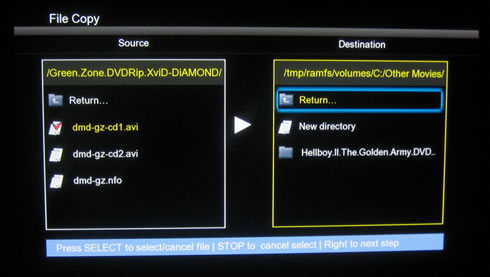
By pressing the right arrow initiates the selected ' move' or 'copy' function. We found that the device downloaded at 6.09MB/sec (network-to-attached USB HDD) and uploaded to other devices even slower, at 5.55MB/sec.


Review Pages

1. Features
2. A closer look
3. Powering up the player
4. Network
5. Watching movies
6. Final thoughts


Pages

  • « first
  • ‹ previous
  • 1
  • 2
  • 3
  • 4
  • 5
  • 6
  • next ›
  • last »

ACRyan

Tags: ACRyan
Previous Post
Patriot Memory Inferno 100GB SSD review
Next Post
OCZ Agility2 60GB SSD review

Related Posts

  • ACRyan Veolo review

Latest Reviews

Swit NP-FZ100 Battery
Cameras

Swit NP-FZ100 Battery

The Technology Stack Behind Modern Digital Gaming Platforms
Consumer Electronics

The Technology Stack Behind Modern Digital Gaming Platforms

be quiet! Dark Rock Pro 6
Cooling Systems

be quiet! Dark Rock Pro 6

How Online Casinos Use Encryption, Verification, and Risk Controls to Build User Trust
Enterprise & IT

How Online Casinos Use Encryption, Verification, and Risk Controls to Build User Trust

Why Low-Latency Infrastructure Matters More Than Raw Specs
Enterprise & IT

Why Low-Latency Infrastructure Matters More Than Raw Specs

Popular News

TEAMGROUP Launches EXPERT P34F Find My External SSD

TEAMGROUP Launches EXPERT P34F Find My External SSD

CORSAIR announces Vanguard Pro 96 and Vanguard 96 Gaming Keyboards

CORSAIR announces Vanguard Pro 96 and Vanguard 96 Gaming Keyboards

MSI Launches FORGE GK600 TKL WIRELESS Special Edition Compact Mechanical Keyboard

MSI Launches FORGE GK600 TKL WIRELESS Special Edition Compact Mechanical Keyboard

Samsung announces Galaxy Tab S11 and Galaxy S25 FE series

Samsung announces Galaxy Tab S11 and Galaxy S25 FE series

Viltrox Showcases Upcoming Lens Lineup and New TTL Flash at IBC 2025

Viltrox Showcases Upcoming Lens Lineup and New TTL Flash at IBC 2025

Panasonic Introduces the First Ultra-Telephoto Zoom Lens in the LUMIX S Series

Panasonic Introduces the First Ultra-Telephoto Zoom Lens in the LUMIX S Series

MSI Launches DATAMAG 40Gbps Magnetic Portable SSD

MSI Launches DATAMAG 40Gbps Magnetic Portable SSD

Viltrox Joins the L-Mount Alliance, Expanding Creative Possibilities

Viltrox Joins the L-Mount Alliance, Expanding Creative Possibilities

Main menu

  • Home
  • News
  • Reviews
  • Essays
  • Forum
  • Legacy
  • About
    • Submit News

    • Contact Us
    • Privacy

    • Promotion
    • Advertise

    • RSS Feed
    • Site Map
  • About
  • Privacy
  • Contact Us
  • Promotional Opportunities @ CdrInfo.com
  • Advertise on out site
  • Submit your News to our site
  • RSS Feed