
Breaking News

Western Digital Accelerates Storage Innovation for AI Era Leica LUX Case for the iPhone 17 Pro/Pro Max ASUS Announces ROG Strix Aiolos Viltrox Launches AF 16mm F1.8 L for Full Frame Casio to Release G-SHOCK with Minimalist Metal Design and Even Better Fit

logo

  • Share Us
    • Facebook
    • Twitter
  • Home
  • Home
  • News
  • Reviews
  • Essays
  • Forum
  • Legacy
  • About
    • Submit News

    • Contact Us
    • Privacy

    • Promotion
    • Advertise

    • RSS Feed
    • Site Map

Search form

AC Ryan PlayOn!HD2 review

Jun 17,2011 0

7. Online services


Review Pages

1. About the Ac Ryan PlayOn!HD2 player
2. A closer look
3. Powering On the player
4. The GUI 2.0
5. Performance
6. YAMJ
7. Online services
8. Final words


The A.C. Ryan PlayOn!HD2 offers several online services for you to play and explore. We found really interesting the fact that the player can be operated with an external USB keyboard and mouse in order to further improve the usability and the browsing experience. Many different services are supported including Facebook, Twitter, Youtube, Ebuddy messenger, Yahoo! and others. That's a major improvement over the original PlayOn!HD series of players:

The remote control can be used in order to navigate across the desired application. We selected the Facebook application and the player prompted us to use the USB keyboard and mouse, which we had already attached to the player.

Then you are ready to log in to Facebook with your username/password using the keyboard . However, the cursor of the mouse was not visible:
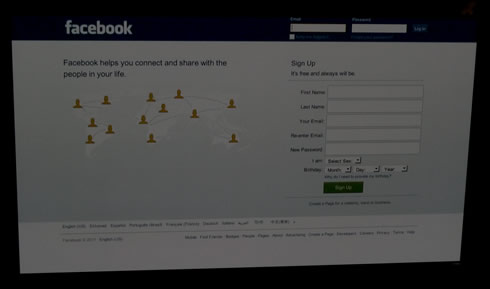
The Facebook page loaded. However the scrolling was rather slow, giving us a general impression that the Facebook app has been designed to offer access to your account but not not for long writing/chatting:

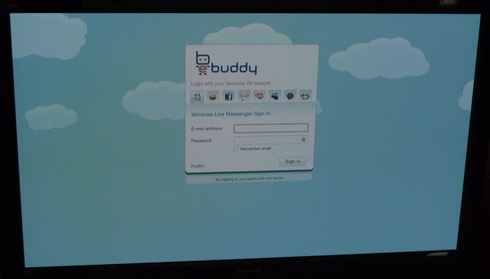
Another available application is the ebuddy for quick chatting with friends:
We also tried the Youtube XL application, which offers videos optimized for watching on large screens:
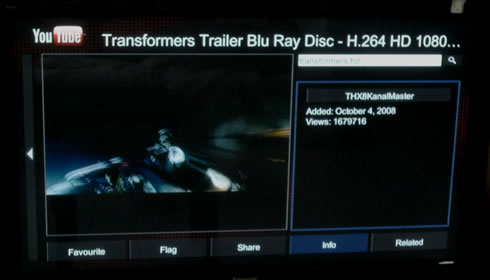
Here we would like to note that the USB keyboard won't work will all applications. For example with SHOUTcast internet radio, you have to search for radio stations using the remote control.

The player's latest firmware r3966 does not include the BitTorrent function. In order to use the new transmission torrent client in the player, you should go to setup menu and switch transmission on. Then open a web browser and enter the IP address of the player followed by port 9091 - for example 192.168.1.3:9091. You will be redirected to the transmission age where you can add/remove torrents for download.

Overall, we feel that the player's internet experience has been improved compared to the past but there are still some issues to be ironed out.


Review Pages

1. About the Ac Ryan PlayOn!HD2 player
2. A closer look
3. Powering On the player
4. The GUI 2.0
5. Performance
6. YAMJ
7. Online services
8. Final words


Pages

  • « first
  • ‹ previous
  • 1
  • 2
  • 3
  • 4
  • 5
  • 6
  • 7
  • 8
  • next ›
  • last »

Tags:
Previous Post
OCZ Agility 3 240GB SSD review
Next Post
Patriot Memory Torqx 2 128GB SSD Review

Related Posts

  • AC Ryan Playon!HD Mini 2 review

  • AC Ryan PlayOnHD!

Latest Reviews

Akaso Brave 8 Lite
Cameras

Akaso Brave 8 Lite

Soundpeats Air 5
Consumer Electronics

Soundpeats Air 5

XbotGo Chamaleon
Consumer Electronics

XbotGo Chamaleon

be quiet! Dark Perk Mice
Gaming

be quiet! Dark Perk Mice

Acemagic W1
PC components

Acemagic W1

Popular News

COLORFUL Introduces CVN B850I GAMING FROZEN Motherboard

COLORFUL Introduces CVN B850I GAMING FROZEN Motherboard

COLORFUL Presents CVN X870 ARK FROZEN Motherboard for AMD Ryzen 9000 CPUs

COLORFUL Presents CVN X870 ARK FROZEN Motherboard for AMD Ryzen 9000 CPUs

TEAMGROUP Launches EXPERT P34F Find My External SSD

TEAMGROUP Launches EXPERT P34F Find My External SSD

ASRock AM5 Motherboards Now Fully Support AMD Ryzen 9 9950X3D & 9900X3D Processors

ASRock AM5 Motherboards Now Fully Support AMD Ryzen 9 9950X3D & 9900X3D Processors

Samsung announces Galaxy Tab S11 and Galaxy S25 FE series

Samsung announces Galaxy Tab S11 and Galaxy S25 FE series

Viltrox Showcases Upcoming Lens Lineup and New TTL Flash at IBC 2025

Viltrox Showcases Upcoming Lens Lineup and New TTL Flash at IBC 2025

CORSAIR announces Vanguard Pro 96 and Vanguard 96 Gaming Keyboards

CORSAIR announces Vanguard Pro 96 and Vanguard 96 Gaming Keyboards

Panasonic Introduces the First Ultra-Telephoto Zoom Lens in the LUMIX S Series

Panasonic Introduces the First Ultra-Telephoto Zoom Lens in the LUMIX S Series

Main menu

  • Home
  • News
  • Reviews
  • Essays
  • Forum
  • Legacy
  • About
    • Submit News

    • Contact Us
    • Privacy

    • Promotion
    • Advertise

    • RSS Feed
    • Site Map
  • About
  • Privacy
  • Contact Us
  • Promotional Opportunities @ CdrInfo.com
  • Advertise on out site
  • Submit your News to our site
  • RSS Feed