Breaking News

Akasa Launches Newton N16, Compact Fanless Case for ASUS NUC 16 Pro TEAMGROUP Unveils the ACE 8K MicroSDXC Memory Card ASUS Announces Ascent QN10 Mini PC CORSAIR Launches Second Generation Nautilus II AIO CPU Coolers CORSAIR Launches VOXARA USB Gaming Condenser Microphone

logo

  • Share Us
    • Facebook
    • Twitter
  • Home
  • Home
  • News
  • Reviews
  • Essays
  • About
    • Submit News

    • Contact Us
    • Privacy

    • Promotion
    • Advertise

    • RSS Feed

Search form

AC Ryan PlayOn!HD2 review

Jun 17,2011 0

3. Powering On the player


Review Pages

1. About the Ac Ryan PlayOn!HD2 player
2. A closer look
3. Powering On the player
4. The GUI 2.0
5. Performance
6. YAMJ
7. Online services
8. Final words


We connected the player with our TV using the HDMI connector so it's time to power it on. We pushed the button on the front side of the player and the AC Ryan logo appeared on the screen. Shortly after, the v2.0 interface will just showed up. Compared to the GUI of the PlayOn!HD series, the new GUI looks much simpler, cleaner and easier to navigate. The main menu includes the basic indexing: Movies, Music, Photo, File Manager, and Internet media. Highlighting each of these options brings up a brief explanation on the right. Lists of recently added music and movies are also available:

The setup section is not very different than what we had seen with the PlayOn!HD player. There are many options to play an experiment with. For example, you can fully translate the menu in your language:

Audio and video settings are easy to understand, a least if you have a small experience with menus found in A/V devices:

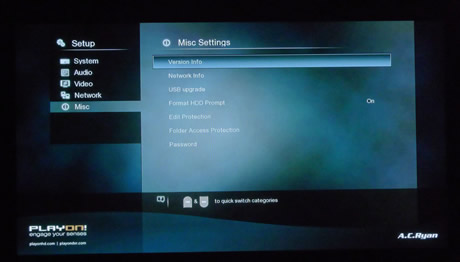
You can also enable 1080p playback, choose the HDMI audio output format, connect to a network (Wi-Fi or cable) and upgrade the firmware/GUI from a USB device.


The player came in our labs with the latest firmware version installed (v2988)
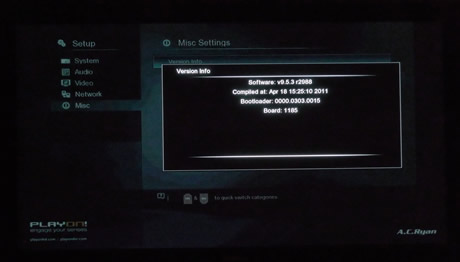
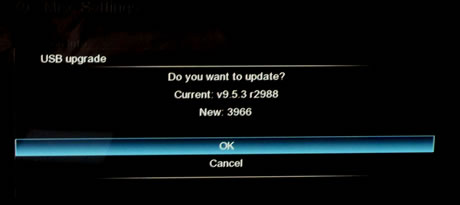
Soon after we had finished this review, AC Ryan released the firmware v3966, which we also installed for further testing. The firmware upgrade procedure is simple. We used the USB option, in which the firmware file was stored in a USB flash memory. Through the USB Upgrade menu, we confirmed the upgrade procedure and the installation of the firmware started:
 

Review Pages

1. About the Ac Ryan PlayOn!HD2 player
2. A closer look
3. Powering On the player
4. The GUI 2.0
5. Performance
6. YAMJ
7. Online services
8. Final words


Pages

  • « first
  • ‹ previous
  • 1
  • 2
  • 3
  • 4
  • 5
  • 6
  • 7
  • 8
  • next ›
  • last »

Tags:
Previous Post
OCZ Agility 3 240GB SSD review
Next Post
Patriot Memory Torqx 2 128GB SSD Review

Related Posts

  • AC Ryan Playon!HD Mini 2 review

  • AC Ryan PlayOnHD!

Latest Reviews

Fanxiang MP83 M.2 NVMe SSD Enclosure
Enterprise & IT

Fanxiang MP83 M.2 NVMe SSD Enclosure

Ugreen CM642 USB4.0 Enclosure
PC components

Ugreen CM642 USB4.0 Enclosure

be quiet! Dark Power 14 IO
PC components

be quiet! Dark Power 14 IO

SanDisk High Endurance 512GB microSDXC
Cameras

SanDisk High Endurance 512GB microSDXC

Samsung PRO Ultimate 512GB microSDXC
Cameras

Samsung PRO Ultimate 512GB microSDXC

Popular News

CORSAIR announces Vanguard Pro 96 and Vanguard 96 Gaming Keyboards

CORSAIR announces Vanguard Pro 96 and Vanguard 96 Gaming Keyboards

MSI Launches FORGE GK600 TKL WIRELESS Special Edition Compact Mechanical Keyboard

MSI Launches FORGE GK600 TKL WIRELESS Special Edition Compact Mechanical Keyboard

MSI’s Latest AMD X870E MAX & EVO Series Motherboards

MSI’s Latest AMD X870E MAX & EVO Series Motherboards

Panasonic Introduces the First Ultra-Telephoto Zoom Lens in the LUMIX S Series

Panasonic Introduces the First Ultra-Telephoto Zoom Lens in the LUMIX S Series

COLORFUL Launches iGame B850M ULTRA Series Micro-ATX Motherboards

COLORFUL Launches iGame B850M ULTRA Series Micro-ATX Motherboards

COLORFUL Presents Limited Edition Chitu MAG-60 Magnetic Keyboard Inspired by the Year of the Horse

COLORFUL Presents Limited Edition Chitu MAG-60 Magnetic Keyboard Inspired by the Year of the Horse

COLORFUL Presents iGame Z890 ULTRA-S W and iGame Z890M ULTRA Z Motherboards

COLORFUL Presents iGame Z890 ULTRA-S W and iGame Z890M ULTRA Z Motherboards

LIAN LI Launches 8.8” Universal Screen with Flexible Mounting Solution

LIAN LI Launches 8.8” Universal Screen with Flexible Mounting Solution

Main menu

  • Home
  • News
  • Reviews
  • Essays
  • About
    • Submit News

    • Contact Us
    • Privacy

    • Promotion
    • Advertise

    • RSS Feed
  • About
  • Privacy
  • Contact Us
  • Promotional Opportunities @ CdrInfo.com
  • Advertise on out site
  • Submit your News to our site
  • RSS Feed