
Breaking News

Akasa Launches Newton N16, Compact Fanless Case for ASUS NUC 16 Pro TEAMGROUP Unveils the ACE 8K MicroSDXC Memory Card ASUS Announces Ascent QN10 Mini PC CORSAIR Launches Second Generation Nautilus II AIO CPU Coolers CORSAIR Launches VOXARA USB Gaming Condenser Microphone

logo

  • Share Us
    • Facebook
    • Twitter
  • Home
  • Home
  • News
  • Reviews
  • Essays
  • About
    • Submit News

    • Contact Us
    • Privacy

    • Promotion
    • Advertise

    • RSS Feed

Search form

AC Ryan PlayOn!HD2 review

Jun 17,2011 0

7. Online services


Review Pages

1. About the Ac Ryan PlayOn!HD2 player
2. A closer look
3. Powering On the player
4. The GUI 2.0
5. Performance
6. YAMJ
7. Online services
8. Final words


The A.C. Ryan PlayOn!HD2 offers several online services for you to play and explore. We found really interesting the fact that the player can be operated with an external USB keyboard and mouse in order to further improve the usability and the browsing experience. Many different services are supported including Facebook, Twitter, Youtube, Ebuddy messenger, Yahoo! and others. That's a major improvement over the original PlayOn!HD series of players:

The remote control can be used in order to navigate across the desired application. We selected the Facebook application and the player prompted us to use the USB keyboard and mouse, which we had already attached to the player.

Then you are ready to log in to Facebook with your username/password using the keyboard . However, the cursor of the mouse was not visible:
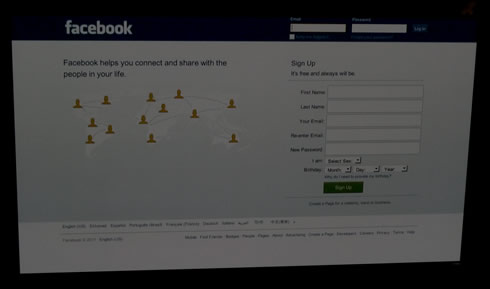
The Facebook page loaded. However the scrolling was rather slow, giving us a general impression that the Facebook app has been designed to offer access to your account but not not for long writing/chatting:

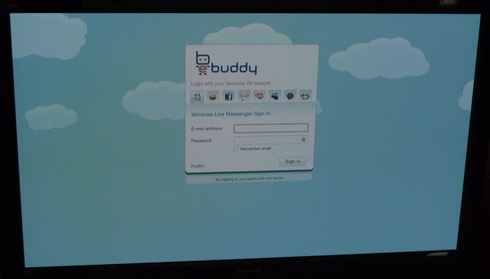
Another available application is the ebuddy for quick chatting with friends:
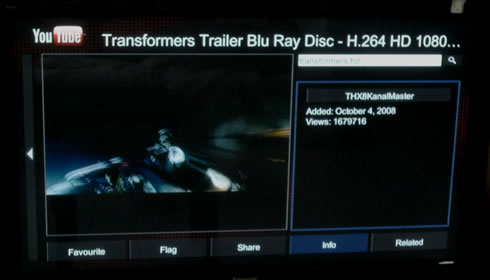
We also tried the Youtube XL application, which offers videos optimized for watching on large screens:
Here we would like to note that the USB keyboard won't work will all applications. For example with SHOUTcast internet radio, you have to search for radio stations using the remote control.

The player's latest firmware r3966 does not include the BitTorrent function. In order to use the new transmission torrent client in the player, you should go to setup menu and switch transmission on. Then open a web browser and enter the IP address of the player followed by port 9091 - for example 192.168.1.3:9091. You will be redirected to the transmission age where you can add/remove torrents for download.

Overall, we feel that the player's internet experience has been improved compared to the past but there are still some issues to be ironed out.


Review Pages

1. About the Ac Ryan PlayOn!HD2 player
2. A closer look
3. Powering On the player
4. The GUI 2.0
5. Performance
6. YAMJ
7. Online services
8. Final words


Pages

  • « first
  • ‹ previous
  • 1
  • 2
  • 3
  • 4
  • 5
  • 6
  • 7
  • 8
  • next ›
  • last »

Tags:
Previous Post
OCZ Agility 3 240GB SSD review
Next Post
Patriot Memory Torqx 2 128GB SSD Review

Related Posts

  • AC Ryan Playon!HD Mini 2 review

  • AC Ryan PlayOnHD!

Latest Reviews

Fanxiang MP83 M.2 NVMe SSD Enclosure
Enterprise & IT

Fanxiang MP83 M.2 NVMe SSD Enclosure

Ugreen CM642 USB4.0 Enclosure
PC components

Ugreen CM642 USB4.0 Enclosure

be quiet! Dark Power 14 IO
PC components

be quiet! Dark Power 14 IO

SanDisk High Endurance 512GB microSDXC
Cameras

SanDisk High Endurance 512GB microSDXC

Samsung PRO Ultimate 512GB microSDXC
Cameras

Samsung PRO Ultimate 512GB microSDXC

Popular News

CORSAIR announces Vanguard Pro 96 and Vanguard 96 Gaming Keyboards

CORSAIR announces Vanguard Pro 96 and Vanguard 96 Gaming Keyboards

MSI’s Latest AMD X870E MAX & EVO Series Motherboards

MSI’s Latest AMD X870E MAX & EVO Series Motherboards

Panasonic Introduces the First Ultra-Telephoto Zoom Lens in the LUMIX S Series

Panasonic Introduces the First Ultra-Telephoto Zoom Lens in the LUMIX S Series

COLORFUL Launches iGame B850M ULTRA Series Micro-ATX Motherboards

COLORFUL Launches iGame B850M ULTRA Series Micro-ATX Motherboards

COLORFUL Presents Limited Edition Chitu MAG-60 Magnetic Keyboard Inspired by the Year of the Horse

COLORFUL Presents Limited Edition Chitu MAG-60 Magnetic Keyboard Inspired by the Year of the Horse

COLORFUL Presents iGame Z890 ULTRA-S W and iGame Z890M ULTRA Z Motherboards

COLORFUL Presents iGame Z890 ULTRA-S W and iGame Z890M ULTRA Z Motherboards

COLORFUL Launches iGame B850I MINI OC V14 Motherboard

COLORFUL Launches iGame B850I MINI OC V14 Motherboard

COLORFUL Expands B850 Motherboard Lineup with New CVN, Battle-Ax, and MEOW Models

COLORFUL Expands B850 Motherboard Lineup with New CVN, Battle-Ax, and MEOW Models

Main menu

  • Home
  • News
  • Reviews
  • Essays
  • About
    • Submit News

    • Contact Us
    • Privacy

    • Promotion
    • Advertise

    • RSS Feed
  • About
  • Privacy
  • Contact Us
  • Promotional Opportunities @ CdrInfo.com
  • Advertise on out site
  • Submit your News to our site
  • RSS Feed