Breaking News

SAMA Introduces the S32 WOOD, a Compact M-ATX Case Bundled with an 80 PLUS Gold PSU Thypoch Completes Simera-C Cine Prime Lineup with New 100mm T1.9 Lens CORSAIR Launches the RM1200e Power Supply with Built-in PinProtect GPU Overcurrent Protection and Platinum-certified Efficiency CORSAIR Changes the Game with PureVector, a Science-Based Personalized Aiming Technology, Launching Exclusively in the SABRE v3 PRO PureVector Mouse Series AMD FSR Upscaling 4.1 Boosts Frames and Image Quality on More Devices

logo

  • Share Us
    • Facebook
    • Twitter
  • Home
  • Home
  • News
  • Reviews
  • Essays
  • About
    • Submit News

    • Contact Us
    • Privacy

    • Promotion
    • Advertise

    • RSS Feed

Search form

SONY BW-RU101 PDD

Feb 23,2005 0

8. Software


Review Pages

1. Introduction
2. Blue laser technology
3. Design
4. Specifications
5. The media
6. Installation - Page 1
7. Installation - Page 2
8. Software
9. Tests
10. Conclusion


SONY BW-RU101 PDD - Page 8

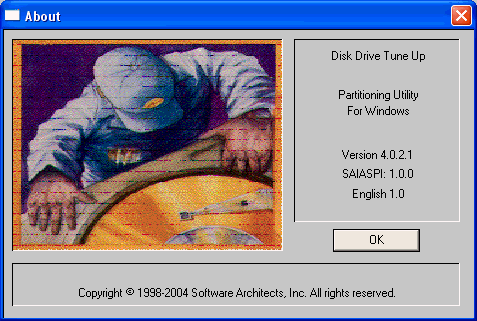
The second is with the included Disk Drive Tune Up software from Software Architects. Once the physical format has finished, the user can then use the disk. Note that the drive by default performs formatting in the foreground which takes around 80mins to complete. The drive can also be set to perform background formatting (function switch settings), whereby formatting is initiated automatically without an explicit format command from the user, and is carried out in the background. It is possible to read and write on the disc while background formatting is being carried out but the format process will take at the very least, 135 minutes.

The Disk Drive Tune Up software is a very useful suite since you can perform a series of actions, including creating partitions and formatting a disc for FAT16, FAT32 and various UDF builds:
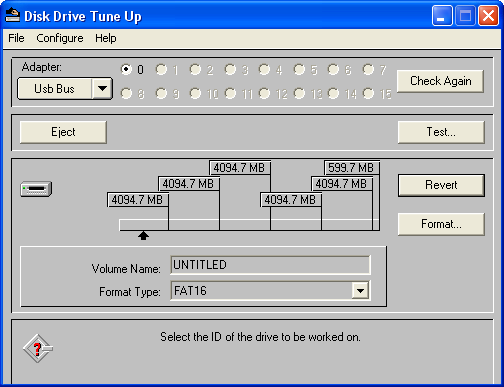
The software supports UDF 1.02, 1.50, 2.00 and 2.01 versions. It is advisable for users to use the latest UDF 2.01 which supports 4K clusters under Win2000/XP systems:

We can also create partitions, again a fairly easy procedure. This is especially useful when the FAT16 format type has been selected where the partition size limit is 4GB (see snapshot above).
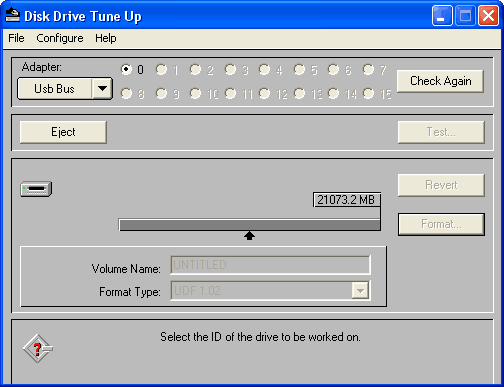
Under the Test option, the user can test the integrity of a disc either with the read/verify or write/verify process. The software will report any ECC problems found:

The necessary OS format can be done either with Windows Format or with the Disk Drive Tune Up software:
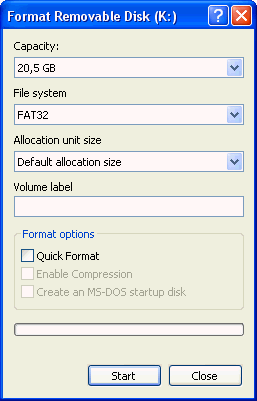
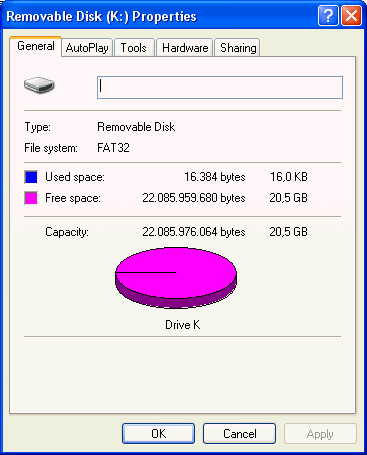
The formatted disc had 20.5GB free space:

 

Review Pages

1. Introduction
2. Blue laser technology
3. Design
4. Specifications
5. The media
6. Installation - Page 1
7. Installation - Page 2
8. Software
9. Tests
10. Conclusion


Pages

  • « first
  • ‹ previous
  • …
  • 2
  • 3
  • 4
  • 5
  • 6
  • 7
  • 8
  • 9
  • 10
  • next ›
  • last »

Sony

Tags: Sony
Previous Post
MSI NX6600GT AGP
Next Post
Sony SCD-XB790 SACD Player

Related Posts

  • Sony Announces the World's First Eclipsa Audio Certified Microphone1 for Smartphones

  • Sony Introduces New Colour to INZONE H9 II Headset and INZONE E9 In-ear Headphones

  • Sony Rewrites the Rules of Super-Telephoto: Announces World's Lightest 400mm and 600mm G Master Primes

  • Sony Expands its ULT POWER SOUND series Lineup with 3 New Bass-Powered Speakers

  • Sony Launches ‘FE 100-400MM F5.6-8 OSS

  • Sony Launches FX5 Camera

  • Sony announces RX10V

  • Sony Semiconductor Solutions to Release Advanced 1/2-type CMOS Sensor for Mobile Applications

Latest Reviews

Why Intelligent Firmware Matters More Than Peak Throughput in NAS Systems
Enterprise & IT

Why Intelligent Firmware Matters More Than Peak Throughput in NAS Systems

Fanxiang MP83 M.2 NVMe SSD Enclosure
Enterprise & IT

Fanxiang MP83 M.2 NVMe SSD Enclosure

Ugreen CM642 USB4.0 Enclosure
PC components

Ugreen CM642 USB4.0 Enclosure

be quiet! Dark Power 14 IO
PC components

be quiet! Dark Power 14 IO

SanDisk High Endurance 512GB microSDXC
Cameras

SanDisk High Endurance 512GB microSDXC

Popular News

MSI’s Latest AMD X870E MAX & EVO Series Motherboards

MSI’s Latest AMD X870E MAX & EVO Series Motherboards

COLORFUL Launches iGame B850M ULTRA Series Micro-ATX Motherboards

COLORFUL Launches iGame B850M ULTRA Series Micro-ATX Motherboards

COLORFUL Presents Limited Edition Chitu MAG-60 Magnetic Keyboard Inspired by the Year of the Horse

COLORFUL Presents Limited Edition Chitu MAG-60 Magnetic Keyboard Inspired by the Year of the Horse

COLORFUL Launches iGame B850I MINI OC V14 Motherboard

COLORFUL Launches iGame B850I MINI OC V14 Motherboard

COLORFUL Launches the iGame X870E VULCAN W OC Motherboard

COLORFUL Launches the iGame X870E VULCAN W OC Motherboard

COLORFUL Presents iGame Z890 ULTRA-S W and iGame Z890M ULTRA Z Motherboards

COLORFUL Presents iGame Z890 ULTRA-S W and iGame Z890M ULTRA Z Motherboards

COLORFUL Expands B850 Motherboard Lineup with New CVN, Battle-Ax, and MEOW Models

COLORFUL Expands B850 Motherboard Lineup with New CVN, Battle-Ax, and MEOW Models

ASRock Adds Support for One Sub-Channel DRAM Module on Intel DDR5 Motherboards

ASRock Adds Support for One Sub-Channel DRAM Module on Intel DDR5 Motherboards

Main menu

  • Home
  • News
  • Reviews
  • Essays
  • About
    • Submit News

    • Contact Us
    • Privacy

    • Promotion
    • Advertise

    • RSS Feed
  • About
  • Privacy
  • Contact Us
  • Promotional Opportunities @ CdrInfo.com
  • Advertise on out site
  • Submit your News to our site
  • RSS Feed