Breaking News

SAMA Introduces the S32 WOOD, a Compact M-ATX Case Bundled with an 80 PLUS Gold PSU Thypoch Completes Simera-C Cine Prime Lineup with New 100mm T1.9 Lens CORSAIR Launches the RM1200e Power Supply with Built-in PinProtect GPU Overcurrent Protection and Platinum-certified Efficiency CORSAIR Changes the Game with PureVector, a Science-Based Personalized Aiming Technology, Launching Exclusively in the SABRE v3 PRO PureVector Mouse Series AMD FSR Upscaling 4.1 Boosts Frames and Image Quality on More Devices

logo

  • Share Us
    • Facebook
    • Twitter
  • Home
  • Home
  • News
  • Reviews
  • Essays
  • About
    • Submit News

    • Contact Us
    • Privacy

    • Promotion
    • Advertise

    • RSS Feed

Search form

Noctua NH-D14

Jan 18,2010 0

5. Final words


Review Pages

1. Features
2. The package
3. How we test
4. Measurements
5. Final words


The Noctua NH-D14 is probably one of the biggest cpu coolers we have ever tested in our labs. The new design results to a dual-tower cpu cooler with two powerful and silent fans installed.

The product retails in a generous and complete package, but also at a price of $85 - that's definitely on the expensive side for a cooler. The SecuFirm 2 mounting package is simple to install and does not leave any doubt about how tight you need to tighten the mounting nuts. The provided spacers and studs with positive stops allow anyone to install it without fear of getting it hooked up incorrectly. The Intel bracket assembly comes with an insulated backplate that is drilled for multi-socket compatibility. so any socket is covered for worry-free installation. However, since the product weights around 1.2kg with the two fans installed, you will need to use a backplate in order to securely fasten the cooler on your motherboard. Installing the backplate adds some extra time to the installation procedure in order to remove your motherboard from your PC case first. Reading the excellent printed manual would help you a lot with the installation.
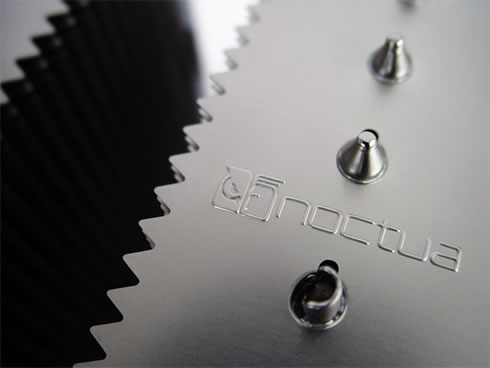
Performancewise, this product smokes away the competition! We experienced a great cooling efficiency with the Intel Core i7-920 running at default speed (43 degrees C) as well as after overclocking, with the CPU temperature to stay below the 60 degrees C! The only product that could compete this performance was the Prolimatech Megahalems CPU cooler, which gave the same performance under overclocking. However, these numbers came after installing two Noctua NF-P12 fans to the Prolimatech cooler.

The noise levels were also very acceptable despite the installed massive fans. We measured ~ 44dB at 30cm distance (open testbed). After using the noise adapters, the noise dropped to 40dB, without a serious performance hit (+3 degrees C). Great job here.
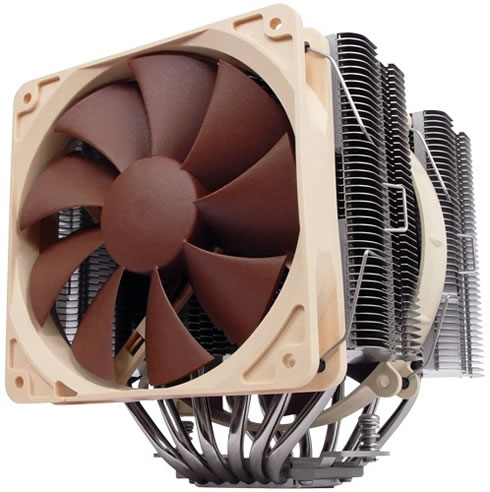
If you want to pick up this cooler, then make sure it will actually fit into your PC chassis. Make sure that your high-profile memory modules will not block the cooler. However, despite its huge size, the Noctua NH-D14 was designed to evade all major components, offering flexible installation options for the fans in case you run out of space.

After spending many hours testing the Noctua NH-D14 we can safely say that its performance absolutely rocks! It's been quite a while since we saw a Noctua product reaching the top in terms of performance. If buying a liquid cooling solution for your high-end system is not an option for you, the Noctua NH-D14 is probably the best option for you.

Sometimes you need to pay more to get the best. Good job from Noctua, Editors Choice Award for this excellent product.


Retail package
Design
Motherboard compatibility
Installation time
Copper Base quality

Pros:

+ Complete retail package
+ Works with both AMD/Intel platforms
+ Includes thermal paste and noise reduction adapters
+ Includes 2 fans (120mm & 140mm)
+ Great external design and aesthetics

+ Top performance under both stock and overclocking tests
+ Low noise levels with fans spinning even at full speed

+ 120mm fan can be moved according to your needs
+ Reasonably priced for its performance

Cons:

- A faster fans set could boost cooling efficiency even higher
- No installation set for adding a third fan


Review Pages

1. Features
2. The package
3. How we test
4. Measurements
5. Final words


Pages

  • « first
  • ‹ previous
  • 1
  • 2
  • 3
  • 4
  • 5

Noctua

Tags: Noctua
Previous Post
Titan Skalli
Next Post
Corsair Voyager GT 32GB

Related Posts

  • Thermal Grizzly and Noctua introduce WireView Pro II Noctua Edition GPU monitoring device

  • Forced Physics DCT and Noctua announce research partnership on micro-channel array cooling

  • Noctua and Prusa Research release PETG filaments in signature Noctua colours

  • Noctua NL-LC1-36

  • Noctua introduces NL-LC1 all-in-one liquid coolers

  • Noctua at Computex 2026

  • Carbice and Noctua announce strategic partnership for DIY PC cooling applications

  • Noctua presents NF-A12x25 G2 chromax.black 120mm fans

Latest Reviews

Why Intelligent Firmware Matters More Than Peak Throughput in NAS Systems
Enterprise & IT

Why Intelligent Firmware Matters More Than Peak Throughput in NAS Systems

Fanxiang MP83 M.2 NVMe SSD Enclosure
Enterprise & IT

Fanxiang MP83 M.2 NVMe SSD Enclosure

Ugreen CM642 USB4.0 Enclosure
PC components

Ugreen CM642 USB4.0 Enclosure

be quiet! Dark Power 14 IO
PC components

be quiet! Dark Power 14 IO

SanDisk High Endurance 512GB microSDXC
Cameras

SanDisk High Endurance 512GB microSDXC

Popular News

MSI’s Latest AMD X870E MAX & EVO Series Motherboards

MSI’s Latest AMD X870E MAX & EVO Series Motherboards

COLORFUL Launches iGame B850M ULTRA Series Micro-ATX Motherboards

COLORFUL Launches iGame B850M ULTRA Series Micro-ATX Motherboards

COLORFUL Presents Limited Edition Chitu MAG-60 Magnetic Keyboard Inspired by the Year of the Horse

COLORFUL Presents Limited Edition Chitu MAG-60 Magnetic Keyboard Inspired by the Year of the Horse

COLORFUL Launches iGame B850I MINI OC V14 Motherboard

COLORFUL Launches iGame B850I MINI OC V14 Motherboard

COLORFUL Launches the iGame X870E VULCAN W OC Motherboard

COLORFUL Launches the iGame X870E VULCAN W OC Motherboard

COLORFUL Presents iGame Z890 ULTRA-S W and iGame Z890M ULTRA Z Motherboards

COLORFUL Presents iGame Z890 ULTRA-S W and iGame Z890M ULTRA Z Motherboards

COLORFUL Expands B850 Motherboard Lineup with New CVN, Battle-Ax, and MEOW Models

COLORFUL Expands B850 Motherboard Lineup with New CVN, Battle-Ax, and MEOW Models

ASRock Adds Support for One Sub-Channel DRAM Module on Intel DDR5 Motherboards

ASRock Adds Support for One Sub-Channel DRAM Module on Intel DDR5 Motherboards

Main menu

  • Home
  • News
  • Reviews
  • Essays
  • About
    • Submit News

    • Contact Us
    • Privacy

    • Promotion
    • Advertise

    • RSS Feed
  • About
  • Privacy
  • Contact Us
  • Promotional Opportunities @ CdrInfo.com
  • Advertise on out site
  • Submit your News to our site
  • RSS Feed