Breaking News

SWIT Packs 210Wh and 200W Output into Compact MINO-A Gold Mount Battery Series Fanatec and Trak Racer showcase the future of simulation at SimRacing Expo Frankfurt 2026 Razer Unveils the Barracuda V2 Pro ASUS Republic of Gamers Announces Bulwark Dock DG310 Akasa Announces Fermi CM5 Fanless Case for Raspberry Pi Compute Module 5

logo

  • Share Us
    • Facebook
    • Twitter
  • Home
  • Home
  • News
  • Reviews
  • Essays
  • About
    • Submit News

    • Contact Us
    • Privacy

    • Promotion
    • Advertise

    • RSS Feed

Search form

Connect 3D X850XT PE

Mar 9,2005 0

15. Overclocking


Review Pages

1. Introduction
2. Features
3. A closer look
4. Test System
5. 3DMark05
6. 3DMark 2003
7. Aquamark3 / 3DMark 2001
8. Codecreatures
9. Half life 2
10. Doom 3
11. Far Cry
12. Thief 3
13. Colin McRae 05
14. Ground Control II
15. Overclocking
16. Conclusion


Connect 3D X850 XT PE- 15 - Overclocking

No matter your graphics card, there comes a time in your computer's life when it can no longer cope with the latest technology the ever so popular games use. This is one of the main reasons for overclocking your graphics card. Gamers are always looking forward for a little extra boost in terms of framerate. Even though most of the times the boost is far from noticeable, overclocking remains the last resort when you can't afford to buy a brand new VGA card.
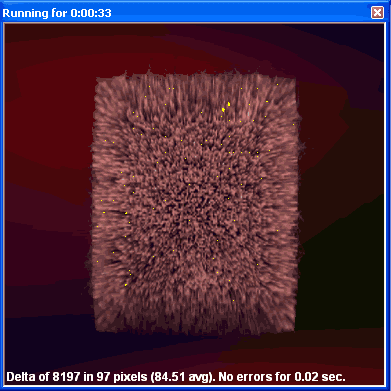
Increasing the memory clock too much,
produces the so-called "artifacts".

The default clock speeds of the Connect3D X800XT PE are 540MHz for the core and 590MHz for the memory. The memory clock was already set high so we didn't expect it to increase too much.
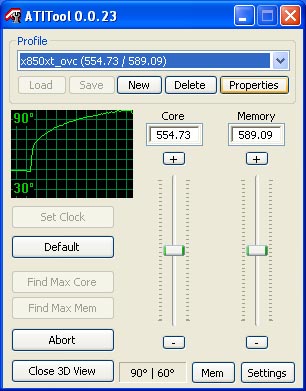
The highest stable settings we could achieve

To our suprize, we couldn't overclock the memory at all, not even by 5MHz without losing the card's stability. So using ATITool 0.0.23 (which is the first version to support the new X850 cards), we only succeeded in overclocking the card's core up to 560MHz and 590MHz (1.18GHz) respectively.

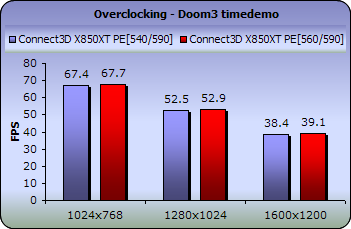
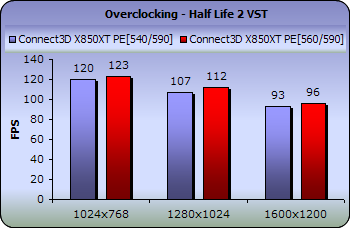
Let's see the performance boost we got from these extra 20MHz.

The difference in the games is not noticeable. As a result, it is not advisable to clock the Connect3D's X850XT PE any higher than it is already.

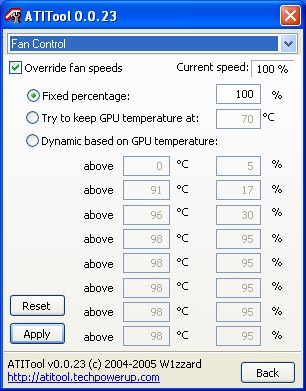
One more thing about the fan system on the X850 XT, the fan's speed is set by the card's BIOS on boot at 4% of its maximum value. We tried setting the fan to 100% in case the card could clock a bit higher.

However, the fan when running at full speed is incredibly noisy and annoying so we switched it back.
 

Review Pages

1. Introduction
2. Features
3. A closer look
4. Test System
5. 3DMark05
6. 3DMark 2003
7. Aquamark3 / 3DMark 2001
8. Codecreatures
9. Half life 2
10. Doom 3
11. Far Cry
12. Thief 3
13. Colin McRae 05
14. Ground Control II
15. Overclocking
16. Conclusion


Pages

  • « first
  • ‹ previous
  • …
  • 8
  • 9
  • 10
  • 11
  • 12
  • 13
  • 14
  • 15
  • 16
  • next ›
  • last »

Connect 3D

Tags: Connect 3D
Previous Post
CeBIT 2005
Next Post
Club3D X850 XT

Related Posts

  • Connect3D X300SE

  • Connect3D X800

  • Connect3D X800XL

  • Connect3D X800XT PE

Latest Reviews

Fanxiang MP83 M.2 NVMe SSD Enclosure
Enterprise & IT

Fanxiang MP83 M.2 NVMe SSD Enclosure

Ugreen CM642 USB4.0 Enclosure
PC components

Ugreen CM642 USB4.0 Enclosure

be quiet! Dark Power 14 IO
PC components

be quiet! Dark Power 14 IO

SanDisk High Endurance 512GB microSDXC
Cameras

SanDisk High Endurance 512GB microSDXC

Samsung PRO Ultimate 512GB microSDXC
Cameras

Samsung PRO Ultimate 512GB microSDXC

Popular News

MSI’s Latest AMD X870E MAX & EVO Series Motherboards

MSI’s Latest AMD X870E MAX & EVO Series Motherboards

COLORFUL Launches iGame B850M ULTRA Series Micro-ATX Motherboards

COLORFUL Launches iGame B850M ULTRA Series Micro-ATX Motherboards

COLORFUL Presents Limited Edition Chitu MAG-60 Magnetic Keyboard Inspired by the Year of the Horse

COLORFUL Presents Limited Edition Chitu MAG-60 Magnetic Keyboard Inspired by the Year of the Horse

COLORFUL Launches iGame B850I MINI OC V14 Motherboard

COLORFUL Launches iGame B850I MINI OC V14 Motherboard

COLORFUL Launches the iGame X870E VULCAN W OC Motherboard

COLORFUL Launches the iGame X870E VULCAN W OC Motherboard

COLORFUL Presents iGame Z890 ULTRA-S W and iGame Z890M ULTRA Z Motherboards

COLORFUL Presents iGame Z890 ULTRA-S W and iGame Z890M ULTRA Z Motherboards

COLORFUL Expands B850 Motherboard Lineup with New CVN, Battle-Ax, and MEOW Models

COLORFUL Expands B850 Motherboard Lineup with New CVN, Battle-Ax, and MEOW Models

ASRock Adds Support for One Sub-Channel DRAM Module on Intel DDR5 Motherboards

ASRock Adds Support for One Sub-Channel DRAM Module on Intel DDR5 Motherboards

Main menu

  • Home
  • News
  • Reviews
  • Essays
  • About
    • Submit News

    • Contact Us
    • Privacy

    • Promotion
    • Advertise

    • RSS Feed
  • About
  • Privacy
  • Contact Us
  • Promotional Opportunities @ CdrInfo.com
  • Advertise on out site
  • Submit your News to our site
  • RSS Feed